Just a slightly puzzling behaviour I wondered if other users have run into; I have the floating taskbar which is set to intellihide, however when I initally log in and open an app in fullscreen the taskbar disappears, never to appear again unless I minimise or resize the app - It just won't appear. However, if I lock my screen, then immediately unlock again, it works normally. It's no biggy, but... Odd..
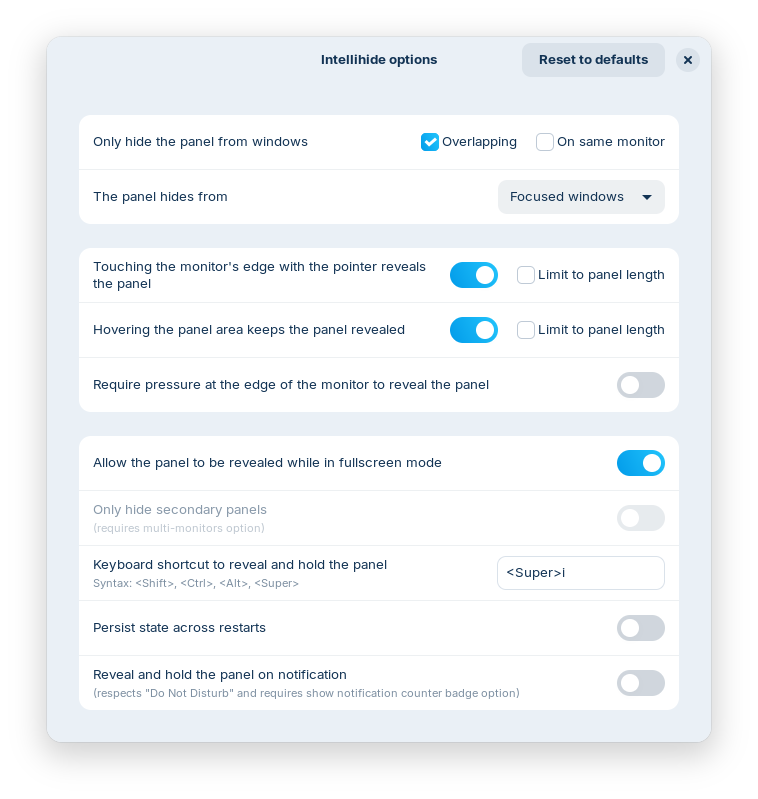
In the intellihide options you can enable the taskbar for fullscreen apps. Right-click on the panel > taskbar settings > style, then click on the cogwheal at Panel Intellihide.
Turn the slider on at "Allow the panel to be revealed while in fullscreen mode"
2 Likes
Yes, this is the setting I've always had, but strangely it doesn't work upen initial login, only after the "lock-unlock" hokey-cokey  It's just odd. But thanks for your suggestion
This topic was automatically closed 90 days after the last reply. New replies are no longer allowed.