Hello,
I’m having an issue with telegram desktop and zorin OS 18.1. If telegram desktop is set to launch on login without minimising, it works fine. However, if it launches minimised, I can’t maximise it from the taskbar; I have to close it manually and then restart it.
The issue seems to be related to a specific installation. I’ve already tried a fresh installation on virtualBox and it works fine. So I tried completely removing the telegram desktop data from /home/computer/.local/share/TelegramDesktop and logging in again, but without success.
Do you have any suggestions?
Thanks
Hello,
Try to see if you are in Wayland or Xorg with this command
echo $XDG_SESSION_TYPE
If you are in Wayland switch to Xorg like this
- Logout
- At the login screen, click your username (don't enter password)
- Click the gear icon in the bottom right
- Select "Zorin Desktop on Xorg"
- Log in
And try if iy's better
2 Likes
I would also check the autostart entry, since Telegram can create its own .desktop file and it may keep an old start-minimized argument. Look in ~/.config/autostart/ for a Telegram entry and compare the Exec= line with the one in /usr/share/applications/ or ~/.local/share/applications/. If it has something like -startintray, try removing that autostart entry and letting Telegram recreate it from its own settings. Also worth checking if the installed version is Flatpak/Snap/deb, because the tray/window behaviour can differ between them.
2 Likes
If it still doesn't work on x11, you can try xdotool windowminimize command on startup apps.
For example I wanted Thunderbird to start minimized and I used this solution:
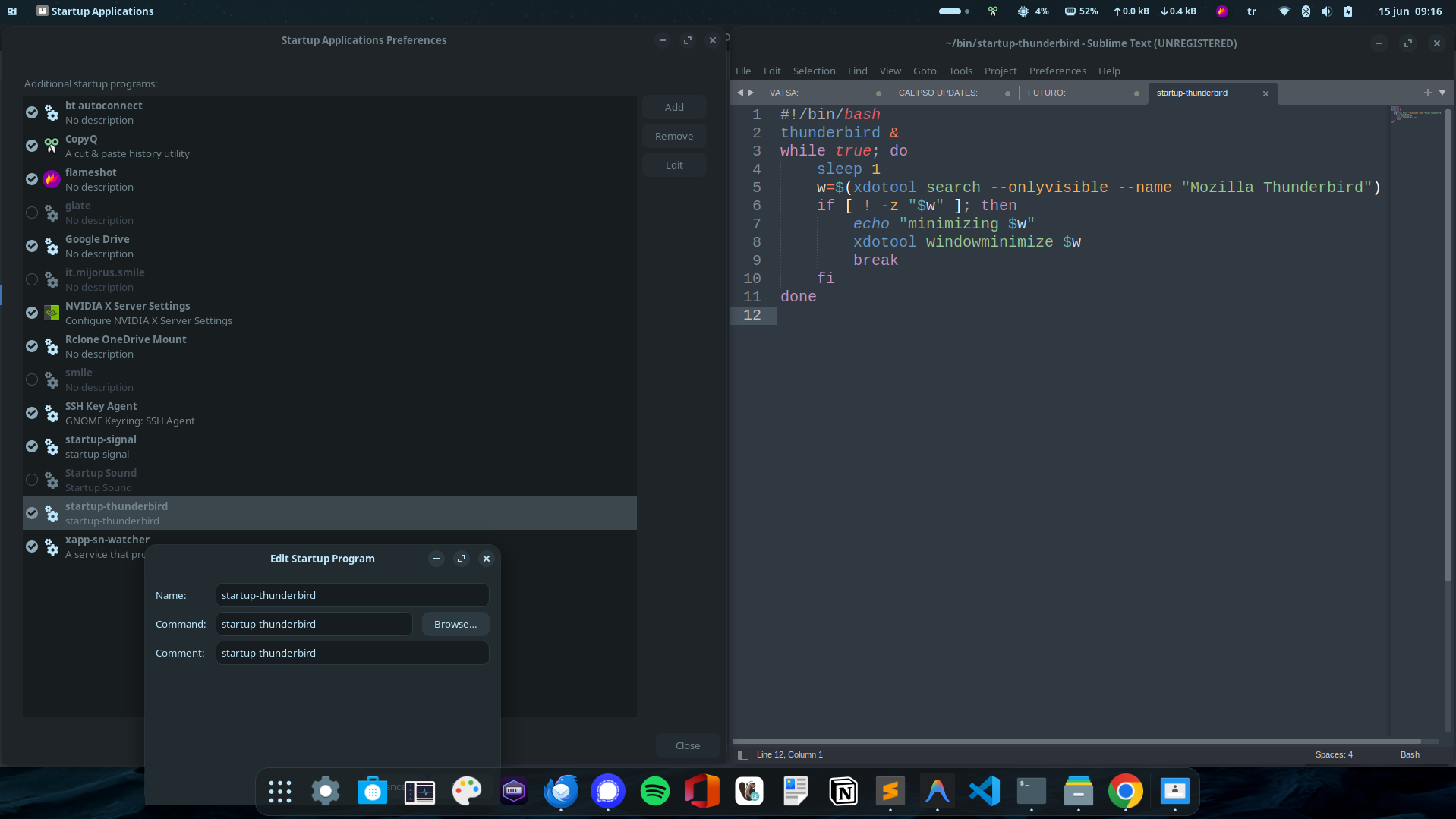
If you're going to apply the same solution, make sure to run:
grep -qxF 'export PATH="$HOME/bin:$PATH"' ~/.bashrc || echo 'export PATH="$HOME/bin:$PATH"' >> ~/.bashrc
sudo apt update -y
sudo apt install -y xdotool
After you save the file to ~/bin folder, don't forget to chmod +x ~/bin/startup-telegram
1 Like
Hi,
by using x11 it works well. Is it possible to solve it with wayland?
Thank you
Hi,
I found the files in both paths ~/.config/autostart/ and ~/.local/share/applications/. After deleting them, telegram, downloaded from official website, recreated it in the second path.
[Desktop Entry]
Name=Telegram
Comment=New era of messaging
TryExec=/path/Telegram
Exec=/path/Telegram -- %U
Icon=org.telegram.desktop
Terminal=false
StartupWMClass=TelegramDesktop
Type=Application
Categories=Chat;Network;InstantMessaging;Qt;
MimeType=x-scheme-handler/tg;x-scheme-handler/tonsite;
Keywords=tg;chat;im;messaging;messenger;sms;tdesktop;
Actions=quit;
DBusActivatable=true
SingleMainWindow=true
X-GNOME-UsesNotifications=true
X-GNOME-SingleWindow=true

[Desktop Action quit]
Exec=/path/Telegram -quit
Name=Quit Telegram
Icon=application-exit
Should I change this? Exec=/path/Telegram -- %U to -autostart?