Recently trashed W10 on two laptops in favor of Zorin OS 17.3 and I wish I had done it years ago. I pretty much did them both simultaneously assuming all the tailoring etc would be 'about the same'. #1 is a pretty old Dell and #2 is a 'fairly' new Acer. Turns out, lots of differences (different hardware, of course).
On the old Dell (with disabled touchpad), I have a desktop icon for TERMINAL and it works with one left double click with a mouse (hate double clicking, but that's OK for now).
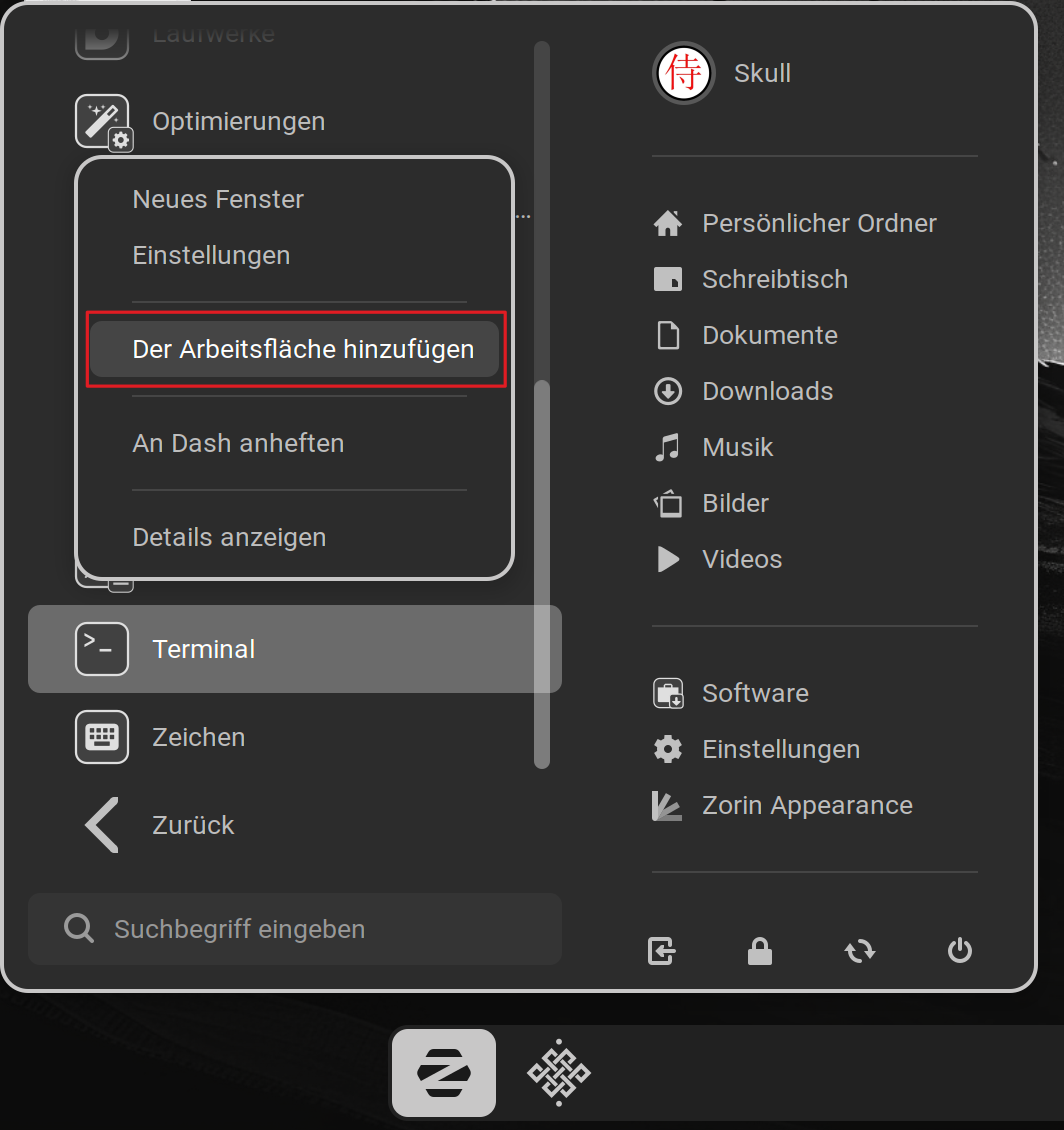
On the Acer, no matter what I try, cannot create that Icon. Start/system tools lists TERMINAL and it runs fine from there, but no go on a Desktop icon. (right click no option to create such a thing but right OR left opens terminal.) I've looked and looked but don't find a solution. Thank you in advance for any help.
An Alternative would be to install the Gnome Extension Add to Desktop - GNOME Shell Extensions with the Extension Manager which You can find in the Software Store. It is this:
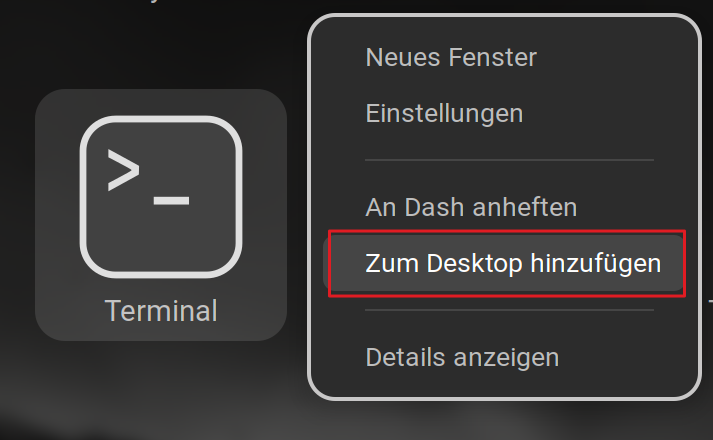
When the Extension is installed, it adds an ''Add To Desktop'' Entry in the Right-Click Menu in the App Grid. You can come to the App Grid when You press fast 2 Times the Super (Windows) Key.
There stands nothing in Your Profile. If You use Core:
Not sure what profile you are referring to. I had Core on both machines but I have since installed MintXFC on one. A right click on Terminal does not present an option to place on desktop and neither does any other app. The alternative is interesting but I prefer the traditional way ..... activating the right click options.
i would like to get a Chrome browser icon on the desktop too and NOT have it require authentication when I run it from the menu .... but that might require another post. Forums don't ususally like us to compound issues in one post. I mention it only to provide info relative to this post ... if any.
What is shown in your right-click menu when you search for terminal in start menu and try to add it to desktop? Can you add apps to the panel or do you have no right-click menu?
Do you have Zorin gnome extension "Zorin desktop icons" enabled? Install extension manager and then take a look at installed if the extension is enabled.
The easiest way to avoid authentication for browsers is to use not the automatic login but a login with password entry.
It helps keeping things organized. Often times people are redirected to the forum by a search engine, and this help with finding threads quickly. Also internally, using the search functionality.
As for the right-click issue, does it work if you try to pin any program to the taskbar instead? Or the context menu doesn't show up at all?
not sure i saw anyone post but usally you just hit and hold conrtol+ alt then press t and the terminal will always popup even over what ever is on the screen
In Zorin start menu you should have the option to add an app to desktop, but not all layouts in Zorin Appearance show a Zorin startmenu button.
So you could switch to another layout or in gnome extension manager enable the Zorin menu.
If you use the app grid instead to choose your apps, you can install the gnome extension "Add to desktop" as Ponce-De-Leon showed you, then you get this option to add an app to desktop in the right-click menu of app grid.
If you use Arc menu as start menu and not Zorin menu, then you can get the option "Add to desktop" by disabling the gnome extension "Zorin desktop icons" and installing/enabling the gnome extension "Desktop Icons NG (DING).
Apologies for the delayed reply. Thanks to everyone for the replies.
First of all I am NOW running Zorin Os 18 Core. Guess it somehow updated.
I have never heard of ARC Menu until now. I DID go to Zorin Appearance and selected the layout of all the app shortcuts icons presented in nice rows in the middle of the screen. This is almost as good as 'desktop icons except I have to switch to that window first in order to access an app. Hence the desire to have desktop shortcuts.
I apologize for my ignorance. All this help probably answers my question but can't actually follow them .... when I don't understand what some if it refers to.
Also, I don't think I am getting notification of replies to this post. Thanks to all for the attention.
Go to Software center and search for extension manager. Install it (Zorin package).
Then open extension manager and go to tab "browse". Search for "Add to desktop". Then select the extension and for shell version select gnome 46. Install it.
Now you can right-click on an app in the app overview and select "Add to desktop".
Okay, that makes something easier. First the Add To Desktop Gnome Extension. In general: gnome Extensions are little Additions for the Gnome Desktop (the Zorin Core Desktop uses Gnome as Base).
Like @Forpli aöready wrote: Open Gnome Software and search for ''Extension Manager'':
Enable the Toggle. When you then press fast 2 Times the Windows Button, You will come to the so-called App Grid. It is an Overview with all installed Programs. When You make there a Right-Click on an App Icon, You will now have the Option to add a Program to the Desktop.
Also, You should have the Option by default in the Zorin Start Menu.
In the Extension Manager, You can check that the Extension ''Zorin Desktop Icons'' is enabled: