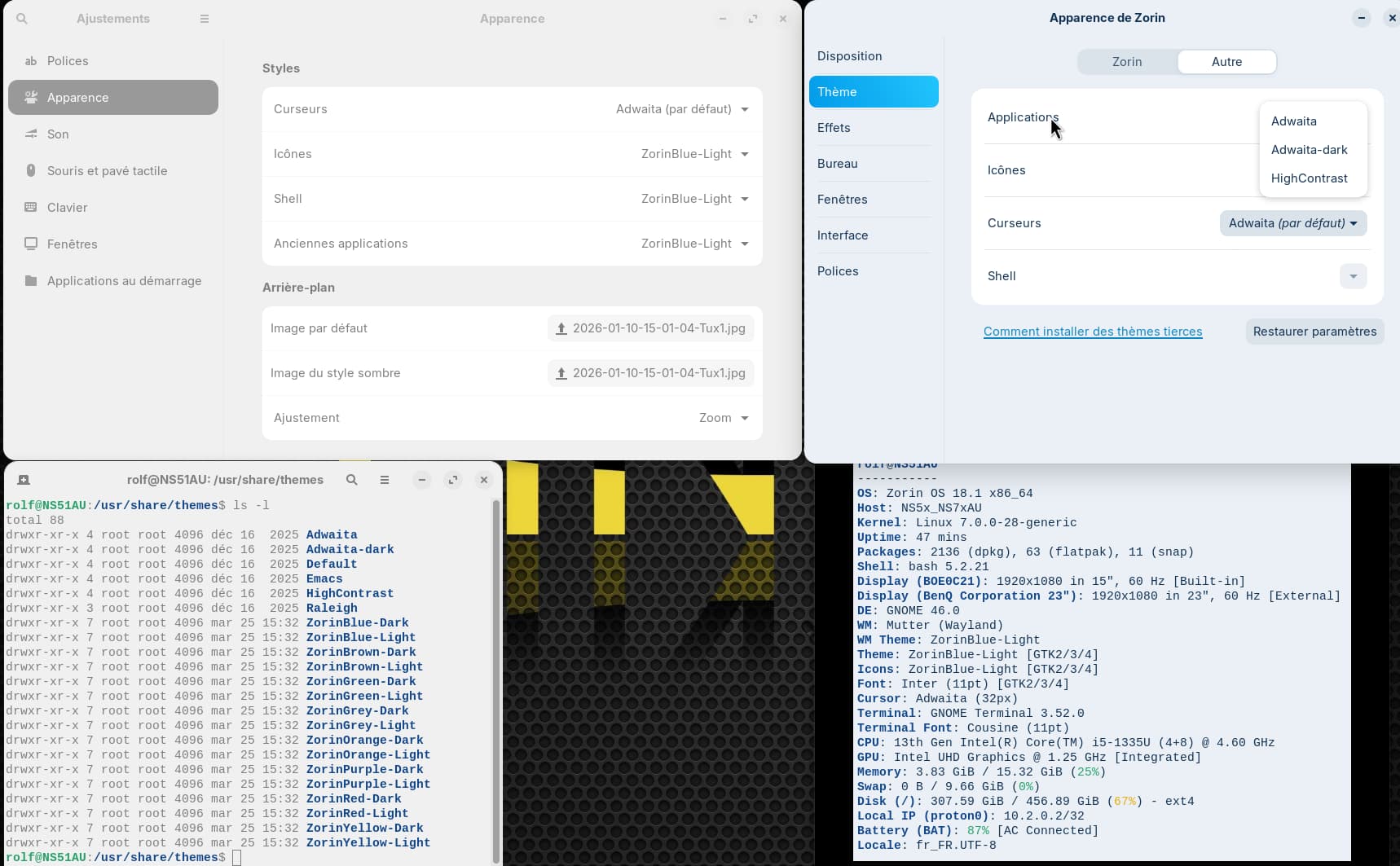
Images on the left:
Gnome Tweaks - download of the Zorin APT package, version 46.0:
All themes stored in /usr/share/themes are available in Icons, Shell, and Legacy Applications.
Top right:
Zorin Appearance:
Applications: Only Adwaita, Adwaita-dark, and HighContrast are selectable.
Icons: Only Adwaita and HighContrast are selectable.
The ~/.local/share/icons directory is empty
Bottom right:
Zorin 18 Pro is up to date. It was completely reinstalled in mid-December 2025 and updated to 18.1 in April 2026.
Fastfetch was just run.
I found this tip, but it didn’t help me at all:
Can someone please give me some tips on how to solve this problem?
The Zorin themes you can set in Zorin appearance at tab Zorin, because of this they are not listed at "others".
When you want to set just other icons, e.g., you select a theme at "Zorin" tab and then at "others" select an icon theme from the list. With gnome tweaks, you are a bit more flexible to mix different styles.