Tiling Shell custom layout as default (when using CTRL)?

  • ZorinOS 18 Core

Hi everyone,

I configured a custom layout for my Zorin Tiling Shell.

I can use the custom layout with "Snap Assistant" when dragging at the top of the screen.

However, when I use the CTRL key, I am only presented the default 50/50 split.

I don't like the Snap Assistant so I disable it as soon as possible. How can I associate my custom layout to the CTRL key?

Thanks!

Alright, found a solution, just have to test if it's reliable.

In Zorin Tiling Shell > Keybindings, there is "Cycle layouts", that is unbound as default. You can bind it to whatever you'd like and go around the layouts you have until you select your custom one.
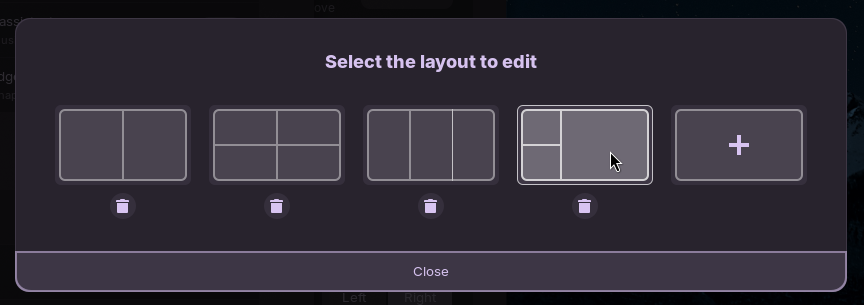
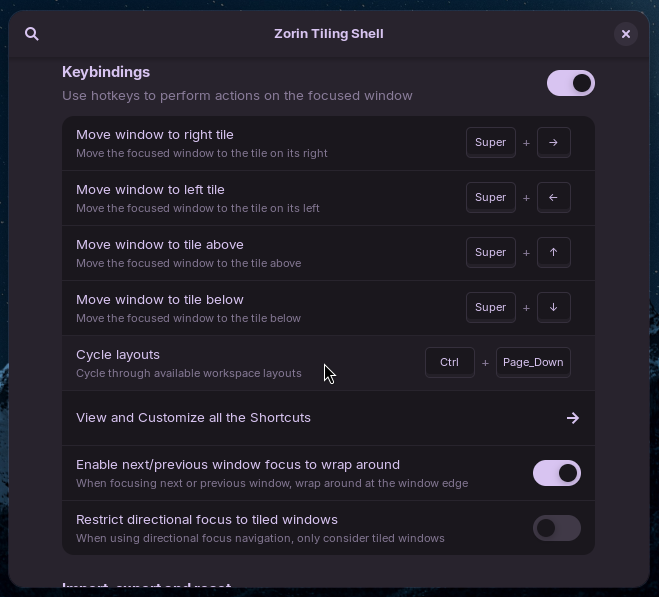
Then using the CTRL key will make your custom layout be the one suggested.

I'll try rebooting and reporting back to see if it sticks.

1 Like

Reporting back : it sticks. So the above post is the solution for anyone wondering. :slight_smile:

1 Like