Can you please include a set of programs like Timesift & Backup to the rest of your releases. These are included in Linux Mint and are a game changer for reinstalling in case of a failure. Timeshift for snapshots and for the backup it is busted up in 2 sections. One for data and another for installed programs. These 2 alone makes for recovering so very much easier. You have a good OS but including these would make it so very much more appealing. No need to respond just add them and I will know you included them.
1 Like
Hi and welcome.
It's what I always recommend in the Unofficial Manuals for Zorin. I too wish they would include it. PCLOS Debian is another distro that includes it, and Q4OS lists it in its Application installer.
As for backup, the best standalone is Rescuezilla which now includes an experimental file viewer to access files within the backup (like Acronis True Image).
1 Like
I installed Time Shift within the Zorin OS-18 software store. I just opened the software search and typed Time Shift. After installing I yested it and it worked just fine. I do think the Time Shift should be preinstalled.
2 Likes
I agree, it would most certainly be a great idea! Just so you are aware, Zorin OS Core & PRO does come with Deja Dup, labeled as Backups on Zorin OS.

All can be found in Software, no need for the command line.
- Install.
- Watch the video.
Beginners
You only need Back in Time and Timeshift.
Skip the installation parts of the videos; videos show installation processes in a different Linux system, just ignore.
Back in Time (backintime)
[1] https://www.youtube.com/watch?v=Mnfz6gBFhi8 (Arch Linux Post Install: Backup and Restore Your Personal Files with Back In Time, Arch Linux Post Install: Backup and Restore Your Personal Files with Back In Time 2020 @ October 15, 2025)
Timeshift
[2] https://www.youtube.com/watch?v=3YSeMxiXi7c (Arch Linux Post Install: Backup and Restore Your System with Timeshift, Arch Linux Post Install: Backup and Restore Your System with Timeshift 2020 @ October 15, 2025)
[3] https://www.youtube.com/watch?v=7wtxnlWwP7w (Endeavour OS: Snapshotting with Timeshift, Endeavour OS: Snapshotting with Timeshift 2021 @ October 15, 2025)
Duplicati
This is for cloud storage, European hosting: pCloud, Jottacloud, Nextcloud. You need to check whether Duplicati connects to your host, or not.
[4] https://www.youtube.com/watch?v=gnNIhIrhzNU (Arch Linux Post Install: Backup and Restore Your Files with Duplicati, Arch Linux Post Install: Backup and Restore Your Files with Duplicati 2020 @ October 15, 2025)
Intermediate
Borg + Vorta
[5] https://www.youtube.com/watch?v=tGiuOZu_Jws (How to Backup Files and Folders Using Vorta in Linux, How to Backup Files and Folders Using Vorta in Linux 2021 @ October 18, 2025)
[6] https://www.youtube.com/watch?v=asZX2YbTaNE (How to Back up Data Privately and Securely to the Cloud Using Borg and Vorta, How to Back up Data Privately and Securely to the Cloud Using Borg and Vorta 2020 @ October 18, 2025)
[7] https://www.youtube.com/watch?v=lw4_jJsFUy8 (Master BorgBackup 1.4.0: Init, Create, Prune, Remote SSH, and More!, Master BorgBackup 1.4.0: Init, Create, Prune, Remote SSH, and More! 2025 @ October 18, 2025)
[8] Borg release series (‘Borg Release Series’, ‘Borg Release Series’ n.d. @ October 17, 2025)
Advanced
Grsync
This is the GUI to Rsync.
[9] https://www.youtube.com/watch?v=Ne_hHj8S1QQ (Arch Linux Maintenance: How to Backup with Grsync, Arch Linux Maintenance: How to Backup with Grsync 2020 @ October 15, 2025)
Rsync
[10] https://www.youtube.com/watch?v=G2gbun8LEC4 (Arch Linux Maintenance: How to Backup with Rsync from the Terminal, Arch Linux Maintenance: How to Backup with Rsync from the Terminal 2020 @ October 15, 2025)
Crontab
This explains how to do Rsync as part of the system's clock. Very nerdy.
[11] https://www.youtube.com/watch?v=dPwssteyDXU (Arch Linux Maintenance: Combining Rsync with Crontab - Part 1, Arch Linux Maintenance: Combining Rsync with Crontab - Part 1 2020 @ October 15, 2025)
[12] https://www.youtube.com/watch?v=cREJHcu5G80 (Arch Linux Maintenance: Combining Rsync with Crontab - Part 2 (SSH), Arch Linux Maintenance: Combining Rsync with Crontab - Part 2 (SSH) 2020 @ October 15, 2025)
Others
Many other tools do exist.
[14]: Screenshots | Rescuezilla (Clonezilla GUI) (‘Rescuezilla (Clonezilla GUI)’, ‘Rescuezilla (Clonezilla GUI)’ n.d. @ October 17, 2025)
[15]: The Complete Guide to Cloning Disks with dd in Linux – TheLinuxCode (‘The Complete Guide to Cloning Disks with Dd in Linux’, ‘The Complete Guide to Cloning Disks with Dd in Linux’ 2023 @ October 17, 2025)
1 Like
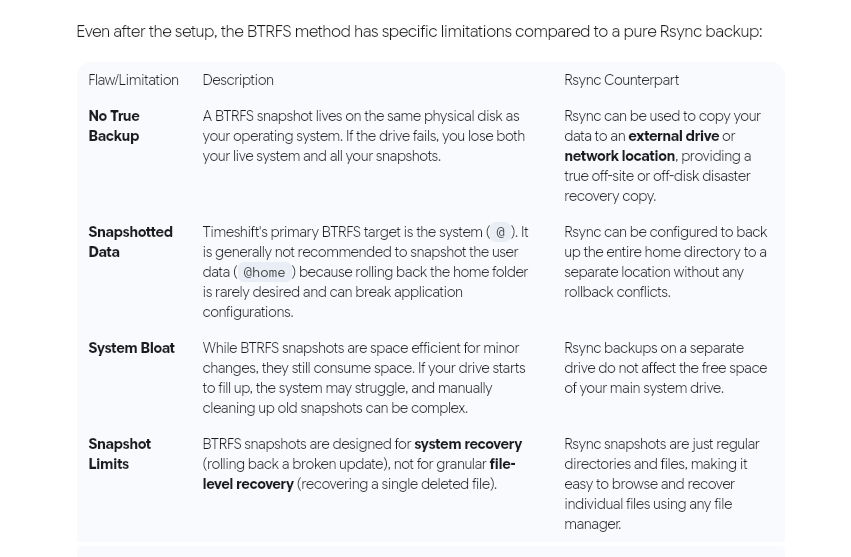
Used Timeshift twice. Does the job. Back up everything (home directory isn't included by default, but by choice), but don't use for snapshots, Instead, when system is at optimum. Not interested in BTRFS - too complex. RSYNC - simplistic
1 Like
This topic was automatically closed 90 days after the last reply. New replies are no longer allowed.