Tired of GDebi crashing? I built a lightweight, visual wrapper for local .deb installs!
Hey everyone! I've either created something absolutely brilliant or completely niche, but I needed to scratch my own itch.
I got incredibly tired of GDebi constantly freezing or crashing on modern desktop layouts, and the default Software Center feels way too bloated and slow just to open a quick, local .deb file.
Since I couldn't find a lightweight, visual tool that just handled local installs reliably, I built deb-progress-installer.
What it does
It’s a lightweight frontend script that uses Zenity to capture dpkg output in real-time. It gives you a smooth, graphical progress bar for local installations without any of the resource bloat.
How to get it
Ubuntu 26.04 users: I’ve set up an automated PPA for easy background updates.
Zorin OS 18 / Ubuntu 24.04 / Debian users: You can grab the raw .deb package directly from the GitHub Releases page and install it graphically or via a quick terminal one-liner.
Check out the repository, grab the installer, and let me know what you think!
Hello and welcome,
Does it display dependencies before installing and a way to not install the deb, or it's just a direct installer with visual output?
I completely understand the confusion! Gdebi has been incredibly stable for a long time.
The freezing or crashing tend to pop up specifically on the more recent versions of Ubuntu. Under-the-hood system changes (like updates to Python and libraries) in the latest releases have caused some compatibility quirks for Gdebi that didn't exist in older versions.
Added Pre-Installation Dependency Checks
No More Surprises: The installer now scans .deb files before launching the installation process to see if any extra system components (dependencies) are required from the internet.
User Confirmation: If additional packages are needed, the tool pauses and displays a neat, bulleted list of everything it needs to download, asking for your explicit permission before making any changes.
Dual-Stage Progress Tracking (Live Download Status)
Real-Time Internet Tracking: Previously, the progress bar could appear frozen or "stuck" at 0% while the system was quietly downloading files from the internet.
Smooth Transitions: The installer now catches live network activity. When it fetches files, the window explicitly updates to show exactly what it is downloading (e.g., Downloading required system component: [package-name]...), keeping the interface active and responsive.
Smart Error Handling & Cancellation Detection
Accurate Status Reporting: Fixed an issue where cancelling the administrator password prompt would still incorrectly trigger a "Success" message. The tool now instantly catches cancellations and handles them safely.
Friendly System Reports: If an installation fails due to a system issue, the installer safely intercepts the technical Linux error code behind the scenes and translates it into a plain, non-technical explanation (such as notifying you if your internet is down or if another system update is currently running in the background).
Thanks for the great suggestion! I completely agree that having visuals makes a massive difference.
I've actually just updated the GitHub page with a brand new, combined preview image showing the entire installation flow—from requesting admin access and handling dependencies all the way to the success screen.
Take a look at the front page now and let me know what you think!
So, there is a Success Prompt and an Error Prompt. But: Under the Success Prompt is noted ''Success Result''. Under the Error Prompt is the same. But when it is an Error, it can't be a Success Result.
Gdebi also has a reinstall and remove button.
I suspect that the Ubuntu issue may well have been down to there introduction of the letter 't' in their new packages. I also suspect the move to Wayland may also have an influence.
Good catch! You are completely right—an error is definitely not a 'success result'!
That label copy-paste slipped right past me when I was stitching the full layout image together. I'll get that graphic updated to properly say 'Error Result' or 'Failure State' so it makes perfect sense.
Thanks for pointing it out, I appreciate the sharp eyes!
Thanks for the insights! You raise some really good points. I suspect you're spot on about the Wayland transition and Ubuntu's package changes causing friction behind the scenes—it certainly explains a lot of the weird stability issues people have been running into lately.
Regarding Gdebi's remove and reinstall functionality: I'm definitely aware of those features, and they are fantastic to have. I wanted to get the core, lightweight installation engine rock-solid first for version 1.0.2, but I can happily say that a 'Reinstall & Remove' feature is already on my drawing board for a future update!
Hmmm? CSS does not work that way.
Themes only set CSS properties (colors, backgrounds, borders, alpha values). They don't execute code or touch the app's render pipeline.
A theme, by itself, cannot cause a rendering glitch in a well-behaved app.
This sounds like an app-side assumption failure, exposed by a theme that doesn't match the assumption, not a theme bug.
In GTK4 terms, there's no such thing as css sandboxing. CSS providers aren't sandboxed, they're just prioritized.
The app registers its own GtkCssProvider scoped to its own widgets via gtk_style_context_add_provider (or _for_display) at GTK_STYLE_PROVIDER_PRIORITY_APPLICATION or higher, setting an explicit background-color on its root container. This will override whatever the user's theme/compositor combination was doing, without touching the user's actual gtk.css. That's not a "sandbox," it's a specificity override. So, it sounds like you are simply saying, "Uses LibAdwaita to take over your theming so that we do not need to fix errant assumptions made in the apps creation."
This content reads like A.I. output without notification that A.I. was used.
This becomes significant when I am seeing notes that are misleading enough to require correction.
Yes, you can; that is not sandboxed, that is specificity bypassing.
That quibble aside:
Application Developers should not bypass User Set Controls instead of filling out their application.
That fails accessibility and usability.
The right course of action is to code the application to dynamically meet demand; not to limit demand and bypass rules.
Of course an you are totally right and Gnome is really touchy when you play with his nerves lol
I experimented some beautiful crash when I played too much
"You are 100% right, and I really appreciate the sharp correction. I used an AI assistant to help me clean up and format my release notes, and it completely over-embellished a very straightforward fix with totally inaccurate buzzwords ('sandbox' and 'canvas isolation'). That's entirely on me for not catching the nonsense before pasting it.
To clarify what's actually happening under the hood: some custom X11 themes and compositors were dropping alpha values or rendering the Zenity window transparently. To fix it, the script just pipes a brief, temporary CSS snippet at startup to explicitly enforce a solid background color property on the application container. It's just a standard GTK style priority override to ensure visibility, exactly as you described—no sandboxes or rendering pipeline modifications involved.
I've already gone ahead and cleaned up my changelog files to strip out the fluff and accurately reflect the actual code. Thanks again for calling it out and keeping it real!"
Thanks @Nourpon and @Aravisian, you are both exactly right. Nourpon nailed what I was trying to accomplish—I just explained it terribly by using some bad AI-formatted phrasing that didn't match reality.
To clarify: there is no "canvas isolation" or "sandbox" happening here. It is exactly what Nourpon showed in that Python snippet—the script simply uses a standard GTK CSS priority override at startup to explicitly enforce a solid background color. This ensures the Zenity text and progress window stay perfectly visible and legible even if a user is running a custom X11 theme or compositor that accidentally causes rendering or transparency issues.
Now that the wording is sorted out, here is the clean, accurate list of what is actually new in v1.1.0:
Smart Version Upgrade Detection: Uses dpkg --compare-versions to automatically trigger a seamless upgrade when a newer local .deb file is opened, completely bypassing the manual reinstall/remove prompts.
Localization Guardrails: Forces background processing utilities to fallback to the standard C locale (LC_ALL=C). This ensures text-based dependency parsing doesn't break on non-English system languages (like French, Spanish, or Russian).
Cairo Backend Performance Boost: Switches the core GTK pipeline engine to the classic 2D Cairo renderer (GSK_RENDERER=cairo), dropping CPU overhead and keeping the progress bar fluid.
GTK Theme Visibility Fix: Injects a temporary custom CSS property at startup to enforce a solid background color, preventing custom desktop themes from rendering the app windows transparently.
The local changelogs and GitHub release notes have all been updated to reflect the true technical facts. Thanks again for keeping me honest and helping me make the project better!
To Clarify my points now, in light of @Cybermaxpower's corrections to the text:
Yes, this is a viable solution (Patching with a GTK snippet override.)
If a user sets background opacity in compositor settings; it can render a window as transparent if it has an alpha value of its own. This is a fault of the Compositor, not of the theme or application.
Using a python script to bypass that value is not the same as sandboxing the applications theme to bypass all values.
One small point:
These can only pass a value, however. They cannot act on those values. So you likely are actually witnessing the same compositor or rendering issue in these cases, not a theme issue.
If I can give an analogy: Suppose I paint seven different cars - this can be called a custom theme for each car.
In each case, the color of the paint cannot altar engine performance in any way. If a user claims that the Red Custom Theme for his car makes it go faster, we would question the merit of that claim.
Cybermaxpower, thank you for taking this seriously and quickly addressing it. That A.I. description really painted you out some mischief on this one.
Thanks Aravisian! That car analogy makes perfect sense, and I appreciate the extra clarity on the theme vs. compositor distinction. I'm glad we got the technical details straightened out.
Thanks again to you both for the warm welcome and for helping me make sure the documentation matches the actual code!
 Tired of GDebi crashing? I built a lightweight, visual wrapper for local .deb installs!
 What it does
 How to get it
 Added Pre-Installation Dependency Checks
 Dual-Stage Progress Tracking (Live Download Status)
 Smart Error Handling & Cancellation Detection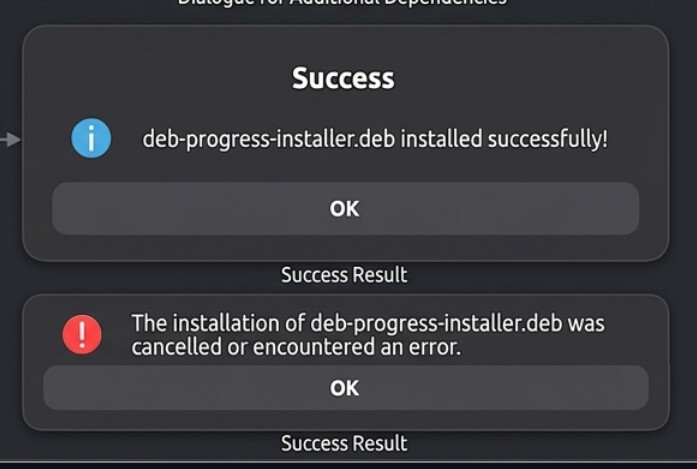

 Smart Version Upgrade Detection: Uses
  Localization Guardrails: Forces background processing utilities to fallback to the standard C locale (
 Cairo Backend Performance Boost: Switches the core GTK pipeline engine to the classic 2D Cairo renderer (
 GTK Theme Visibility Fix: Injects a temporary custom CSS property at startup to enforce a solid background color, preventing custom desktop themes from rendering the app windows transparently.
 How to Install / Update via Terminal