Anyone got this working in Zorin 18 Pro?
Hi, not everyone might have that. I would fill out a help request form to Team Zorin as you are using Pro:
Oh, I was thinking this help is as you write "support for the installation process of Zorin OS" and not installation of hardware.
saw a linux driver here for it
has instructions in the read me file on how to install
But this is only for Kernel up to 5.17:
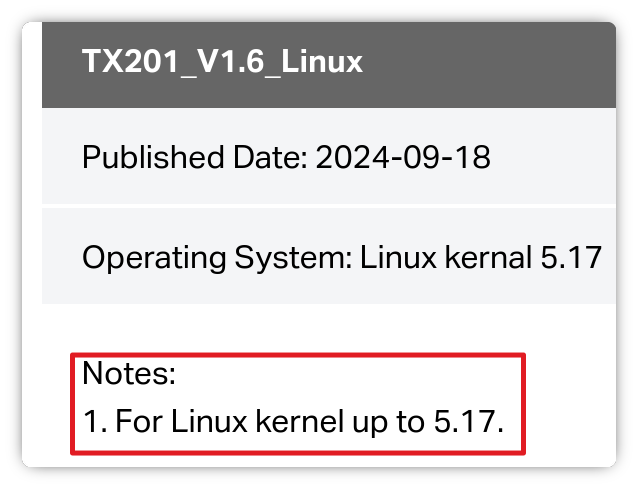
- Are Secure Boot and Fast Boot in BIOS disabled?
- If Windows is still installed: Is Fast Start-Up in Windows disabled?
- Is this a new Problem or does this not work at all from the Beginning?
- Could You post the Output of the Commands
sudo lshw -C networkandrfkill listplease?
Although from LM forum item, but LM is Ubuntu based, so maybe this could be a help: https://forums.linuxmint.com/viewtopic.php?p=2637842#p2637842
1 Like
Hi, first of all I am not a Linux expert but I have been using Linux since more then 25 years back starting with Slackware Linux. My little project Im working on now is to have my LAN wired up for 2.5Gb workstation and server. I invested in 2x TP-link TX201, a 2.5Gb PCIe card as well as 1x 2.5Gb switch.
Started by installing the TX201, not recognized by Zorin 18 Pro Kernel 6.17
Latest driver I found on REALTEK web was "2.5G Ethernet LINUX driver r8125 for kernel up to 6.12"
Driver installed anyway but no change, TX201 not recognized.
Looking at LED indicators on TX201, nothing just dark.
Moving TX201 to another PCIe slot on the motherboard and YES! LED flickering, Im on-line!
At this moment Im on my standard 1Gb LAN so I dont know anything about the 2.5Gb part yet.
Next step is to install a TX201 on the server and connect the 2.5Gb switch.
I write more here when next step is done.
Are Secure Boot and Fast Boot in BIOS disabled?
Dont like to tinker in BIOS but I think both are disabled as it normally is the default setting.
If Windows is still installed: Is Fast Start-Up in Windows disabled?
No Windows.
Is this a new Problem or does this not work at all from the Beginning?
Not working at all from beginning (writing above explaining it, bad PCIe slot!?
might have been okay without doing anything if the first PCIe slot been okay)
Could You post the Output of the Commands.
Here we go:
sudo lshw -C network
*-network
description: Ethernet interface
product: RTL8125 2.5GbE Controller
vendor: Realtek Semiconductor Co., Ltd.
physical id: 0
bus info: pci@0000:04:00.0
logical name: enp4s0
version: 04
serial: 58:04:4f:50:e3:13
size: 1Gbit/s
capacity: 1Gbit/s
width: 64 bits
clock: 33MHz
capabilities: pm msi pciexpress msix vpd bus_master cap_list ethernet physical tp mii 10bt 10bt-fd 100bt 100bt-fd 1000bt-fd autonegotiation
configuration: autonegotiation=on broadcast=yes driver=r8169 driverversion=6.17.0-20-generic duplex=full firmware=rtl8125b-2_0.0.2 07/13/20 ip=192.168.50.248 latency=0 link=yes multicast=yes port=twisted pair speed=1Gbit/s
resources: irq:18 ioport:e000(size=256) memory:f7c00000-f7c0ffff memory:f7c10000-f7c13fff
rfkill list
0: hci0: Bluetooth
Soft blocked: yes
Hard blocked: no
Hi,
What happens after you run:
sudo rfkill unblock ethernet
?
In respect of speed, does all of your hardware meet 2.5 Gb speeds, for example are you using CAT6 Ethernet cable?
" To achieve 2.5 Gbps on Ubuntu 24.04 when currently limited to 1 Gbps, you must ensure that all physical components (cables, switches, and NICs) support 2.5 Gbps and that the auto-negotiation settings are correctly configured in the OS.
Hardware and Cabling Requirements
- Cable Quality : You must use Cat 6 or higher cabling; older Cat 5e cables often fail to negotiate speeds above 1 Gbps reliably.
- Switch/Router Compatibility : Your switch or router must have a dedicated 2.5 GbE port ; standard Gigabit ports will cap the connection at 1 Gbps regardless of the NIC capability.
- NIC Support : Verify your network card supports 2500baseT/Full, as some older drivers or hardware may not advertise this speed by default.
Software Configuration on Ubuntu 24.04
- Verify Link Modes : Run
ethtool <interface_name>to check if "2500baseT/Full" appears in the Supported link modes . If it is missing, the driver may be outdated or the hardware incompatible. - Force Speed Temporarily : Use the command
sudo ethtool -s <interface_name> speed 2500 duplex full autoneg onto force the link to 2.5 Gbps and verify the connection stabilizes. - Make Permanent : To ensure the setting persists after reboot, configure your network manager (Netplan or NetworkManager) with the following parameters:
# Example for Netplan (in /etc/netplan/*.yaml)
ethernets:
  enp3s0:
    dhcp4: true
    link-local: [address]
    # Note: Speed settings are often handled via ethtool hooks or nmcli
Alternatively, use nmcli for NetworkManager:
nmcli connection modify <connection_name> 802-3-ethernet.auto-negotiate yes 802-3-ethernet.speed 2500 802-3-ethernet.duplex full
- Bridge Issues : If the interface is part of a bridge, ensure the bridge is not locked to 100 Mbps or 1 Gbps; removing the interface from the bridge temporarily can help isolate the issue.
AI-generated answer. Please verify critical facts."
Thanks for the info, I got all the hardware stuff but as I wrote : "At this moment Im on my standard 1Gb LAN so I dont know anything about the 2.5Gb part yet.Next step is to install a TX201 on the server and connect the 2.5Gb switch.I write more here when next step is done."
rfkill is a tool for enabling and disabling wireless devices.
It dont have to be the normal Setting that it is disabled by default - especially not nowadays.
At least it reads strongly like that.
1 Like
Anything here help?
Just to add ifconfig is not present anymore, you have to install net-tools to use it.
Thanks
Completion of my little project:
My server is on Debian 13 Kernel 6.12.
Installing the TX201 PCIe card and it was recognized without any problems.
Connected the 2.5Gb switch (UGREEN CM753)
My little project is up and running!
Simple test up/down transfer using FileZilla SFTP and 8.1 GB ISO file
UP Status: File transfer successful, transferred 8 127 479 808 bytes in 38 seconds
DOWN Status: File transfer successful, transferred 8 127 479 808 bytes in 49 seconds
Transfer time in 1Gb LAN is just over 2 times longer.
After reading a little more I understand the kernel driver for TX201 PCI card is r8169
and that it includes all that is in the older r8125.
I also learned that check, check and double check is important and I would not have had
any problem from the start trying to install a driver for a card that was not recognized.
Thanks to everyone for the help, If you want me to run any test, let me know.
1 Like
This topic was automatically closed 90 days after the last reply. New replies are no longer allowed.