Does Zorin have a TP Link AC600 archer t2u nano driver? I've been thinking about changing my Windows 10 PC to Zorin OS since it's an older desktop (i5 6th Gen) but I absolutely require the Wifi adapter to work "out of the box" or at least easy to set up. All I see online is about issues with using USB wireless adapters.
1 Like
Hmm...looking at the archer site for what you posted ...I dont see a linux driver...now this doesnt mean that it cant be used...just may take some time and effort to make it work...or it may go in real easy
https://www.youtube.com/watch?v=QPsdp3aE4is This is done in kali so it maybe possible
Download for Archer T2U | TP-Link version 3.60 has a linux driver what version do you have? Pretty old linux kernel on that one tho
Does this help?
1 Like
Welcome to the Forum!
You could start Zorin in a Live Session and there check if the Wifi Adapter works.
1 Like
This USB WLAN Stick should work with Zorin OS:
BrosTrend AX900 USB WiFi 6 WLAN Stick Dualband für Linux & Windows
According to this OSTechNix guide for the T2U nano dongle, it uses the Realtek RTL8811AU chipset.
According to this random GitHub repo for backported Realtek drivers I found in an Ask Ubuntu thread for the RTL8811AU, linux kernel 6.14 and higher should include a suitable driver so it will work out-of-the-box.
Notice: An updated standards compliant (mac80211), in-kernel driver for rtl8821/11au chipset based adapters and modules is available and as of kernel 6.14 is of good quality. If your distro uses kernel 6.14 or later, there is no need to install this driver.
That said, I don't know what kernel version Zorin is using right now. If it's lower than 6.14 then that OSTechNix guide says the makers of Aircrack-ng, a suite of WiFi security auditing tools, have a suitable driver on their GitHub. There are also multiple Ask Ubuntu threads for this device (also referenced as device ID 2357:011e) which similarly point to the Aircrack-ng drivers.
You will want to confirm that this is indeed the correct chipset by running lsusb in a terminal.
However, the Aircrack-ng driver repo says theirs is deprecated and recommends using this one instead, which seems to be actively maintained as recently as 3 months ago:
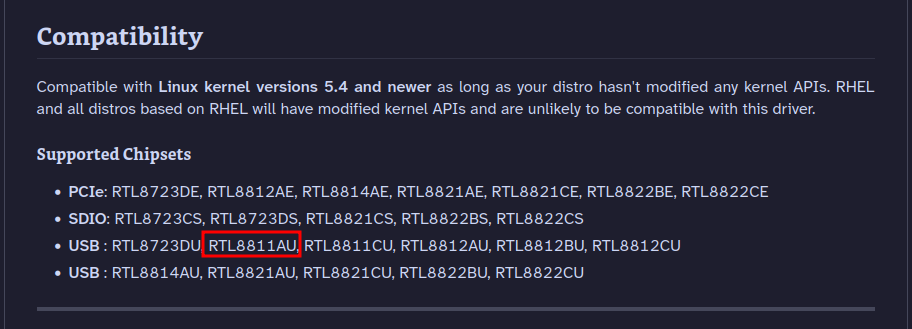
Obligatory don't install random drivers from the Internet without verifying you are willing to trust them. I similarly had to grab drivers from a different random GitHub repo for an old Dell tablet a while back and had no issues, but it was only intended as a basic web-browsing device that nothing important (financial, social media, work, etc.) is done on so the risks were practically nil for me.