I have the Core version of Zorin OS.
Is there a way turning off the toughpad while typing, it's getting in the way.
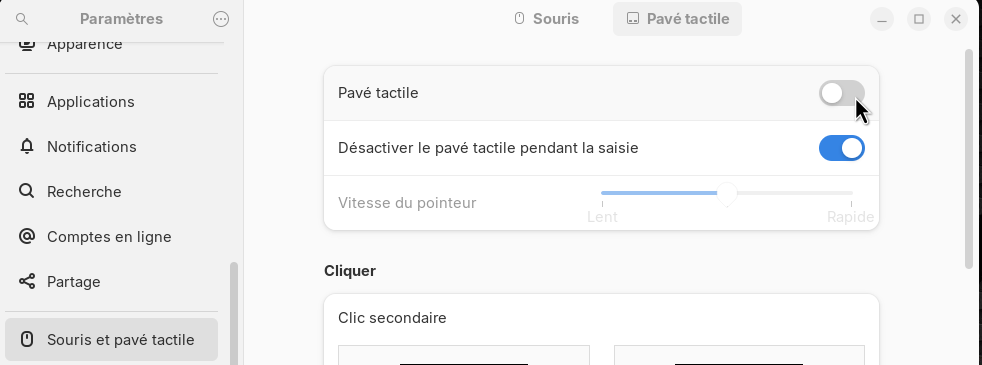
I still want to use the touchpad and read that there is a feature to stop it from operating while typing.
I can't find this option, so perhaps it is only available with the Pro?
In the settings, you can choose between “always on” or “always off” for Core and Pro.
The second field there at touchpad should disable the touchpad while typing.
Perhaps it doesn't work on all devices. I read that a user reported that it didn't help to enable this function there.
You're right, I was too quick to answer.
1 Like
I need new glasses, I see it now.
It is already on. I've turned it off and back on again. It might not have engaged correctly before.
I'll give it another go.
If it doesn't work,maybe this thread can help (if running xorg):
https://www.reddit.com/r/linuxmint/comments/1t9o9uq/solution_for_disable_touchpad_while_typing_not/
Thanks for the link but I don't know if I'm running xorg.
echo $XDG_SESSION_TYPE
shows if you are running on Wayland or Xorg. You can switch between both at loginscreen (click on your username, then a cog wheal appears at the bottom right corner where you can select two options).
But I'm not sure if it would help to create that file. You can try it, and when it doesn't help, remove the file with
sudo rm /etc/X11/xorg.conf.d/30-touchpad.conf
and then reboot.
I would also check you user manual. On HP note and netbooks there used to be a corner of the touchpad that you had to press to temporarily disable the touchpad.
Dell had their own touchpad program but that only works with Windows.
I'm running wayland
Then switch to xorg first and look, if that helps with your touchpad. If not, you can consider if you like to make a test with that file.
I've tried it. The laptop was not running as smoothly with xorg so I've switched back to Wayland.
The touchpad, I'll put up with.
1 Like
Maybe this could be another idea:
with local-overrides.quirks
Run
sudo apt install libinput-tools
sudo libinput list-devices
and search for your keyboard. You can post the terminal output here.
When you have the exact name of the keyboard (mine e.g. is
AT Translated Set 2 keyboard), you can create the folder and the file
sudo mkdir /etc/libinput
sudo nano /etc/libinput/local-overrides.quirks
Write the text into the file as shown in the guides, but replace the name at
MatchName with the name of your keyboard, and then press ctrl +o to save, Enter to confirm and ctrl+x to exit the nano editor.
Then reboot and test. Make sure that the function "disable the touchpad while typing" is enabled in the settings app.
If it doesn't help, remove the file
sudo rm /etc/libinput/local-overrides.quirks
2 Likes