I am trying to install the Sunshine Client to be able to stream my PC to my other devices. When I go to install the latest version I got off of GitHub, It always fails. I tried every version on the site, the Ubuntu based one, Debian based one, and the AppImage. None of them work. So my question is, how can I install Sunshine?
Welcome to the Forum!
What exactly means ''failed''? Did You got any Error Messages? If yes: What one's? And do You use Zorin 17 or 18?
An AppImage isn't for install. It is similar to the portable Version on Zorin. they run by itself. You have to make a Right-Click on them, choose Properties and active ''Run as Program''. and then Double-Click it and it should start.
Does Your System run in Wayland or X11?
1 Like
Sorry for the late reply, I've been really busy.
What I mean by "failed" is it won't install. Yes I did get an error message
E: http://us.archive.ubuntu.com/Ubuntu noble/main amd64 libminiupnpc amd64 2.2.6-1build2 is not ready (yet) available (Connection failed [IP: 91.189.91.81 80])
This was different than the error I got when I tried to install it yesterday, but I am unable to get that error message to come back.
I use Zorin 18
Ah I see, I'm a beginner to using Linux.
I don't know what that means.
At your login screen, click on your username field as if to login. See a cog/gearwheel icon bottom left of screen appears. What does that indicate? Post a screenshot.
1 Like
Was the error related to unable to install some dependencies?
sudo dpkg -i ./sunshine-ubuntu-24.04-amd64.deb
[sudo] password for zenzen:
Selecting previously unselected package sunshine.
(Reading database ... 274044 files and directories currently installed.)
Preparing to unpack .../sunshine-ubuntu-24.04-amd64.deb ...
Unpacking sunshine (2025.924.154138) ...
dpkg: dependency problems prevent configuration of sunshine:
 sunshine depends on miniupnpc; however:
  Package miniupnpc is not installed.

dpkg: error processing package sunshine (--install):
 dependency problems - leaving unconfigured
Processing triggers for desktop-file-utils (0.27-2build1) ...
Processing triggers for gnome-menus (3.36.0-1.1ubuntu3) ...
Processing triggers for hicolor-icon-theme (0.17-2) ...
Errors were encountered while processing:
 sunshine
If yes, you can install the missing package:
sudo apt install miniupnpc
Although this will also show another error that can be fixed by:
sudo apt --fix-broken install
And finally, install it using the first command pointing to the .deb file:
sudo dpkg -i ./sunshine-ubuntu-24.04-amd64.deb
After that, it looks like it's running, but I've never used this so I don't know if it's supposed to run in the background or not, but it's definitely listening for conenctions.
EDIT: Oh, looks like it is

Make sure to check the documentation as there seems to be some additional setup and other tips that might interest you for running this properly:
1 Like
Okay, try the Following:
Open Software & Updates and on the first Tab choose as Source ''Main Server'':
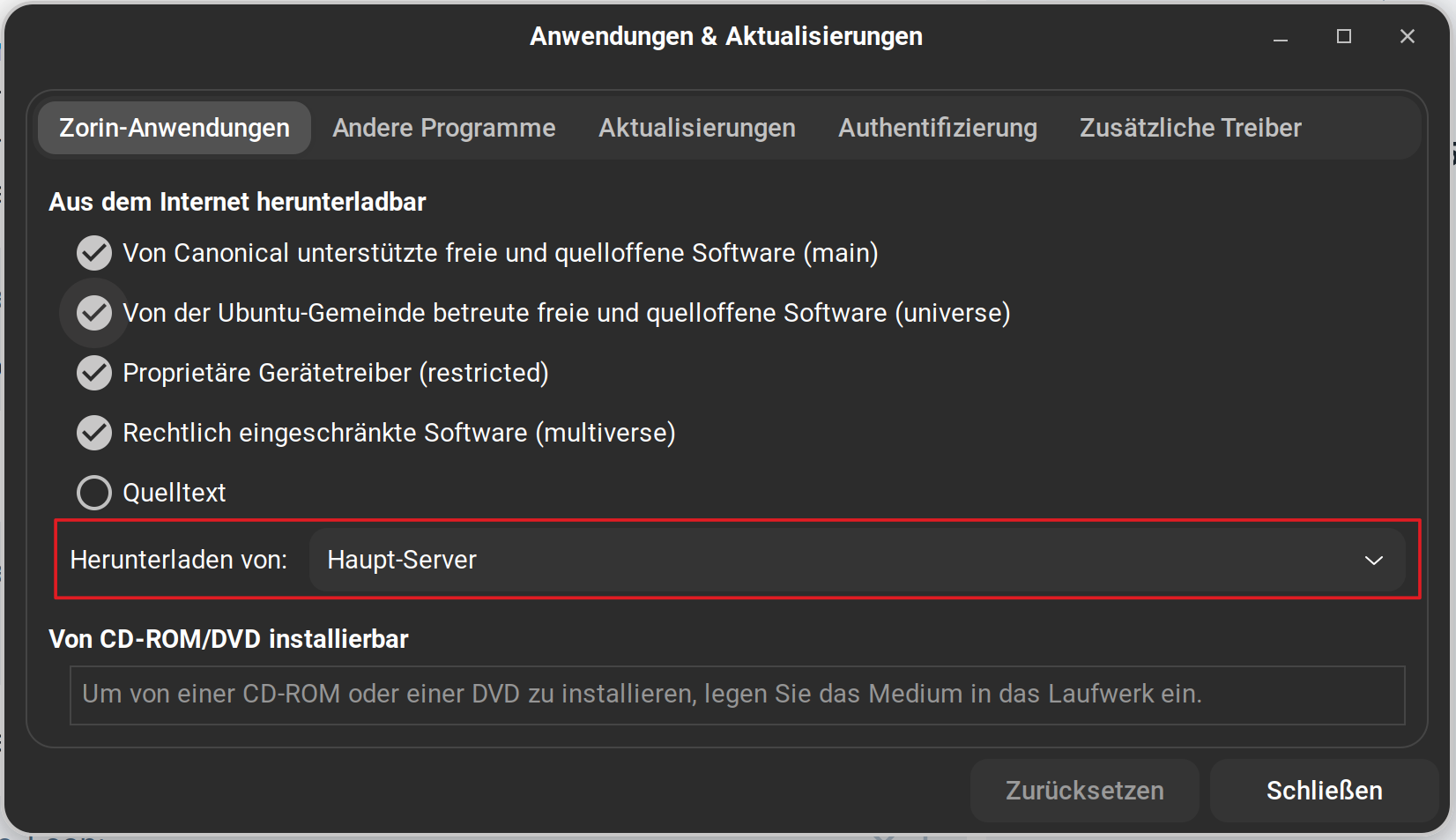

It most likely was. But I don't remember.
It seems to have installed, but I am unable to get it to start. There is supposed to be a port running at localhost:47990 that when I try to access, brings up ERR_CONNECTION_REFUSED.
Alright I did that.
The first Option is the Wayland Option (doesn't stand there directly; a bit irritating, I know). And the 2nd one is the X11/Xorg Option. Click on this to activate it and then log in.
If you launch Firewall Configuration from the applications list, in the Report tab you can see a list of programs actively listening for connections. You can check if Sunshine it's listed there, in addition to verify that the Firewall is either disabled or has any rules to allow incoming traffic to that port.

How are you trying to access e.g. from another computer on the same network, over a browser, etc?
I've done that, but it still isn't starting. Is there a command I can run in the command line to get it to start?
After checking, Sunshine was not running. I have the firewall is disabled.
The command itself is simply sunshine. If you run it from the command line it will also show you some output that might contain errors, that can be useful to troubleshoot this further.
It appears to start and work normally if I run it from the command prompt, do you know why? But it works now, thanks to everyone that helped!
It seems to take a few seconds after launching it, but after that I can see it running quietly in the background. You can try to click on the launcher, and immediately run this command on a terminal:
journalctl -xe
This will display any logs, seeing the most recent ones at the bottom which should match the ones from trying to run this application, hopefully.
By the way, if you run it from the command line, you'll notice that you have to keep it open otherwise the application will be closed when the terminal closes as well. Instead, try:
sunshine &
The ampersand here tells the shell to run this in the background, so you can safely close the terminal if you want.
Here are the logs it generated:
× sunshine.service - Self-hosted game stream host for Moonlight
Loaded: loaded (/home/me/.config/systemd/user/sunshine.service; disa>
Active: failed (Result: exit-code) since Thu 2025-11-13 20:54:47 PST; 4mi>
Duration: 1ms
Process: 5733 ExecStartPre=/bin/sleep 5 (code=exited, status=0/SUCCESS)
Process: 5742 ExecStart=/tmp/.mount_sunshidgdpjj/sunshine.AppImage (code=e>
Main PID: 5742 (code=exited, status=203/EXEC)
CPU: 4ms
Nov 13 20:54:47 Dell systemd[1989]: sunshine.service: Scheduled restart counter is at 4.
Nov 13 20:54:47 Dell systemd[1989]: sunshine.service: Start request repeated too quickly.
Nov 13 20:54:47 Dell systemd[1989]: sunshine.service: Failed with result 'exit code'.
Nov 13 20:54:47 Dell systemd[1989]: Failed to start sunshine.service self hosted game stream host for Moonlight
Nov 13 20:58:37 Dell systemd[1989]: sunshine.service: Start request re>
Nov 13 20:58:37 Dell systemd[1989]: sunshine.service: Failed with resu>
Nov 13 20:58:37 Dell systemd[1989]: Failed to start sunshine.service -
I got these by running systemctl --user status sunshine.service, that's what it told me to run when I ran journalctl -xe
Do you still have multiple versions of Sunshine installed? That logs show that you're using the AppImage, at least for the launcher that you used. It would be better to avoid this and run only a single version.
For reference, there is at least one other case with what seems a very similar issue. It's supposed to be fixed so it might not be the exact same situation here:
It might be faster to uninstall it completely from all sources, but let's see if we can fix this one real quick. We can take a look at the launcher file by running:
grep "Exec" /usr/share/applications/dev.lizardbyte.app.Sunshine.desktop
And paste the output here. This will show the line that actually runs the executable.
Exec=/usr/bin/env systemctl start --u sunshine
Exec=gio launch /usr/share/applications/dev.lizardbyte.app.Sunshine.terminal.desktop
That looks fine, so it must be that launching the AppImage created a background service:
Are you still using the AppImage or did you install something else? If yes, I'd recommend to uninstall it completely, and use the deb version instead. It's possible this will not remove the background service file, though, so double check that it works fine afterwards.
I deleted the app image from my downloads folder.
According to the docs, there's a dedicated command that you are supposed to run to uninstall it. If you keep running into issues, try downloading the AppImage again and run that.
This topic was automatically closed 90 days after the last reply. New replies are no longer allowed.