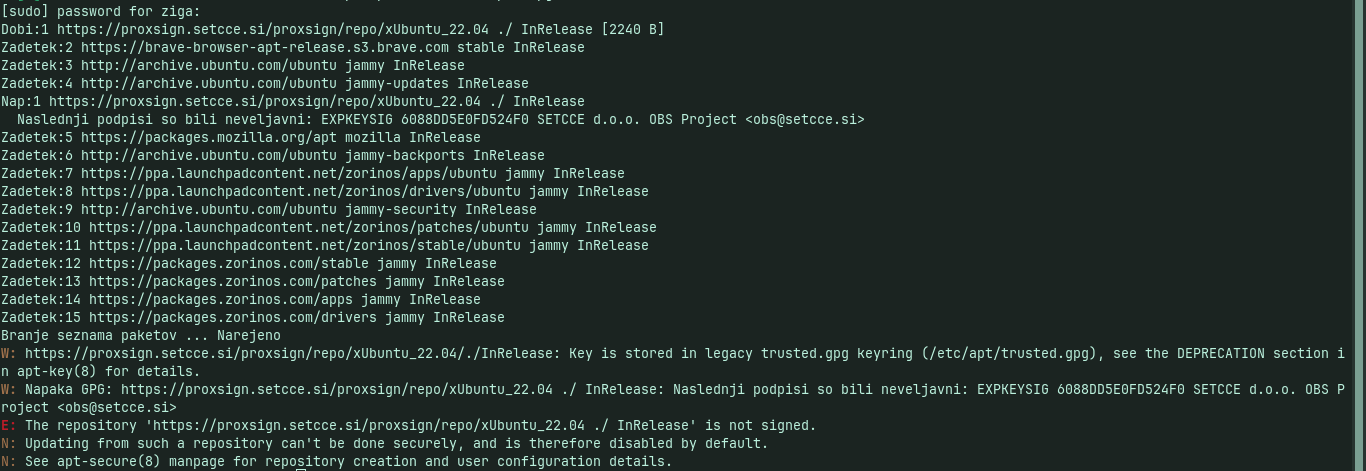
Hi,
I use Zorin 17.3 and I can't update him from last update. What is solution for that thing? I will appreciate any help.
Best regards
Hi,
I use Zorin 17.3 and I can't update him from last update. What is solution for that thing? I will appreciate any help.
Best regards
No answer...interesting.
Are you saying that you are not receiving regular system updates, or that you are unable to use the Upgrader tool to Upgrade the release from 17 to 18?
Can You post the Output of the Terminal Command sudo apt update && sudo apt upgrade please?
I'm talking about getting regular updates yup.
I wanna to thank you both very much for your help.
Your proxsign repository is misconfigured - which is the most likely cause of the issue blocking updates. It halts at that error.
In your BIOS settings, is Secure Boot enabled? It would block an unsigned application, as well.
I was look in Bios and Secure Boot is disabled.
Well, that leaves us with Proxsign.
It needs the GPG key - how did you install it? Were you following a guide?
I need that for signing documents. I was install this from that site: SETCCE proXSign®
The link you give provides instructions for an AppImage.
It has a section that links to instructions for installing, including Ubuntu 22.04.
However, that is not working. Why not remove it, the deb package and the repository - and use the AppImage, instead?
No problem. Yes, I totally agree with you. I would do that but I don`t know how, so I please you for your instructions.
You can launch Software & Updates application, then in the "Other Software" tab, select the proXsign repository, then click the button marked "Remove."
You can use Gnome Software to remove the installed package.
If you do not see it listed, please say so. Reading their website, it is not very clear...
I have never used ProXsign, so I can only give general advice.
It seems to isn`t listed.
I wonder if it is already installed as an AppImage and the repository was superfluous.
Because while the site mentions a .deb package, those instructions do not include a .deb package.
Let's remove the repository - then test in terminal:
sudo apt update && sudo apt full-upgrade
Sorry I dont know how to remove repository. I was found key file in apt folder but I cant erase that. Please can you help me?
Elevate to Root permission. From terminal, run
nautilus admin:///
Then navigate to:
and you should now have permission to delete it.
Finally I managed to get rid of it. First I deleted the key file and it didn't get any better, then I was go ask on Google how to solve no pubkey message and then I got idea to look in sources list folder. There were two more files to delete in the sources list folder from this proXsign.
Long story short: Now everything is great. The updater app works flawlessly.
Thank you very much.
Just one more question, why does it say that when updating it might be missing files for amd graphics drivers?
If you are using Legacy drivers, that warning may appear due to newer kernels utilizing AMDGPU and expecting those naming conventions.
It can be ignored if your Radeon driver is working well.
This topic was automatically closed 90 days after the last reply. New replies are no longer allowed.