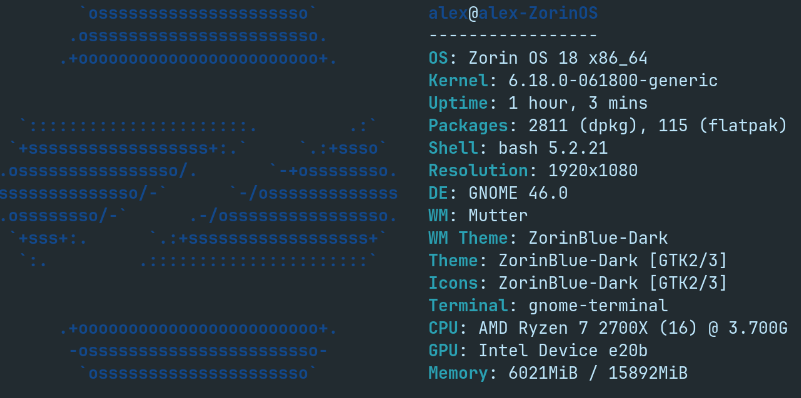
The issue: I am experiencing random unexpected logouts whilst the PC is idle but streaming (with Jellyfin) to another device in the house.
I was successfully running Zorin 17 Pro for a few months before I upgraded to 18 pro without this issue.
I have not experienced these issues whilst actively using the PC. Apart from some stuttery slow down moments, that I am pretty sure are related to the new Jellyfin media scraping method, there has been nothing untoward happening otherwise.
I don't believe that Jellyfin is the culprit as an untrained eye at the logs doesn't seem like anything catastrophic is going on.
Yes, I have upgraded the Kernel to 6.18 in an attempt to improve compatibility with my ARC B580. Although, I am no expert so perhaps I am complicating things and causing instability for no gain given I have followed the intel install guide to give me the latest Mesa. I have Mainline installed, I can roll back, although I would be interested if anyone knows if the kernel version has a real effect on B580 performance once the mesa drivers etc is manually updated as per Intel instructions (I haven't looked close enough side by side to draw a meaningful conclusion).
It seems unusual for instability to result in a log out event? Although again, I'm no Linux wizard. I have been sat infront of the idle PC streaming and seen the stream drop out and can confirm this is not a reboot event.
P.S. I wanted to say how fantastic I have found Zorin to be. It has been the first distro I have found myself staying with for a prolonged period. Keep up the good work
That sounds like an energy-saving feature. Have you tried turning off automatic locking and suspension or increasing the time interval? Linux often doesn't recognize when movies or music are playing and considers the computer to be inactive, causing it to shut down.
You could also use a gnome extension such as "caffeine" or "espresso."
Thanks for taking the time to have a think about this
I'll take a look at caffeine or espresso. In terms of automatic lock and suspend, both have been deactivated the whole time so I don't expect it's related to them. I do have an auto screen blank which I will deactivate now to see if that is causing the log outs.
Maybe switching to Xorg could help. At least, it is worth a Try. to do that, go to the Login Screen. Click there on Your Profile so that the Passowrd Field appears. When it is appeared, You should see a Gear Icon in the bottom right Corner. Click on it and choose the Option ''Zorin Desktop on Xorg'' and then log in.
Another Thing: Open the Terminal and type powerprofilesctl and post the Output here or make a Screenshot of it please.
Thanks If the problem persists, I will try XOrg. I did try XOrg out a little while ago when there was a bug in the GPU drivers but this was quickly solved and I moved back to Wayland.
This is the output you requested:
balanced:
PlatformDriver: placeholder
power-saver:
PlatformDriver: placeholder
I have deactivated the screen blank time that I had on following Forpli's reply and, so far today, the issue has not yet reoccurred (current up time without logout circa 20 hours) although I've not sat down to watch any shows yet so the proof may be in this evenings' TV watching. Screen blanking being on is a change from my old Zorin 17 setup where I did not have it on. My current working theory, based on this, is that there is a bug linked to screen blanking that is causing my logouts. I'll leave it running and stream as I would usually for a few more days and report back on my stability. The short term solution for me may be to leave this off and perhaps a deeper solution to re-enable screen blanking will surface in the future from some clever developer.
I let the PC run for a few more days and had no further issues. It seems like when the screen blanks, it logs out! Very unusual. So for now I have turned off screen blank and I just make sure I turn my screen off when I leave it, to save power.
Solution: Turn off screen blanking to prevent unplanned log out