Zorin 18, layout 1:
Please see image below. Is there a way to remove this unwanted icon from the bottom panel? I think it might be baked into gnome and can't be removed. I have already removed the "right box" and its contents.
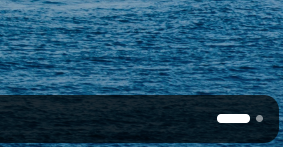
I believe that's their new icon for their workspaces, if I'm not mistaken. As for removing it, I'm not sure if it's actually removable or not. I will have to try later too.
Let me know if anyone does manage to remove it, because I removed it by accident and have no idea how, I want it back 
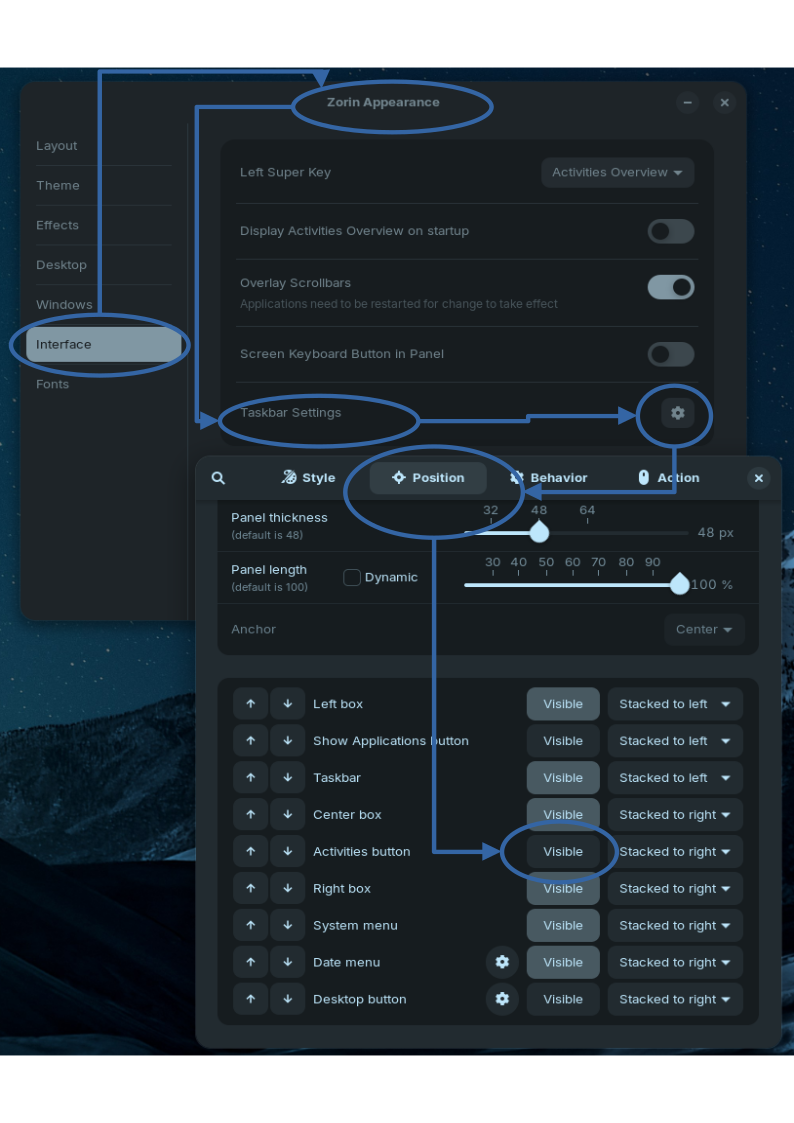
Go in the Taskbar Settings and there to the Position Tab. Scroll down where You can enable/disable the elements of the Taskbar. This one can be disabled; it is the ... I don't know the english Term for it ... Workspace Indicator, Application, Activities or Overview/App Grid Indicator. Something like that. You can definetely disable it; I did it, too.
It would be easier when You could post a Screenshot of the Settings. Then I could name it from the List. Or: Disable one after the other until You see this disappear.
It's in Zorin Appearance:
Interface - Taskbar Settings - Position - Activities button. Deselect 'Visible'. @MidnightRose that will be re-selecting 'Visible' in your case.
3 Likes
Thank You for the Picture. Activities Button, yes.
Thank you. That was easy with your image.
This topic was automatically closed 90 days after the last reply. New replies are no longer allowed.