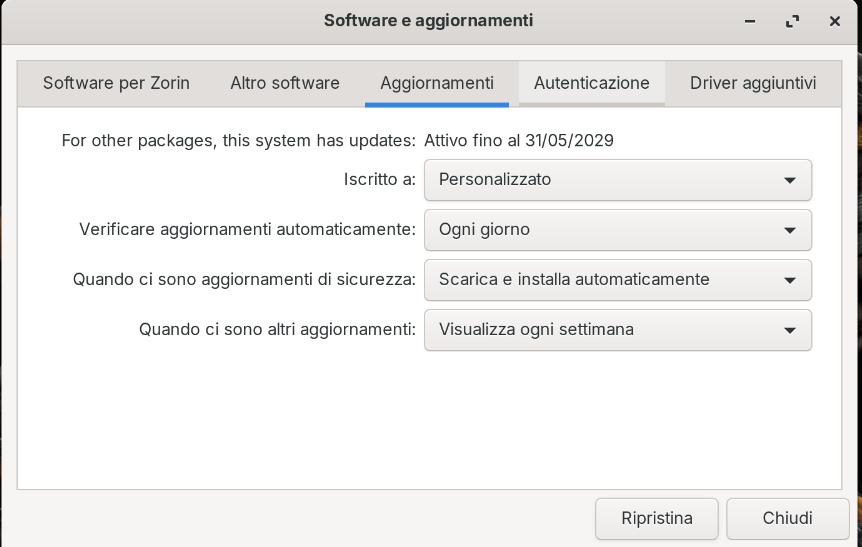
Why does the update settings always stay on "Custom" when I try to change them?
It won't let me change them to "All Updates."
Thanks!
Why does the update settings always stay on "Custom" when I try to change them?
It won't let me change them to "All Updates."
Thanks!
Did You set up ''Main Server'' as Source on the first Tab in Software & Updates? Can You post the Output of the Command sudo apt update && sudo apt upgrade please?
Yes i set uo "Main Server" as source on the first tab in "Sofware & Update".
lenovo@lenovo-ThinkPad-L14-Gen-1:~$ sudo apt update
[sudo] password di lenovo:
Trovato:1 Index of /ubuntu/ noble-updates InRelease
Trovato:2 Index of /ubuntu noble-security InRelease
Trovato:3 https://linux.teamviewer.com/deb stable InRelease
Trovato:4 Index of /ubuntu/ noble-backports InRelease
Trovato:5 https://brave-browser-apt-release.s3.brave.com stable InRelease
Trovato:6 Index of /ubuntu noble InRelease
Trovato:7 Index of /zorinos/apps/ubuntu noble InRelease
Trovato:8 Index of /ubuntu noble-updates InRelease
Trovato:9 Index of /zorinos/drivers/ubuntu noble InRelease
Trovato:10 Index of /ubuntu noble-backports InRelease
Trovato:11 Index of /zorinos/patches/ubuntu noble InRelease
Trovato:12 Index of /zorinos/stable/ubuntu noble InRelease
Trovato:13 Index of /stable/ noble InRelease
Trovato:14 Index of /patches/ noble InRelease
Trovato:15 Index of /apps/ noble InRelease
Trovato:16 Index of /drivers/ noble InRelease
Lettura elenco dei pacchetti... Fatto
Generazione albero delle dipendenze... Fatto
Lettura informazioni sullo stato... Fatto
1 pacchetto può essere aggiornato: eseguire "apt list --upgradable" per vederlo.
lenovo@lenovo-ThinkPad-L14-Gen-1:~$
lenovo@lenovo-ThinkPad-L14-Gen-1:~$ sudo apt upgrade
Lettura elenco dei pacchetti... Fatto
Generazione albero delle dipendenze... Fatto
Lettura informazioni sullo stato... Fatto
Calcolo dell'aggiornamento... Fatto
I seguenti pacchetti saranno aggiornati:
libqpdf29t64
1 aggiornati, 0 installati, 0 da rimuovere e 0 non aggiornati.
È necessario scaricare 0 B/798 kB di archivi.
Dopo quest'operazione, verranno occupati 4.096 B di spazio su disco.
Continuare? [S/n] s
(Lettura del database... 250686 file e directory attualmente installati.)
Preparativi per estrarre .../libqpdf29t64_11.9.0-1.1ubuntu0.1_amd64.deb...
Estrazione di libqpdf29t64:amd64 (11.9.0-1.1ubuntu0.1) su (11.9.0-1.1build1)...
Configurazione di libqpdf29t64:amd64 (11.9.0-1.1ubuntu0.1)...
Elaborazione dei trigger per libc-bin (2.39-0ubuntu8.6)...
@Ponce-De-Leon The problem remains.
I'm signed up for "Custom" and can't make changes.
Maybe a Bug. I took a Look in my Settings and have that, too.
Aravisian answered this on one of my thread:
So the this bug hasn't been fixed yet?
Also, reading other posts, I saw that there was also a bug where automatic update notifications weren't enabled. Has this bug been fixed?
I remember when the Zorin 18 Beta came out it was set to custom and I interpreted this to be down to Zorin updates for the Beta coming from the server Zorin assigned updates from. Final releases normally allocate your country server where you are located.
Main Server is Canonical's (Ubuntu) Main Server.
Found this:
"Custom is selected in the Software & Updates settings when your system's update configuration does not match the standard predefined options like "All updates," "Security and recommended updates," or "Security updates only."
This typically happens if you have manually enabled repositories such as -proposed , -backports , or added third-party PPAs that modify the default update behavior. The system detects that your current setup deviates from the standard configurations and automatically displays Custom to reflect this.
The Custom option persists until you close the System Settings window. If you want to revert to a standard setting, you can manually select one of the predefined options (e.g., "Security and recommended updates"), or adjust the repositories in Software & Updates > Other Software to match a standard configuration.
Note : If you're unsure why Custom is selected, check for any third-party repositories or experimental updates (like
-proposed) that may have been added manually.
AI-generated answer. Please verify critical facts."
I am wondering if this is down to flatpak and snap which I always removed post install (I don't use Zorin as my daily driver.)
In my opinion, if it's a bug, it should be fixed.
If it's not a bug but it's correct that it's this way and therefore unchangeable from that drop-down menu, the whole thing should be revised and simplified; otherwise, it'll only create confusion among users.
In the linked thread is written in the last post that the problem has been solved for the automatic notifications.