Hey,
I'm currenlty running Zorin OS 17 Pro and just purchased the v18 Pro that should be installed through the Upgrade tool. During the installation verification steps, I get this error :
[CHECKING] Started
[CHECKING:Validating Upgrade Attempt] Started
[CHECKING:Validating Upgrade Attempt] Completed
[CHECKING:Checking Filesystem] Started
[CHECKING:Checking Filesystem] Completed
[CHECKING:Creating Necessary Files] Started
[CHECKING:Creating Necessary Files] Completed
[CHECKING:Adding GPG Keys] Started
[CHECKING:Adding GPG Keys] Completed
[CHECKING:Restarting Apt] Started
[CHECKING:Restarting Apt] Completed
[CHECKING:Simulating Flatpak Transaction] Started
[CHECKING:Simulating Flatpak Transaction] Completed
[CHECKING:Processing Apt Repos] Started
[CHECKING:Processing Apt Repos] Completed
[CHECKING:Updating Apt Repos] Started
[CHECKING:Updating Apt Repos] Completed
[CHECKING:Calculating Upgradeable Packages] Started
[CHECKING:Calculating Upgradeable Packages] Completed
[CHECKING:Simulating Apt Transaction] Started
[CHECKING:Simulating Apt Transaction] Fatal Error: { GDBus.Error:org.aptkit.TransactionFailed: error-dep-resolution-failed: The following packages have unmet dependencies:

libpipewire-0.3-0t64: Depends: libspa-0.2-modules (= 1.0.5-1ubuntu3.2) but 1.2.3-1~20.04.sav0 is to be installed
                      Depends: libc6 (>= 2.38) but 2.39-0ubuntu8.7 is to be installed
 }
[CHECKING:Simulating Apt Transaction] Failed
[CHECKING] Failed
[CHECKING:Restoring System] Started
[CHECKING:Restoring System] Completed
The fact is trying to install the exact versions that are supposed to be required woulld lead to the deletion of a lot of packages that're required for the window server running (gnome-tools-, gnome-shell-).
I'd like to know if I have any more options to fix this or if I should wait for a fix from the development team.
Thanks
[CHECKING] Started
[CHECKING:Validating Upgrade Attempt] Started
[CHECKING:Validating Upgrade Attempt] Completed
[CHECKING:Checking Filesystem] Started
[CHECKING:Checking Filesystem] Completed
[CHECKING:Restarting Apt] Started
[CHECKING:Restarting Apt] Completed
[CHECKING:Simulating Flatpak Transaction] Started
[CHECKING:Simulating Flatpak Transaction] Completed
[CHECKING:Processing Apt Repos] Started
[CHECKING:Processing Apt Repos] Completed
[CHECKING:Updating Apt Repos] Started
[CHECKING:Updating Apt Repos] Completed
[CHECKING:Calculating Upgradeable Packages] Started
[CHECKING:Calculating Upgradeable Packages] Completed
[CHECKING:Simulating Apt Transaction] Started
[CHECKING:Simulating Apt Transaction] Fatal Error: { GDBus.Error:org.aptkit.TransactionFailed: error-dep-resolution-failed: The following packages have unmet dependencies:

libcupsfilters1t64: Depends: libc6 (>= 2.38) but 2.39-0ubuntu8.7 is to be installed
                    Depends: libcups2t64 (>= 2.3~b6) but 2.4.7-1.2ubuntu7.9 is to be installed
                    Depends: libtiff6 (>= 4.0.3) but 4.5.1+git230720-4ubuntu2.4 is to be installed
 }
[CHECKING:Simulating Apt Transaction] Failed
[CHECKING] Failed
[CHECKING:Restoring System] Started
[CHECKING:Restoring System] Completed
The Dependency Issue is that it wants to install it with a specific Version Number but a higher Number would be installed. Did You added any third-Party Repos? If yes, delete them and add them later for the new Base.
I've added third party repositories, but running apt policy tells that both are supposed to be installed from the official ubuntu jammy repository.
Don't know if I'm missing anything
A Repository will not be installed from the Ubuntu Jammy Repo. A Repository is a Source Server where Software comes from.
Okay, to be clear about this, check the File /etc/aptsources.list and the Folder /etc/apt/sources.list.d for the Content and report here please. The File Content, You can copy to here and from the Folder Centent, You can make a Screenshot/Picture and post it here.
I was talking about the packages, not the repositories.
Here's the content of the /etc/apt/sources.list :
# deb cdrom:[Zorin-OS 16 Pro 64bit]/ jammy main restricted

# See http://help.ubuntu.com/community/UpgradeNotes for how to upgrade to
# newer versions of the distribution.
deb http://bj.archive.ubuntu.com/ubuntu/ jammy main restricted
# deb-src http://bj.archive.ubuntu.com/ubuntu/ jammy main restricted

## Major bug fix updates produced after the final release of the
## distribution.
deb http://bj.archive.ubuntu.com/ubuntu/ jammy-updates main restricted
# deb-src http://bj.archive.ubuntu.com/ubuntu/ jammy-updates main restricted

## N.B. software from this repository is ENTIRELY UNSUPPORTED by the Ubuntu
## team. Also, please note that software in universe WILL NOT receive any
## review or updates from the Ubuntu security team.
deb http://bj.archive.ubuntu.com/ubuntu/ jammy universe
# deb-src http://bj.archive.ubuntu.com/ubuntu/ jammy universe
deb http://bj.archive.ubuntu.com/ubuntu/ jammy-updates universe
# deb-src http://bj.archive.ubuntu.com/ubuntu/ jammy-updates universe

## N.B. software from this repository is ENTIRELY UNSUPPORTED by the Ubuntu
## team, and may not be under a free licence. Please satisfy yourself as to
## your rights to use the software. Also, please note that software in
## multiverse WILL NOT receive any review or updates from the Ubuntu
## security team.
deb http://bj.archive.ubuntu.com/ubuntu/ jammy multiverse
# deb-src http://bj.archive.ubuntu.com/ubuntu/ jammy multiverse
deb http://bj.archive.ubuntu.com/ubuntu/ jammy-updates multiverse
# deb-src http://bj.archive.ubuntu.com/ubuntu/ jammy-updates multiverse

## N.B. software from this repository may not have been tested as
## extensively as that contained in the main release, although it includes
## newer versions of some applications which may provide useful features.
## Also, please note that software in backports WILL NOT receive any review
## or updates from the Ubuntu security team.
deb http://bj.archive.ubuntu.com/ubuntu/ jammy-backports main restricted universe multiverse
# deb-src http://bj.archive.ubuntu.com/ubuntu/ jammy-backports main restricted universe multiverse

## Uncomment the following two lines to add software from Canonical's
## 'partner' repository.
## This software is not part of Ubuntu, but is offered by Canonical and the
## respective vendors as a service to Ubuntu users.
# deb http://archive.canonical.com/ubuntu jammy partner
# deb-src http://archive.canonical.com/ubuntu jammy partner

deb http://security.ubuntu.com/ubuntu jammy-security main restricted
# deb-src http://security.ubuntu.com/ubuntu jammy-security main restricted
deb http://security.ubuntu.com/ubuntu jammy-security universe
# deb-src http://security.ubuntu.com/ubuntu jammy-security universe
deb http://security.ubuntu.com/ubuntu jammy-security multiverse
# deb-src http://security.ubuntu.com/ubuntu jammy-security multiverse

# This system was installed using small removable media
# (e.g. netinst, live or single CD). The matching "deb cdrom"
# entries were disabled at the end of the installation process.
# For information about how to configure apt package sources,
# see the sources.list(5) manual.
The sources.list File looks good so far for me. There is only one Thing in the first Line: There stands Zorin-OS 16. Did You upgraded from 16 to 17 or are You on Zorin 16?
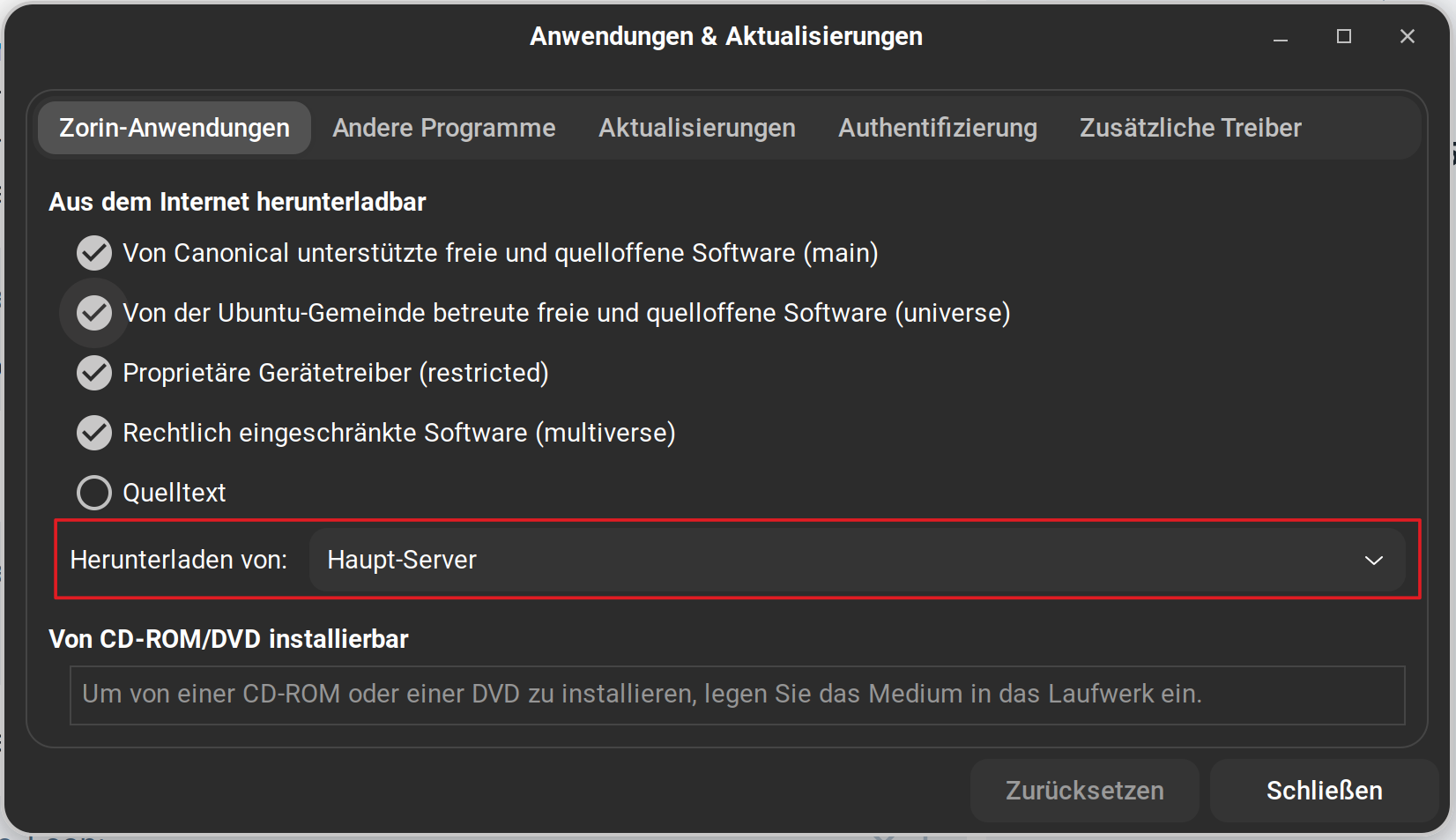
Besides that: You could in Software & Updates on the first Tab set the Source to ''Main Server'':
The surces.list.d Folder is another Thing ... It is a Mixture of Jammy and Focal Sources. I would suggest to delete - or at least disable - all of them, except the Zorin one's.
Yes, I've upgraded to v17 from v16. I'm currently on Zorin 17 Pro.
In the sources.list.d folder, I had commented everything related to focal source before trying the update.
Setting the Source to Main Server didn't change anything, btw
I wanted to see the Output to Double-Check the Sources. But I would suggest now to simply delete every Third-Party Source except the Zorin one's, then make a sudo apt update and then try the Upgrade Process again.
These two bother me the most.
APT should not, under any circumstances, fail to see that 2.39 satisfies >2.38
So, to me, this suggests an Architecture mistmatch, 32bit libraries vs 64 bit.
And t64 was present in Jammy but discontinued in Noble. It looks like, the Jammy source is being referenced and trying to install t64, but not finding them in noble...
If you say you have added none, there are other issues that can arise without any third party repos added.
If you prefer to check to be certain, you can relay the output of
# deb cdrom:[Zorin-OS 16 Pro 64bit]/ jammy main restricted

# See http://help.ubuntu.com/community/UpgradeNotes for how to upgrade to
# newer versions of the distribution.
deb http://archive.ubuntu.com/ubuntu jammy main restricted
# deb-src http://bj.archive.ubuntu.com/ubuntu/ jammy main restricted

## Major bug fix updates produced after the final release of the
## distribution.
deb http://bj.archive.ubuntu.com/ubuntu/ jammy-updates main restricted
# deb-src http://bj.archive.ubuntu.com/ubuntu/ jammy-updates main restricted

## N.B. software from this repository is ENTIRELY UNSUPPORTED by the Ubuntu
## team. Also, please note that software in universe WILL NOT receive any
## review or updates from the Ubuntu security team.
deb http://archive.ubuntu.com/ubuntu jammy universe
# deb-src http://bj.archive.ubuntu.com/ubuntu/ jammy universe
deb http://bj.archive.ubuntu.com/ubuntu/ jammy-updates universe
# deb-src http://bj.archive.ubuntu.com/ubuntu/ jammy-updates universe

## N.B. software from this repository is ENTIRELY UNSUPPORTED by the Ubuntu
## team, and may not be under a free licence. Please satisfy yourself as to
## your rights to use the software. Also, please note that software in
## multiverse WILL NOT receive any review or updates from the Ubuntu
## security team.
deb http://archive.ubuntu.com/ubuntu jammy multiverse
# deb-src http://bj.archive.ubuntu.com/ubuntu/ jammy multiverse
deb http://bj.archive.ubuntu.com/ubuntu/ jammy-updates multiverse
# deb-src http://bj.archive.ubuntu.com/ubuntu/ jammy-updates multiverse

## N.B. software from this repository may not have been tested as
## extensively as that contained in the main release, although it includes
## newer versions of some applications which may provide useful features.
## Also, please note that software in backports WILL NOT receive any review
## or updates from the Ubuntu security team.
deb http://bj.archive.ubuntu.com/ubuntu/ jammy-backports main restricted universe multiverse
# deb-src http://bj.archive.ubuntu.com/ubuntu/ jammy-backports main restricted universe multiverse

## Uncomment the following two lines to add software from Canonical's
## 'partner' repository.
## This software is not part of Ubuntu, but is offered by Canonical and the
## respective vendors as a service to Ubuntu users.
# deb http://archive.canonical.com/ubuntu jammy partner
# deb-src http://archive.canonical.com/ubuntu jammy partner

deb http://security.ubuntu.com/ubuntu jammy-security main restricted
# deb-src http://security.ubuntu.com/ubuntu jammy-security main restricted
deb http://security.ubuntu.com/ubuntu jammy-security universe
# deb-src http://security.ubuntu.com/ubuntu jammy-security universe
deb http://security.ubuntu.com/ubuntu jammy-security multiverse
# deb-src http://security.ubuntu.com/ubuntu jammy-security multiverse

# This system was installed using small removable media
# (e.g. netinst, live or single CD). The matching "deb cdrom"
# entries were disabled at the end of the installation process.
# For information about how to configure apt package sources,
# see the sources.list(5) manual.
For ls s /etc/apt/sources.list.d, I've put back the repositories I've removed after the upgrade process failed again, but here's the current output :
I would say at this Point: Delete all the Stuff in sources.list.d what isn't Zorin. It might be annoying to add it later again but it should be worth a Try. Then make a sudo apt update and then try the Upgrade again.