I used thunderbird for years and liked most of what it did. Standouts were a built in spell check and application of signatures with a intuitive interface. I was recommended Evolution ( not sure why) so didn't migrate Thunderbird over. I now have to send emails unchecked and have to open each each mail to include a signature noting it is picking up old ones when I was overseas so wrong phone no embedded. Is there any reason why evolution trumps thunderbird as a client ? I used the help button and it was not. I was directed to areas I couldnt find and to software not installed ...the ratio of time spent to results is now at its worst for me
1 Like
You can use Thunderbird on Zorin, too. Evolution is not a Must. It is preinstalled because it belongs to the Gnome Eco System. When You don't like it, it is no Problem. Use what suits You.
2 Likes
Team Zorin have long aspired to aim at the Enterprise market. Thunderbird used to be the default, but Evolution works well with Enterprise email ecosystem; I certainly found it exceptionally handy for reading my Outlook365 email working from home during lockdown until retirement in August 2021.
2 Likes
Yes. I choose Thunderbird on multiple platforms, including on my Z17.3Core system.
2 Likes
The old phone number sounds like a saved signature rather than mail content; remove or replace that signature in Evolution's account settings, and it will stop being inserted.
Yes I did that and lo there it was in showing in a current job application response to an agent - unlike Thunderbird I cannot see the signature - it offers auto generation but doesn't show what that is - I got a seriously weird one sent to a friend that was in copperplate script - something I would never use. I have found & installed Thunderbird and peace and signatures are restored! You sound like you might know about use of Windows apps within something like bottles and wines app- I was chasing Teams as most interactions demand this and don't like the cut down browser version ? I also might as well mention that in software I have an update message and rebooted three times (completely on the third attempt) only to have an error report cited - would embed a screen shot but no idea how to get one done - like learning mandarin
That copperplate text confirms Evolution was inserting a saved signature, so Thunderbird was a sensible switch. For the update error, the exact report message matters more than the three reboots.
1 Like
You can add screenshots to your post by clicking on the icon with the mountain:
:
To take a screenshot, take a look at this help site
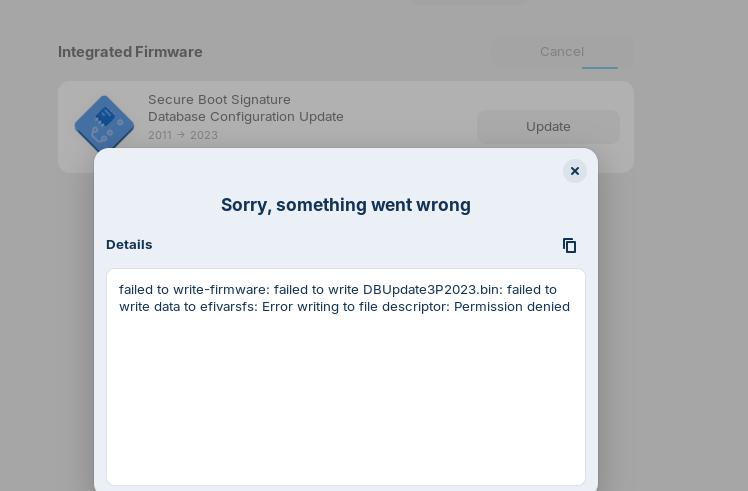
Just experimenting with capture using printscreen to show the error message...ChatGBT gave me some code to check the status and it appears to be a widespread issue ie not my OS
Open the Terminal and type sudo apt update && sudo apt upgrade and then reboot.
Thanks - before rebooting , I thought to copy the script here (last 6 lines of about 20 )
W: Target CNF (main/cnf/Commands-all) is configured multiple times in /etc/apt/sources.list.d/brave-browser-release.list:1 and /etc/apt/sources.list.d/brave-browser-release.sources:1
Reading package lists... Done
Building dependency tree... Done
Reading state information... Done
Calculating upgrade... Done
The following package was automatically installed and is no longer required:
libfwupd2
Use 'sudo apt autoremove' to remove it.
The following upgrades have been deferred due to phasing:
console-setup console-setup-linux keyboard-configuration snapd
0 to upgrade, 0 to newly install, 0 to remove and 4 not to upgrade.
V grateful for your help so far 
The Multiple configuration Issue, we can look later. Type in Terminal sudo apt autoremove and then reboot.
The screenshot shows the Brave source is listed twice, while the deferred packages are normal phasing; that points to two separate issues.
Hi, Thanks for your help again Not knowing how it works I tried simply copying your script in and it incorporated various html bits i think so I removed these leaving sudo apt autoremove which when returned , password > Y and it removed 512kb for when I reboot- fingers crossed ! will confirm what the software update reports anon - much appreciated
My Script? You mean the Command? You only need to copy the Command, press Enter and type in Your Password.
Yes thanks - when I highlighted the script it oddly included extras which the terminal couldn't assimilate. When I simply memorised and typed in the command it worked. Sadly the update message is still there -
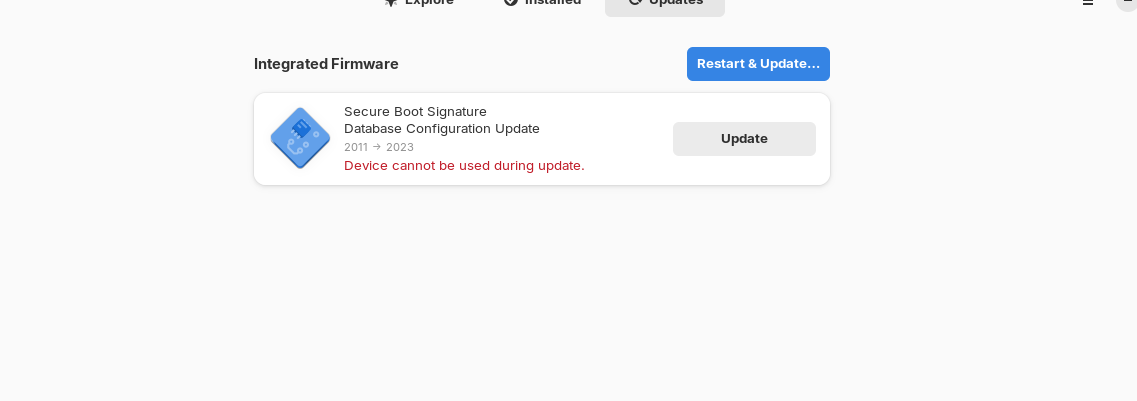
I have already rebooted and it doesn't go away - hmmmm
When you want to paste something in the terminal, use ctrl+shift+v or right-click > paste.
Yes thanks I did that already but for some reason it added on various extras. Please see the above image if it loads up. I am sure everything is fine
You could try it with these commands:
sudo apt update && sudo apt upgrade
sudo fwupdmgr refresh
sudo fwupdmgr get-updates
sudo fwupdmgr update
Then reboot.
Thanks, I assume you mean one after the other so : I try sudo apt update - reboot then sudo apt upgrade - reboot etc etc until one works. It didn't make sense to put in all the codes at once ? I tried one and after reboot same issue with this message "failed to write-firmware: failed to write DBUpdate3P2023.bin: failed to write data to efivarsfs: Error writing to file descriptor: Permission denied"