Really just a post because i don't believe one exists for this specific distro,
Zorin makes running Warcraft 3 very easy, this post also covers modding/maps/custom campaign status and the world editor.
Installation:
Install warcraft 3 as per standard, in my instance i have an old disc and that is what i have used 
To run the game and start playing
Double click on the .exe file in the Warcraft3/x86 titled "Warcraft III.exe" then click
Run Anyway
And it will launch as per standard in the amazing 4:3 aspect ration, there is a common widescreen fix you can apply called "RenderEdge_Widescreen" this appears to work for windows AND linux installations of the game, this is just placed in your Warcraft3 Folder, this fix applies ingame but not in the menu.
Custom Campaigns/Maps
These work as per windows simply drag and drop the files into the respective files these can be downloaded usually from the hive
World Editor
The World Editor for Warcraft 3 is ALOT less stable then the game Warcraft 3 itself on Linux via the windows app support on Zorin is painless and runs great.
The World Editor on the other hand appears to be hard coded to use the default system windows/tab settings which means its style of windows trends towards Zorin and Gnome pretty instantly, however,
it can hang quite frequently when loading up the x86 editor is the most stable the x86_64 is to unstable to even minor use.
To get it running
head to the Warcraft III/x86 folder then double click on the .exe file called World Editor.exe and then click Run Anyway
Some patience is then required as it may stop responding however rest assured it is loading, once loaded in you are fully able to access all functionality, i recommend you zoom in where possible to keep the performance manageable.
Triggers, Doodads work fine, mass terrain modification and large brush sizes lead to some noticeable frame drops, but this should not be a surprise.
Alternate Method for Map Editor
This method requires you hold a Reign of Chaos CD Key.
another way to get the map editor running on Linux is actually Proton, which is a comparability layer for windows games to run on Linux typically used via the platform "Steam" this is however also slightly glitch.
- Start up steam.
- Click on the "Games" tab along the top level window, then "Add a Non-Steam Game to My Library"
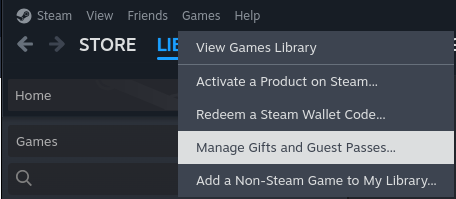
Once added you will be able to run it via steam, however this will ask you for a CD Key otherwise you will be unable to run the program.
Another Option : HiveWE
To quote the team themselves:
HiveWE is a Warcraft III World Editor (WE) that focuses on speed and ease of use. It improves massively on the vanilla WE, especially for large maps where the regular World Editor is often too slow and clunky. The aim is to be a lightweight tool that only does what it needs to and relegates other tasks to high-quality apps.
Some of the benefits over the vanilla WE:
Faster loading
Faster rendering
Faster editing
Modern UI/UX
Edit the pathing map directly
Edit global tile pathing
Import heightmaps
Improved editing palettes
This editor however does require a complex setup to get running.