I've just installed and used Zorin OS for the first time. I really like it, but I noticed that applications were taking forever to launch and the system just felt slow and sluggish. It was slower than Windows 11!
I started doing lots of research and began trying to troubleshoot why my system was slow and finally I discovered that the problem was Wayland the whole time. I switched back to X11 at the login screen and now my system is extremely fast and my applications launch instantly. This is also my first time using Wayland.
During my research I discovered that it might be a bug with Wayland, and that it doesn't work well with muxless laptops with hybrid graphics.
It's an HP Victus with a Ryzen 5600H APU and an AMD 5500M 4GB.
I am technically saavy, but a newcomer to Zorin OS is not going to be able to figure this out and is just going to be put off by this. I'm not sure it's such a good idea having Wayland as the default until these bugs are sorted out.
Hopefully this will also help anyone having the same issue. If your browser is taking 6 to 8 seconds to launch on a solid state drive, when it should open almost instantly.
The Problem with Wayland is that the Experience depends on the Implementation in the Desktop Environment, Hardware, used Software etc. On an up-to-date Desktop Environment, it should run better. Because we are here on an LTS Distro, this unfortunately isn't possible.
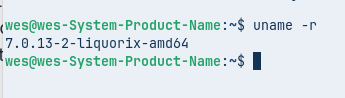
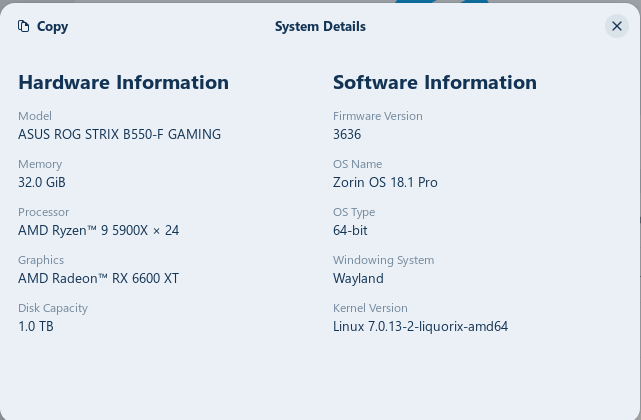
I agree with @Ponce-De-Leon i tested ubuntu 26.04 and wayland works great with my amd vid card now here on zorin os 18 it works awsome with wayland as well ...but i dont have the 6.17 kernel installed.. I use the liquorix kernel, current version is......
so as he stated depends alot on environment hardware software this isnt a new new computer i built it in 2021 heres what i have
I totally agree that Wayland is not ready for prime-time and sadly both Gnome and KDE will be dropping x.org as newer releases come on stream
Thankfully (for me), I am using a distro that has adopted XLibre, a fork of xorg. There are other distributions that have adopted XLibre too, and others will also be doing this in due course.
In the meantime you may wish to download the Unofficial Manual for Zorin 18 Core from here:
I shan't be around for Zorin 19 as it will be based on Ubuntu 26.04 with Rust.
I installed the latest version of Zorin OS 18 Core Edition. I just hope they fix these issues before they decide to remove X11. If they don't then I will have to leave. Slow performance and freezing is not acceptable.
Like I said, it could just be that it doesn't play well with my muxless laptop, but it still needs to be patched as these type of laptops with hybrid graphics are very common.
I will have to install this on another system to test and see if I still have issues.
For me, I click on the Icon an it opens. The Delay is maybe a Second. My System is not very strong. I have a Ryzen 3200G at 4Ghz and 16 Gig's of DDR4 Ram at 3200Mhz (2 Gig's go for the internal Graphics).
That's right, also most of the issues on this forum are solved by changing to x11. GNOME takes years to fix wayland problems (you can check their gitlab and see important issues are taking forever to resolve)
Wayland does not have a developer or maintainer. Unlike most projects, Wayland is diffusely contributed to, by many maintainers, mostly from Red Hat and Intel along with some other companies - and hosted under Freedesktop.org
I believe that the core libwayland does have a dedicated small team.
I have noticed that using the Flatpak version of Steam also benifits from frequent freedesktop updates. Running all my Steam Games (Cyberpunk 2077, Starfield, Oblivian Remastered, ect) in Wayland on my Nvidia 4080 Super with DLSS 4.5 Preset 'L' and they run great and full resolution even though I have fractional scaling set to 125% on the Desktop.
Star Citizen on the otherhand using Lughelper from the Star Citizen Lughelper volunteers while great requires some finessing when running the Lug-Helper Experimental Wayland Runners for Star Citizen.
Example, I have to turn fractional scaling off and set the desktop to 100% or my 2560x1440 resolution changes to 2048x1152 if I leave fractional scaling on set to 125%...
This does NOT happen with Flatpak ProtonGE Steam using Wayland. Everything just works... Somehow I am thinking Flatpak Steam accomplishes this by using an updated version of Gnome (maybe Gnome 50) in a walled off game container and separate from the main Zorin system that uses an older Gnome version but I don't know this for certain, I am just guessing.