Whalebird is listed in the Software application as a snap pack but when I installed it I was logged out and the system would not longer recognise my login password.
Thank heaven for live-USB so I could get back on-line and start looking for solutions.
I tried to use the GRUB recovery mode root shell to reset my password with 'passwd username' as per internet advice but though it was reporting successful update, the system was still not accepting my account password. Things were looking dire.
I eventually was able to see the whalebird package with 'snap list' and uninstall the package with a 'snap remove whalebird' command from the same GRUB recovery mode root shell.
Problem was solved and my account password starting working again though my desktop theme had been reset so I configure it again but the customisations still seemed to be there.
Posted to flag the Whalebird 6.2.5 snap package was a nasty problem (for me) and the solution for anyone in the same boat.
You could try to download the .deb file of Whilebird instead if you like the program. Download it and then go to Download folder and doubleclick on the .deb file to install it.
Yep, me too... Installed Whalebird snap package from the software app and it completely ruined my evening. ctrl+f2 got me to a CLI login and, like @Reg I was able to remove the package...
So a few of things occur to me from this:
My initial experience with the software application has been great, but why do we have a snap package as an editor recommendation when it appears to hose some systems. If snap packages tend to be problematic as @Forpli suggests, should they be flagged as such?
I realise I don't know how troubleshoot this sort of problem. Installing Whalebird was the last thing I correctly assumed this was the problem...
Does anyone know of any good tips, tricks, tutorials anywhere that help with diagnosing wayland/X11 having a meltdown? I had a look through the journal and didn't see anything obvious.
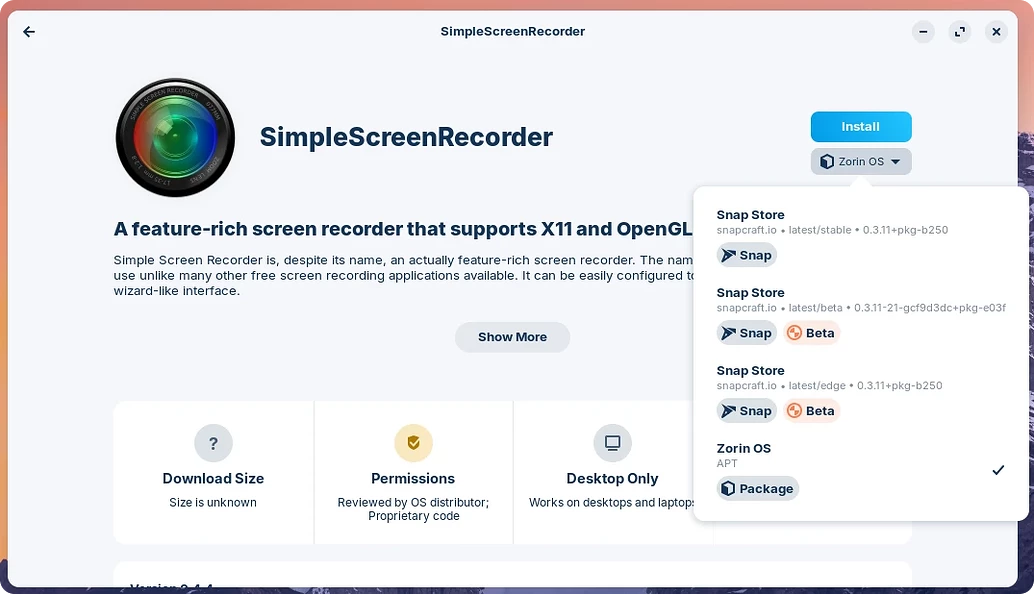
Before you install a package with software store, take a look what package format it has. Sometimes a package is offered in various formats. There are Zorin packages (which are usually apt/deb packages), flatpaks from flathub and snaps. At the right side you can see where the package comes from, e.g.:
At the arrow you can choose the package format.
When no native Zorin package is offered, I personally go to the developers homepage or take a look on github if I can find a .deb package there or if I can add a repository for the software so that it will be automatically updated.