I'm looking at GParted live, but I'm overwhelmed with the decisions between Etcher and Ventoy. Can I just boot to my Zorin USB install disk, select "Try it" and find GParted in the Trial setting? I knew I needed a partition when beginning the install and then it hit me when I saw the final disk size... The 1921 Thinkpad T14s is performing beautifully with Zorin 18 and I'd rather not do it again. As always, thank you for your comments. Bill
Yes, you can.
Zorin OS can auto partition, as well, if it is a sole boot.
Are you dual booting?
1 Like
When I first installed Zorin 18 in December I used LVM (Logical Volume Management) because I read that it was the big new thing. It turned out to be a bit problematic for me because it required Terminal to resize; though I did it successfully, when the time came for a new install I avoided it and left the entire disk to the standard install process. Then I used a Zorin Live session and Disks to resize and create partitions. I don't know if Gparted is simpler, but Disks worked easily for me.
Like @Aravisian already wrote: Yes.
You actually don't need one. When You only want Zorin install on the Drive without keeping Windows or another installed System, You can choose the Install Option ''Erase disk''. This completely wipes the Disk and installs Zorin on it. It cares about Partition Creation, too. You would have to do anything.
And when You should want a Dual-Boot System with Zorin, You should get the Option ''Install Zorin alongside Windows''. Choose that and in the next Step, You get a toggle to move for choosing the Drive Space and that's it. The Setup makes the Installer again.
Thank you Aravisian and others for your comments. I need to clarify; For many years I always have created a "Data" partition keeping personal files outside of the system partion. In my work life I saw too many people delete system things as they dropped data files in the C: drive. So, I now have an OS18 running smoothly and want to move about 400gb into a new partition. At the moment all user data resides on a NAS so the time to mess with partitions on this machine is now. I'll try adding the partition in "Try it " mode.
Could You then show a Picture of the Partition Table in GParted? So, we can have an Overview of Your current Partition Setup and can avoid giving misleading Infos.
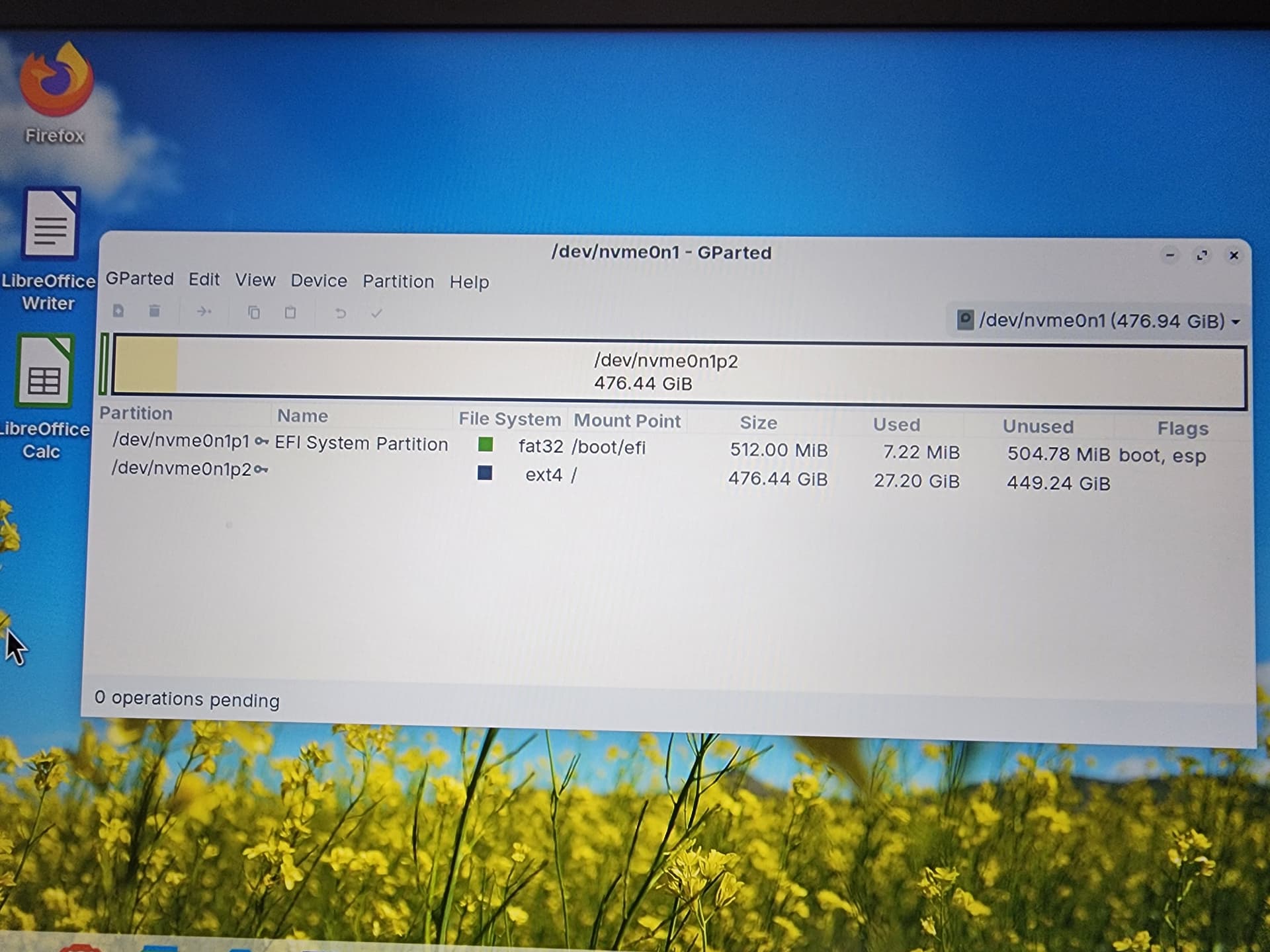
You will need to resize your root partition to create enough unallocated space to make a new partition. You can't do resizing on a mounted partition, so you need to use gparted from the live media to do it.
Leaving a safe amount (for future needs) of 40G for root,
476 - 40 = 436 for your new data partition.
After resizing root, you have to create the new partition, format it, set up ownership, and set up mounting at startup in /etc/fstab. All this can be done from your installed Zorin.
Did it! Tense few minutes and the door bell rings...aaaagggggg. But, it worked. Allowed 150GB for system and reclaimed 350gb for local data. My Doctor recently told me to do more "active" mental exercises, more than just "passive" reading. Let me tell you, having now built two Zorin 18 Thinkpads within a couple months, I am RUNNING my brain! Next attempt is a MS SurfacePro8... that should be worth a few miles of mental activity...
Okay, good. Take p2 and make a Right-Click on it and choose Resize. In the upcoming Windows mofe on the right Side the Partition to the left. then the Space at the right will be Your free Space. Alternatively, You can directly type in the Numbers for the Partition size.
This topic was automatically closed 90 days after the last reply. New replies are no longer allowed.