
I log back in and this appears then it glitches crashes goes back to sign in then restarts then i click log out and log out then re log in any one else have this happening?
i checked terminal its cause a conflict in code but i cant verify this option or something if you guys need me to enter terminal commands tell me and i'll tell you
- Is this a fresh Installation or after an Upgrade from Zorin 17 to 18?
- Are Secure Boot and Fast Boot in BIOS disabled?
- Can You post Your Hardware Specs?
sudo lshw -C video
Any GPU information you can provide, including what driver you are using if using a proprietary one, whether AMD, NVidia or Intel.
The most likely cause is driver failure to init upon wake.
zachary@zachary-HP-EliteDesk-800-G3-SFF:~$ sudo lshw -C video
[sudo] password for zachary:
*-display
description: VGA compatible controller
product: GP107GL [Quadro P600]
vendor: NVIDIA Corporation
physical id: 0
bus info: pci@0000:01:00.0
logical name: /dev/fb0
version: a1
width: 64 bits
clock: 33MHz
capabilities: pm msi pciexpress vga_controller bus_master cap_list rom fb
configuration: depth=32 driver=nvidia latency=0 resolution=1440,900
resources: irq:126 memory:d2000000-d2ffffff memory:c0000000-cfffffff memory:d0000000-d1ffffff ioport:3000(size=128) memory:d3080000-d30fffff
*-display
description: VGA compatible controller
product: HD Graphics 630
vendor: Intel Corporation
physical id: 2
bus info: pci@0000:00:02.0
logical name: /dev/fb0
version: 04
width: 64 bits
clock: 33MHz
capabilities: pciexpress msi pm vga_controller bus_master cap_list rom fb
configuration: depth=32 driver=i915 latency=0 mode=1440x900 visual=truecolor xres=1440 yres=900
resources: iomemory:1f0-1ef iomemory:1f0-1ef irq:125 memory:1ff0000000-1ff0ffffff memory:1fe0000000-1fefffffff ioport:4000(size=64) memory:c0000-dffff
zachary@zachary-HP-EliteDesk-800-G3-SFF:~$
Its a fresh start and i think fast boot is disabled all i know is secure boot is off and my specs : CPU : I5 7th gen GPU Nvidia P600 Quadro RAM DDR4 8gb and zorin is running on a SSD
Im not using ark by the way im using the default GTKS
Because You have a Nvidia Card, I would suggest to switch to Xorg if not already done. To do that, go to the Login Screen. Click on Your Profile so that the Password Field appears. When it is appeared, You should see a Gear Icon in the bottom right Corner. Click on it and choose the Option ''Zorin Desktop on Xorg'' and then log in.
Another Thing: what Nvidia Driver do You use?
zachary@zachary-HP-EliteDesk-800-G3-SFF:~$ nvidia-smi
Fri Dec 5 15:51:54 2025
+---------------------------------------------------------------------------------------+
| NVIDIA-SMI 535.274.02 Driver Version: 535.274.02 CUDA Version: 12.2 |
|-----------------------------------------+----------------------+----------------------+
| GPU Name Persistence-M | Bus-Id Disp.A | Volatile Uncorr. ECC |
| Fan Temp Perf Pwr:Usage/Cap | Memory-Usage | GPU-Util Compute M. |
| | | MIG M. |
|=========================================+======================+======================|
| 0 Quadro P600 Off | 00000000:01:00.0 On | N/A |
| 34% 48C P0 N/A / N/A | 502MiB / 2048MiB | 1% Default |
| | | N/A |
+-----------------------------------------+----------------------+----------------------+
+---------------------------------------------------------------------------------------+
| Processes: |
| GPU GI CI PID Type Process name GPU Memory |
| ID ID Usage |
|=======================================================================================|
| 0 N/A N/A 1767 G /usr/lib/xorg/Xorg 115MiB |
| 0 N/A N/A 1983 G /usr/bin/gnome-shell 122MiB |
| 0 N/A N/A 2217 G /usr/bin/gnome-software 24MiB |
| 0 N/A N/A 2436 G /usr/libexec/xdg-desktop-portal-gnome 7MiB |
| 0 N/A N/A 4109 G /usr/bin/gnome-calendar 1MiB |
| 0 N/A N/A 4627 G /usr/bin/gnome-clocks 15MiB |
| 0 N/A N/A 4968 G ...bian-installation/ubuntu12_32/steam 1MiB |
| 0 N/A N/A 5196 G ./steamwebhelper 20MiB |
| 0 N/A N/A 5230 C+G ...allation/ubuntu12_64/steamwebhelper 8MiB |
| 0 N/A N/A 32007 G ...cess-track-uuid=3190708988185955192 101MiB |
| 0 N/A N/A 32386 G /usr/bin/gnome-control-center 10MiB |
| 0 N/A N/A 32812 G ...onService --variations-seed-version 66MiB |
+---------------------------------------------------------------------------------------+
zachary@zachary-HP-EliteDesk-800-G3-SFF:~$
If your computer is new, it is likely the 535 driver is too old. Please consider switching to the 580 driver here...
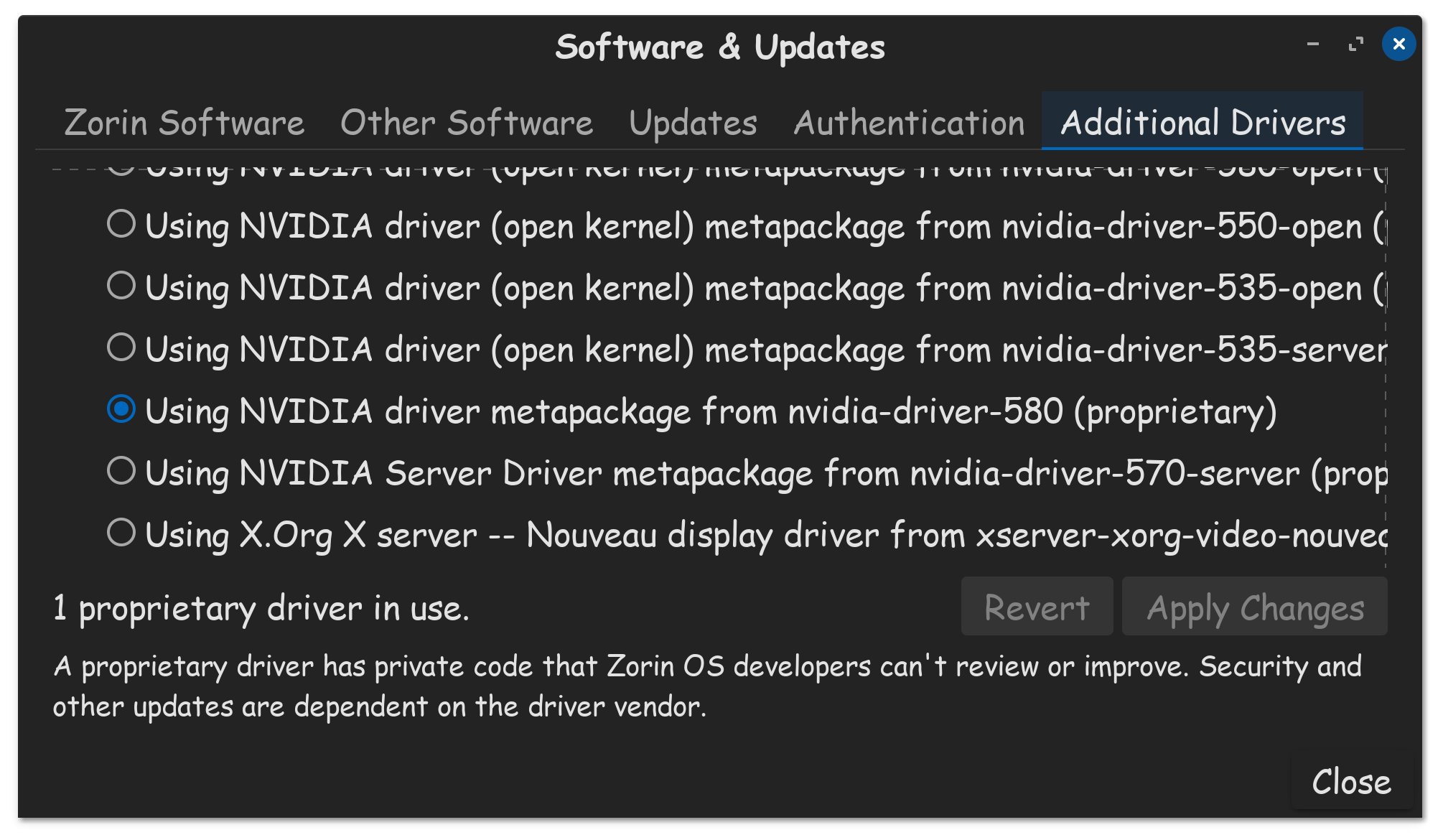

Still Shows error its a GNOME conflict
Please consider disabling power management, I find it doesn't work well on Linux.
Click Zorin  logo bottom of screen, click on settings.
  Then click on Power.
Turn off dim screen when inactive. Blank screen to never. Turn off your WIFI and Bluetooth toggles.
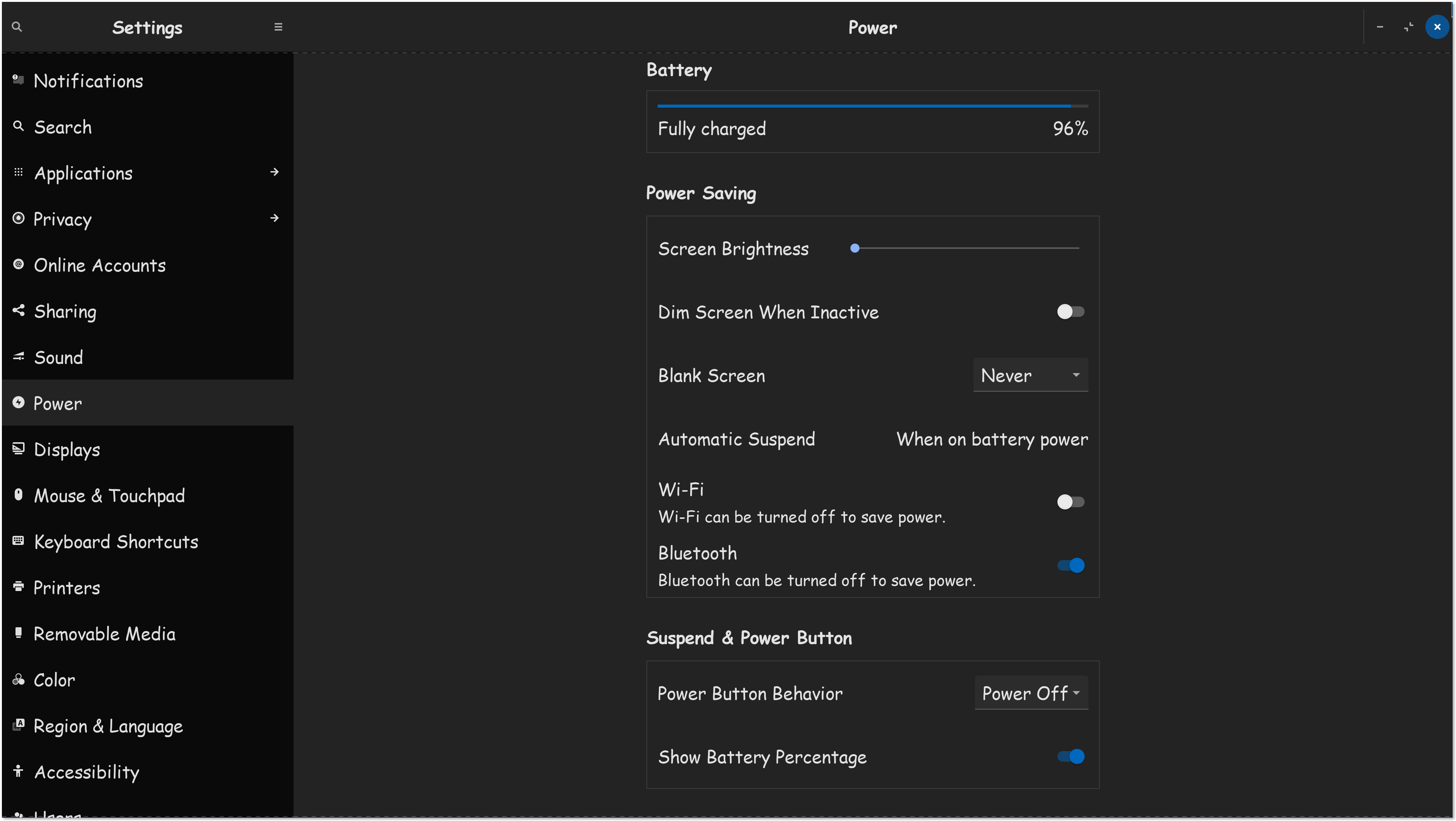
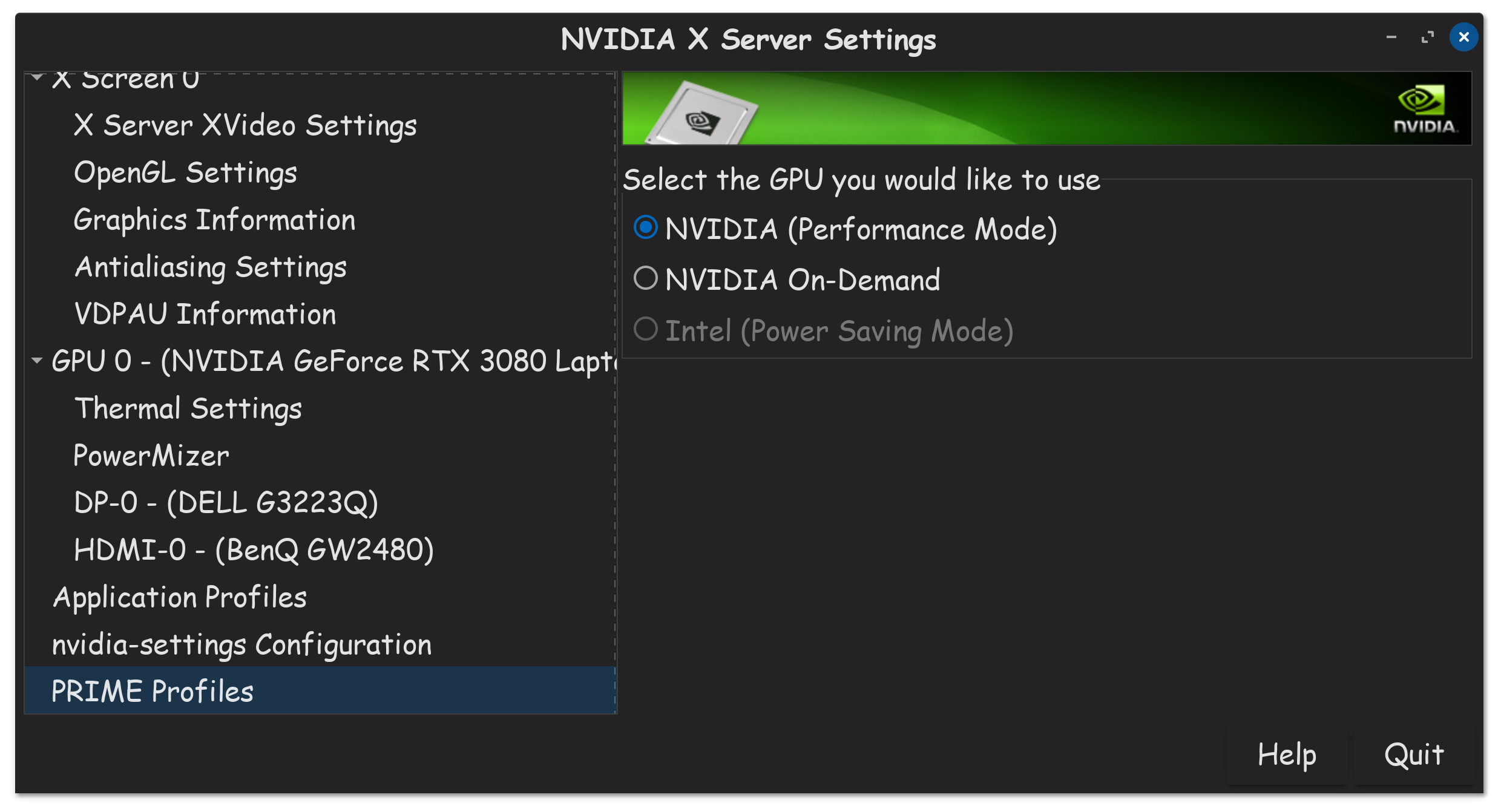
Again, if you have an Nvidia GPU, go into Nvidia X Server Settings, and set the Prime profile to full performance. PS: If your wondering why my Intel GPU is dim, its cause I disabled it in the BIOS.
its about gnome and i have done that zorin told me to through email sry this sounds kinda rude sorry if it sounds like that
I experienced the same issue (see Frequent 'Oh no! Something has gone wrong' error after upgrading to Zorin OS 18 Pro). The problem has not occurred since I switched to Wayland. Most apps seem to work under Wayland, the notable exception is AnyDesk.
GW
i do use wayland and im on core not pro
but i'll read it
And did you test XOrg? Did it solve the problem?
You could also test if it helps to go manually into suspend by pressing the button in start menu.
If you have a Dualboot with Windows please also disable fast startup in the energy settings of Windows.
Another app that does not work under Wayland is Ksnip (screen turns black on capture), so I switched back to X11. In my thread it was recommended to enable the Zorin OS Start Menu extension, I am testing that now. If you get the error again the 'journalctl --no-pager -b' command is useful to identify the extension(s) that might be causing the problem.
yes it does happon when i sign out manuly let me test XORG but i still want to stay on wayland
Wait using zorin with Wayland seems to work for now!