I want to start by saying I really like Zorin OS. I just moved to it as my daily driver about 2 weeks ago and I'm really digging it, but it has some quirks that are a bit odd. One in particular is, when viewing files in various apps, I want to view the most recent file at the top, also known as sort descending order (a.k.a. newest to oldest). When I view my files with Nautilus (Files), the files will sort correctly, but when viewing files with the Open Files window through other apps (i.e. LibreOffice (anything), Anki Flashcard, etc...), if I set the karat pointing down (descending), the file oldest files show at the top, whereas if I point the karat up (ascending) the most recent files show at the top. This is the reverse behavior. Is there some way to correct this? Thanks in advance.
Would you be able to provide a screenshot of the windows in question performing the different behaviour? I can't check right now but I have a feeling that they're their own "file manager" windows that behave differently than the system standard ones, but I can't verify that right now.
If that is the case, it might be pertinent to open a bug report with the developers themselves, if the behaviour is indeed wrong and is their issue (again, can't verify right now, but I know this is the case in some instances). A screenshot (for my and everyone else's information) would help to confirm.
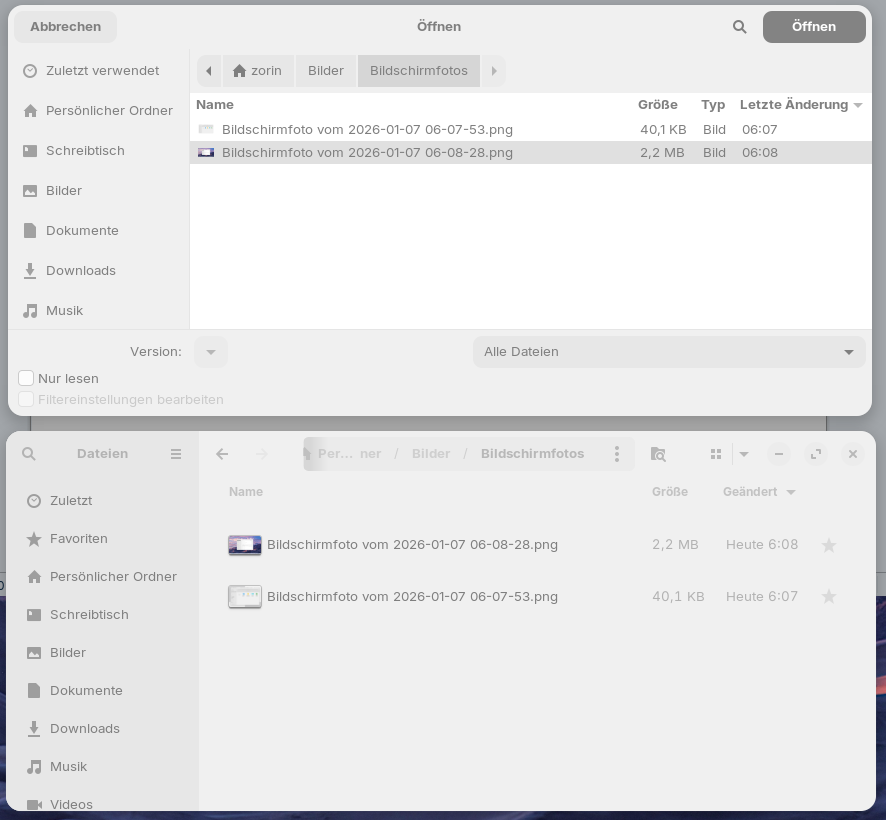
Good observation! This bug exists. The file picker sorts in reverse order compared to nautilus. It seems as if  and
and  were programmed incorrectly.
The window above ist the file picker, the window below nautilus.
The file picker and file manager nautilus are different programs. I don´t know how this behavior can be changed in file picker. You would probably have to edit the code. The file picker is really bad compared to nautilus.
From ubunu 24.10 onwards nautilus is used as filepicker, but not in ubuntu 24.04 Zorin 18 is based on.
@Aravisian
Do you know a way to replace the filepicker with nautilus or another file manager in Zorin 18?
This file gtk-filechooser.ini and gtk file chooser backend do not exist in Zorin 18
Not easily.
The file manager and the file picker work together but are two separate things.
The file picker is integrated and built into Gnome. It is not modular.
The thread you link to offers potential workarounds, but not a replacement.
And portals is limited to individual applications support for them.
This is one of the prime examples of why I am so vocal about Gnome and its integration, removing modular packages from the Gnome Desktop Environment: It limits user workflow and patchability. Feels like Microsoft, where we just have to take it, and work with what they give us.
In Free open source, we are supposed to be able to work together to improve the product. Not be locked into it, because Gnome dislikes the idea of us changing the desktop.
Thanks all for the clarity on this subject. Sorry I'm late in getting back to this conversation. I see Forpli posted a screenshot of the exact problem I've observed; thanks. It's not a game changer, and some thing I can live with. If someone has a good solution to correcting this, thanks in advance.
Here's an image from LibreOffice's file picker, as another example:
