Are you dual booting with Windows OS?
yes, windows 11
In Windows OS, Control Panel > Power options - have you disabled Fast Startup?
did it, didn't work
Can you check Wifi works, then sleep... Wake, then open terminal and run
dmesg | grep -i wlan
and/or
dmesg | grep -i firmware
and relay if it shows any errors or failures?
You could test if wlan is there after waking up when you go manually into suspend by pressing the button in start menu. Often this method helps users which have problems with waking up their computers after suspend.
Here it is : first when it works, then after the wake when it doesn't work
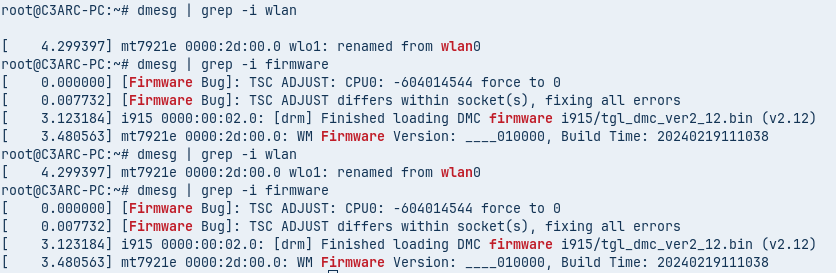
Doesn't seems to have a problem here but maybe you'll see something I don't
I agree, nothing of interest there. That is referring mostly to your intel CPU.
But... it does mention you are using mt7921e - and that helps.
Quick test:
Can you replicate your result by Wake - then with wifi still dead in the water, launch terminal and see if
sudo modprobe -r mt7921e
sudo modprobe mt7921e
Makes the wifi work?
If it does, that would confirm that the issue is a bug with the cards firmware.
I tried the first one, it just loop in the void doing nothing. That's probably the card firmware as you described it.
The first one? I do not understand.
These terminal commands:
sudo modprobe -r mt7921e
sudo modprobe mt7921e
Would both be applied.
The first one tells the Module Prober to remove the wifi module
(Then you would hit enter)
the Second one, when run, tells module prober to probe the wifi module - Essentially, creating a fresh initialization of the card.
the first command you send (the one with -r), it run without asking me to enter a new command for a good minute, so I assume it has bugged and kill it. Maybe I messed the things up...
Well... we can always try again.
sorry, i retry it now
When can I assume it's useless?
Pretty quickly. If it hangs, that means that the removal is blocked because the process is in active use.
This tells us that the module is active - which, I agree is weird... since you do not have wifi.
You can close that terminal out (See? You're not a mess, after-all) and in a new terminal, see if the process is listed:
lsmod | grep mt7921e
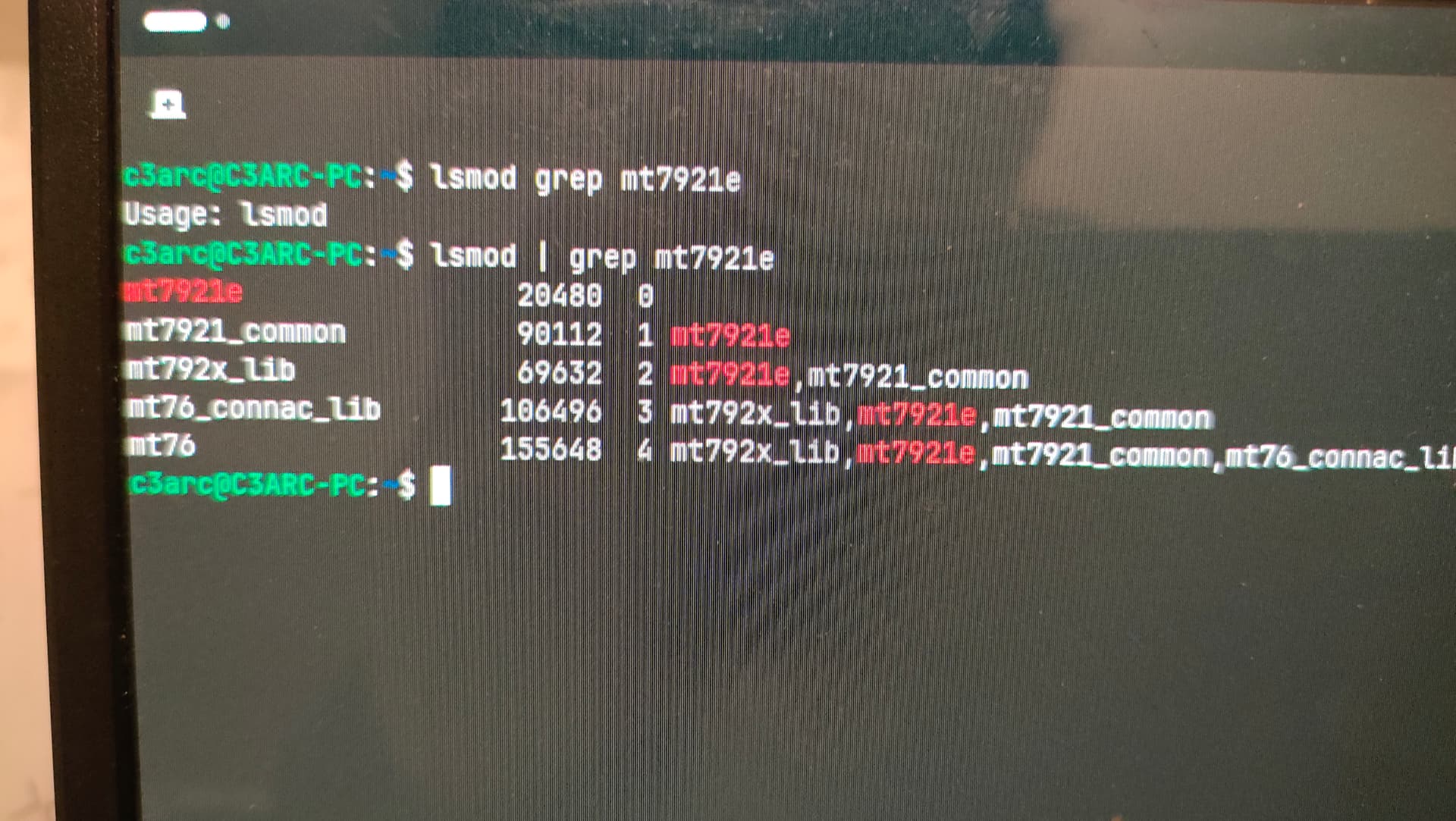
bit sketchy but here you go, seems to be here
btw I haven't restarted my pc so if you want to make some test when the problem is here, I can keep it in this state and use my phone to answer
The above shows the modules as active, but likely uninterruptible kernel sleep.
Well. Yes, I think this is a firmware issue. The module loads and works. You put the computer to sleep - it fails to unload. On wake, it is stuck in that state, which blocks the state from being unloaded when you tried above in terminal.
So rather than it being ended, then failing to init... it never ends, and therefor cannot reinit.
This probably can be fixed by disabling MediaTek's Active Power Management.
echo 'options mt7921e disable_aspm=1' | sudo tee /etc/modprobe.d/mt7921e.conf
The above command 'echo's' the option for disabling it to the configuration file.
After running the above command, reboot fully, then test if wake allows the wifi to work.
nope, wifi is still disabled on wake
Ok, then a full reset.
In terminal run lspci to get the ID for your mediatek wifi card.
Once you have that, (stick it in a text editor for safe keeping at the moment)
You can elevate to root:
sudo -i
Launch file manager
nautilus
Navigate to /lib/systemd/system-sleep and right click, create document - name the new document mt7921e-reset. It should look like:
/lib/systemd/system-sleep/mt7921e-reset
Past in this series for it to fully reset the device. Replace MEDIATEK-DEVICE-ID with the actual device ID you got using lspci above
#!/bin/bash
if [ "$1" = "post" ]; then
    echo 1 > /sys/bus/pci/devices/MEDIATEK-DEVICE-ID/remove
    sleep 1
    echo 1 > /sys/bus/pci/rescan
fi
Save and close the file (remember to insert the device ID, it might look like example: /sys/bus/pci/devices/0000:03:00.0/remove), then in terminal:
Make it executable:
sudo chmod +x /lib/systemd/system-sleep/mt7921e-reset
Reboot - test. If still no good... You might check if you can update the firmware.
Try first:
sudo apt update && sudo apt install linux-firmware
in hopes that if there is a firmware fix, it has been backported. because otherwise, it is off to the vendors page to see if there is one.
tried both solutions, didn't work sadly
Am I condemned ?
Disabling aspm usually works, but not always.
We could expect that might not work.
But resetting it? That surprises me a bit.
You might consider using a fully GnuLinux compatible wifi dongle. Fortunately, they do not tend to run expensive.