Wifi disconnecting after going to sleep

Hi,

I have installed ZorinOS 18 3 days ago.

Everytime the PC goes out of sleep mode, I lost the wifi.
I have tried Ubuntu 24 and 26, I have the same issue (it's logical since ZorinOS is based on ubuntu).

I have tried various things found on google, I asked chatgpt, I have tried many thing found on this forum as well. Nothing works.

I have tried :

  • modifying the GRUB_CMDLINE_LINUX_DEFAULT var
  • setting wifi.powersave = 2
  • deactivating secure boot

Nothing works.

Network card info :

sudo lshw -C network

*-network
       description: Ethernet interface
       product: Wi-Fi 7(802.11be) AX1775*/AX1790*/BE20*/BE401/BE1750* 2x2
       vendor: Intel Corporation
       physical id: 0
       bus info: pci@0000:01:00.0
       logical name: wlo1
       version: 1a
       serial: 10:91:d1:52:e7:70
       width: 64 bits
       clock: 33MHz
       capabilities: pm msi pciexpress msix bus_master cap_list ethernet physical
       configuration: broadcast=yes driver=iwlwifi driverversion=6.17.0-29-generic firmware=101.6ef20b19.0 gl-c0-fm-c0-101. ip=192.168.1.16 latency=0 link=yes multicast=yes
       resources: irq:16 memory:8d300000-8d303fff

Logs after sleep mode :

sudo dmesg | grep wifi
[    2.979159] iwlwifi 0000:01:00.0: enabling device (0000 -> 0002)
[    2.988886] iwlwifi 0000:01:00.0: Detected crf-id 0x2001910, cnv-id 0x2001910 wfpm id 0x80000000
[    2.988956] iwlwifi 0000:01:00.0: PCI dev 272b/00f4, rev=0x472, rfid=0x112200
[    2.988958] iwlwifi 0000:01:00.0: Detected Intel(R) Wi-Fi 7 BE200 320MHz
[    2.989386] iwlwifi 0000:01:00.0: Direct firmware load for iwlwifi-gl-c0-fm-c0-102.ucode failed with error -2
[    2.995845] iwlwifi 0000:01:00.0: loaded firmware version 101.6ef20b19.0 gl-c0-fm-c0-101.ucode op_mode iwlmld
[    3.744216] iwlwifi 0000:01:00.0: Detected RF FM, rfid=0x112200
[    3.856767] iwlwifi 0000:01:00.0: base HW address: 10:91:d1:52:e7:70
[    3.937117] iwlwifi 0000:01:00.0 wlo1: renamed from wlan0
[   92.848429] iwlwifi 0000:01:00.0: WRT: Collecting data: ini trigger 13 fired (delay=0ms).
[   92.848479] iwlwifi 0000:01:00.0: Start IWL Error Log Dump:
[   92.848484] iwlwifi 0000:01:00.0: Transport status: 0x00000042, valid: -1
[   92.848487] iwlwifi 0000:01:00.0: Loaded firmware version: 101.6ef20b19.0 gl-c0-fm-c0-101.ucode
[   92.848490] iwlwifi 0000:01:00.0: 0xFFFFFFFF | ADVANCED_SYSASSERT          
[   92.848493] iwlwifi 0000:01:00.0: 0xFFFFFFFF | trm_hw_status0
[   92.848495] iwlwifi 0000:01:00.0: 0xFFFFFFFF | trm_hw_status1
[   92.848497] iwlwifi 0000:01:00.0: 0xFFFFFFFF | branchlink2
[   92.848499] iwlwifi 0000:01:00.0: 0xFFFFFFFF | interruptlink1
[   92.848501] iwlwifi 0000:01:00.0: 0xFFFFFFFF | interruptlink2
[   92.848503] iwlwifi 0000:01:00.0: 0xFFFFFFFF | data1
[   92.848505] iwlwifi 0000:01:00.0: 0xFFFFFFFF | data2
[   92.848507] iwlwifi 0000:01:00.0: 0xFFFFFFFF | data3
[   92.848509] iwlwifi 0000:01:00.0: 0xFFFFFFFF | beacon time
[   92.848511] iwlwifi 0000:01:00.0: 0xFFFFFFFF | tsf low
[   92.848513] iwlwifi 0000:01:00.0: 0xFFFFFFFF | tsf hi
[   92.848515] iwlwifi 0000:01:00.0: 0xFFFFFFFF | time gp1
[   92.848517] iwlwifi 0000:01:00.0: 0xFFFFFFFF | time gp2
[   92.848519] iwlwifi 0000:01:00.0: 0xFFFFFFFF | uCode revision type
[   92.848520] iwlwifi 0000:01:00.0: 0xFFFFFFFF | uCode version major
[   92.848522] iwlwifi 0000:01:00.0: 0xFFFFFFFF | uCode version minor
[   92.848523] iwlwifi 0000:01:00.0: 0xFFFFFFFF | hw version
[   92.848525] iwlwifi 0000:01:00.0: 0xFFFFFFFF | board version
[   92.848526] iwlwifi 0000:01:00.0: 0xFFFFFFFF | hcmd
[   92.848528] iwlwifi 0000:01:00.0: 0xFFFFFFFF | isr0
[   92.848529] iwlwifi 0000:01:00.0: 0xFFFFFFFF | isr1
[   92.848530] iwlwifi 0000:01:00.0: 0xFFFFFFFF | isr2
[   92.848532] iwlwifi 0000:01:00.0: 0xFFFFFFFF | isr3
[   92.848533] iwlwifi 0000:01:00.0: 0xFFFFFFFF | isr4
[   92.848534] iwlwifi 0000:01:00.0: 0xFFFFFFFF | last cmd Id
[   92.848536] iwlwifi 0000:01:00.0: 0xFFFFFFFF | wait_event
[   92.848537] iwlwifi 0000:01:00.0: 0xFFFFFFFF | l2p_control
[   92.848538] iwlwifi 0000:01:00.0: 0xFFFFFFFF | l2p_duration
[   92.848540] iwlwifi 0000:01:00.0: 0xFFFFFFFF | l2p_mhvalid
[   92.848541] iwlwifi 0000:01:00.0: 0xFFFFFFFF | l2p_addr_match
[   92.848543] iwlwifi 0000:01:00.0: 0xFFFFFFFF | lmpm_pmg_sel
[   92.848544] iwlwifi 0000:01:00.0: 0xFFFFFFFF | timestamp
[   92.848545] iwlwifi 0000:01:00.0: 0xFFFFFFFF | flow_handler
...
...
...
[   99.445605] iwlwifi 0000:01:00.0: WRT: Collecting data: ini trigger 4 fired (delay=0ms).
[   99.648716] iwlwifi 0000:01:00.0: timeout waiting for FW reset ACK (inta_hw=0xffffffff, reset_done 1)

Any help is welcome !
Thanks,

Which brand/model is your computer?

Hello and welcome,
Your dmesg logs show a critical firmware crash after sleep, which is why you're losing WiFi connection. The key indicators are:

Firmware version mismatch: The system tries to load iwlwifi-gl-c0-fm-c0-102.ucode (fails) but only has 101 available
Firmware reset failure after sleep: timeout waiting for FW reset ACK (inta_hw=0xffffffff, reset_done 1) — the WiFi chip firmware is hanging and won't recover

This is a driver/firmware issue specific to your Intel WiFi 7 BE200 card, not a power-saving configuration problem.
If you tried ubuntu 26.04 (I assume it was with latest ubuntu LTS kernel), you could try to upgrade kernel with mainline but be aware they are not signed and if you have dual boot with windows it could be a problem with secure boot.
So If you don't have dual boot you can try latest mainline kernel doing this tutorial and let your secure boot disable.

1 Like

If it doesn't work we will se if we could fix it with disabling WIFI card power management

It is an HP Spectre x360 2-in-1 Laptop 16-aa0xxx.

Thanks for answering fast

Ok I try this and get back to you. Thanks

1 Like

Hi again,

I have downloaded Mainline Kernels.
I have installed and use the latest 6.17 (I was in 6.17.0 and now 6.17.12), it still doesn't work.

I tried to install 7.0.6, 6.19.14 and 6.18.29 but I have errors on installation.

Preparing to unpack .../linux-image-unsigned-6.19.14-061914-generic_6.19.14-061914.202604221411_amd64.deb ...
run-parts: missing operand Try run-parts --help' for more information. 
dpkg: error processing archive /home/christo/.cache/mainline/6.19.14/linux-image-unsigned-6.19.14-061914-generic_6.19.14-061914.202604221411_amd64.deb (--install): new linux-image-unsigned-6.19.14-061914-generic package
pre-installation script subprocess returned error exit status 1 run-parts: missing operand
Try run-parts --help' for more information.
dpkg: error while cleaning up: new linux-image-unsigned-6.19.14-061914-generic package post-removal script subprocess returned error exit status 1

Thanks,

Solution Fournie par Claude AI

L'erreur run-parts: missing operand sur l'installation de kernels mainline récents (≥ 6.19, 7.x) est un problème connu sur Ubuntu 24.04. Les scripts de maintenance du paquet kernel (preinst/postrm) appellent run-parts <répertoire>, mais si le répertoire n'existe pas, run-parts reçoit une chaîne vide → "missing operand".

Fix en une ligne :

sudo mkdir -p /etc/kernel/preinst.d /etc/kernel/postinst.d /etc/kernel/prerm.d /etc/kernel/postrm.d

Ces répertoires sont normalement créés par linux-base, mais sur certaines installs Ubuntu 24.04 ils manquent ou sont absents après une mise à jour partielle. Vérifier aussi que linux-base est à jour :

sudo apt install --reinstall linux-base

Après ça, retenter l'installation du kernel depuis Mainline (ou manuellement avec sudo dpkg -i *.deb dans le dossier du cache).

J'ai testé mais ça ne fonctionne pas.
J'ai testé de modifier le hook preinst sans succès.

Je n'ai plus d'idée, j'ai tenté pas mal de tuto pour désactiver la mise en veille de la carte (ce qui serait le plus simple) sans succès.

Pour couronné le tout, HP ne donne pas accès aux options avancées du BIOS pour des raisons de "sécurité" car ça n'est pas un pc destiné aux "pro".
Entre ça et le service client aux fraises :strawberry:, c'est la première et dernière fois chez HP pour moi.

Merci,

I found that guide which may help, but I'm not sure. You have other error logs:

Or that:

https://community.intel.com/t5/Wireless/Wifi-be200-not-working-after-suspend/m-p/1695172#M60277

1 Like

Try to follow @forbil idea first, it's a good way.

If it doesn't work with mainline we can try with Liquorix, in the link I gave you there is a line with, I know that some people here use Liquorix without any problem on Zorin 18.1 core.

From @Aravisian tutorial

To use the Liquorix kernel:

Add repository

sudo add-apt-repository ppa:damentz/liquorix

Update sources and install:

sudo apt update && sudo apt install linux-image-liquorix-amd64

On va trouver une solution si HP n'en trouve pas une pour toi, tkt :wink:

Sorry for the French, I switch back to English :slightly_smiling_face:

Unfortunatly the script to reboot the network does not work either.
The hardware seems unreachable.

wlwifi 0000:01:00.0: timeout waiting for FW reset ACK (inta_hw=0xffffffff, reset_done 1)
mai 19 17:33:14 christo wpa_supplicant[1063]: Could not set interface wlo1 flags (UP): Connection timed out
mai 19 17:33:14 christo wpa_supplicant[1063]: WEXT: Could not set interface 'wlo1' UP
mai 19 17:33:14 christo wpa_supplicant[1063]: wlo1: Failed to initialize driver interface
<error> [1779204808.0697] device (wlo1): Couldn't initialize supplicant interface: Timeout was reached

mai 19 17:44:59 christo kernel: iwlwifi 0000:01:00.0: timeout waiting for FW reset ACK (inta_hw=0xffffffff, reset_done 1)
mai 19 17:44:59 christo wpa_supplicant[1096]: Could not set interface wlo1 flags (UP): Connection timed out
mai 19 17:44:59 christo wpa_supplicant[1096]: WEXT: Could not set interface 'wlo1' UP
mai 19 17:44:59 christo wpa_supplicant[1096]: wlo1: Failed to initialize driver interface

I couldn't install a more recent kernel, I have try to downgrade (some say it worked for them.
I have tried 6.14, 6.12, 6.11, 6.10, with no success.

I am trying Liquorix Kernel and get back to you @Forpli @Nourpon

Thanks for your precious time !

1 Like

You can test manually if it helps to run before the suspend

sudo systemctl stop NetworkManager
sudo modprobe -r iwlwifi

Then go to suspend

And after the suspend

sudo modprobe iwlwifi
sudo systemctl start NetworkManager

Maybe that link is also an idea - unfortunately no solution mentioned:

When you run

rfkill list

after suspend, is something shown there as blocked?

Did you try to switch to Xorg if you are running on Wayland? At login screen click on your username then a cog wheal appears at the bottom right corner. There you can switch between Xorg and Wayland to test if it helps.

1 Like

Pas de soucis, ne soit pas désolé pour le français je suis français et en plus il y a une traduction sur le site avec le petit globe :wink:

1 Like

Hey,

Thanks.

Here are the logs.
After suspend I still have no wifi.

# Before suspend
~ » sudo systemctl stop NetworkManager                          christo@christo
[sudo] password for christo:          
--------------------------------------------------------------------------------
~ » sudo modprobe -r iwlwifi                                    christo@christo
rmmod: ERROR: Module iwlwifi is in use by: iwlmld
modprobe: FATAL: Error running remove command for iwlwifi

# After suspend

~ » sudo systemctl suspend                                130 ↵ christo@christo
--------------------------------------------------------------------------------
~ » sudo modprobe iwlwifi                                       christo@christo
--------------------------------------------------------------------------------
~ » sudo systemctl start NetworkManager                         christo@christo
--------------------------------------------------------------------------------
~ » rfkill list                                                 christo@christo
0: hci0: Bluetooth
	Soft blocked: no
	Hard blocked: no
1: phy0: Wireless LAN
	Soft blocked: no
	Hard blocked: no

I tried

~ » sudo modprobe -r iwlmld                                     christo@christo
--------------------------------------------------------------------------------
~ » sudo modprobe -r iwlwifi                                    christo@christo
rmmod: ERROR: missing module name.
modprobe: FATAL: Error running remove command for iwlwifi

sudo modprobe iwlmld                                        christo@christo
--------------------------------------------------------------------------------
~ » sudo modprobe iwlwifi                                       christo@christo
--------------------------------------------------------------------------------
~ » sudo systemctl start NetworkManager 

And it works ! Seems like iwlmld are the driver used.

I have changed the script to

#!/bin/sh

case "$1" in
    pre)
        /usr/bin/systemctl stop NetworkManager
        /sbin/modprobe -r iwlmld
        /sbin/modprobe -r iwlwifi
        ;;
    post)
        /sbin/modprobe iwlwifi
        /sbin/modprobe iwlmld
        /usr/bin/systemctl start NetworkManager
        ;;
esac

exit 0

Everything works perfectly fine !

Thanks a lot @Forpli and @Nourpon ! If I was living near you I would buy you a bear :upside_down_face: !

2 Likes

Great you have found a way! Glad to hear!

I'm not very experienced in this area yet. I'm trying to figure out how to identify the kernel modules used for the Intel network card for the future when a user has a problem. Could you please show me what your terminal output is for

lsmod |grep iwl

My laptops which have Intel network cards show iwlwifi and iwlmvm there, so I'm interested what you have.

Hey,

I got

~ » lsmod |grep iwl                                                                                                                                                                                                                                                                                     130 ↵ christo@christo
iwlmld                430080  0
mac80211             1851392  1 iwlmld
iwlwifi               647168  1 iwlmld
cfg80211             1462272  3 iwlmld,iwlwifi,mac80211

I think it lists bluetooth mouse and keyboard as well right ?

Thank you! I would have to research what they are for. I have the same mac and cfg modules and no external bluetooth devices in use.
You could test if it works when you only use the command for removing/loading the iwlmld module, because it sounds as if the other one with iwlwifi isn't applied.
Probably iwlwifi is already removed with sudo modprobe -r iwlmld.

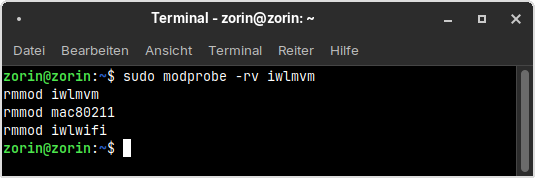
I tested that on my system, and when I run sudo modprobe -rv iwlmvm (replace iwlmvm with iwlmld), the terminal output shows that iwlwifi is also removed (there is shown rmmod iwlwifi). So perhaps it is the same on your system with iwlmld. Then you can remove those two lines which are referring to iwlwifi from your script.

Interesting !

Here is what I got :

~/noonchak/monorepo (preprod) » sudo modprobe -rv iwlmld
[sudo] password for christo:          
rmmod iwlmld
rmmod mac80211
rmmod iwlwifi
--------------------------------------------------------------------
~/noonchak/monorepo (preprod*) » lsmod |grep iwl    christo@christo
------------------------------------------------------------------------------------------------------------------------------------------------------------------------------------------------------------------------------------------------------------------------------------------------------------------------------------------------------------------------------------------------------------------------------------------------------------------------------------------------------------------------------------------------------------------------------------------------------------------------------------------------------------
~/noonchak/monorepo (preprod*) » 
1 Like