I just tried that but it takes me straight to the BIOS Setup...
No I do not get this type of menu.
that's another name that is used for UEFI. It does the similar function as the old BIOS did, so the name stayed here for the sake for familiarity, even if it technically is called "UEFI"
Is there any difference in features when comparing what you used to get by accessing there than what you get when accessing it now? Windows updates can, in some cases, update the BIOS/UEFI aswell, so if the change is mostly a visual change but all the features are still there, then it was definitely an update
When I had Win11 22H2 I was able to access UEFI Menu without having to login but now with Win 11 23H2 I am unable to do so...
What could be the reason?
And what type of Menu do You get? Could You describe it? The only other Idea taht comes in my Mind would be that You land in the Boot Menu like @Sorro already named.
When pressing F2 I get the BIOS Setup which is not what I'm looking for.
I am looking to access the UEFI (Which is the blue colored menu with white text on it)
UEFI can be used for multiple different things such as:
Reseting PC
Command Prompt
Enabling Safe Mode
System Restore Point
Installing USB Drive Boot
and more...
Having it accessible without having to login the OS itself is very useful.
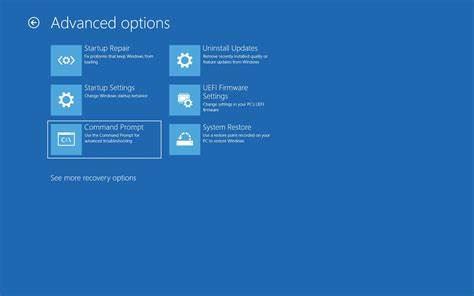
are you referring to this?
1 Like
Dude that's not UEFI, that's Windows Recovery Partition!
2 Likes
Yes precisely this!
I want to be able to access this menu without having to login Win11 OS.
1 Like
Try pressing the F8 key repeatedly until something happens since as soon as the manufacturer's logo appears on the screen when you turn on the laptop
1 Like
Dell website also offers the method of, with the computer off, holding the Windows key, press the power button, release them together.
1 Like
Wait what?
You mean that menu image @Sorro posted at 21:08 is NOT the UEFI Menu but a Windows Recovery menu?
Yes, that's right
The UEFI menu is that "BIOS setup" menu you were accessing before
This menu from the image I sent is the Windows Recovery menu
1 Like
Ok this actually worked!
When I was at the Win11 login screen, I hold the shift key and press restart - it then took me to the Windows Recovery Enviroment menu.
I finally found the menu I was looking for!
I just can't believe it took so long to do so...
1 Like
Please can you stop retrospectively editing your original post to change the question being asked?
Editing history like this makes the replies look off-topic and disjointed, it prevents solutions being properly marked to each question, and removes keywords and information making it harder for other people with similar questions to find this thread if it contains the solution to their problem.
I'm not a mod, but it may even be considered a breach of the forum guidelines in regards to "Don’t divert a topic by changing it midstream."
In future, please make new posts to ask new questions instead of constantly editing a single thread with multiple different topics.
1 Like
Apologies, it has been months since I last even logged onto here.
I can reedit back the original title post if you want.
From a Moderator, I agree with your assessment.
I did take note of the first edit and your comment at the time. I reviewed the changes and determined that the O.P. (Original Poster) was attempting to maintain clarity as to what the issue was, rather than trying to divert the topic.
However, the third edit does indeed move the topic into new areas that were not present at the outset and this can be very confusing.
A method of avoiding these edits is to Avoid the X - Y Problem. Rather than ask about an assumed fix; instead focus on the symptoms of the problem you are having. This maintains a steady stream of information from troubleshooting the problem, to then applying corrective steps.
Asking about the an assumed corrective step at the very beginning can lead the reader - and also become problematic if that was indeed, the wrong step to take, creating back-tracking.

3 Likes
Replying to what I said about Tiny11:
Upon booting Zorin Installer,it said "This computer has Windows 10 on it"
Is this an issue with Windows 11 or Tiny11?
Just asking☺️
I am not sure, as I never tried dualbolting w11 with linux
Though, from what I saw some people show, windows 11 is just windows 10 internally, but with many things changed visually. There are changes to how it looks but not much to how it works internally, to the point you could make it look like w10 with a few commands and registry changes.
If it is a windows 11 or a tiny11 issue, I do not know, but I wouldn't worry about it being detected as windows 10 (the windows entry in grub will refer to it as "windows boot manager" regardless of the windows version installed anyway)
1 Like