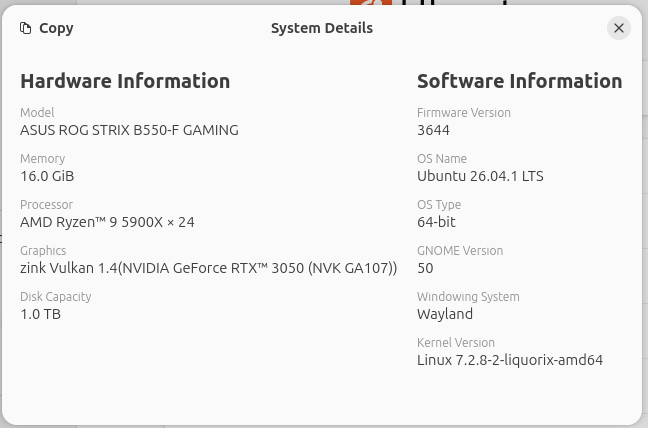
Greetings, not sure how to explain it correctly it I will try.
Sometimes when I open an app or filemanager window the windows is going back and forth really fast / flikkering trying to resize or lock to a position but something else is countering it go back to other position. Result is flikkering windows resize/move all the time. Sometimes when I’m able to get to full screen or able to drag it then it stops doing it. It’s bit of annoying behavior. I tried disable tilling but that did not help and no clue how to prevent this from happening.
I use a laptop and have extra monitors connect to it that are different resolution not sure maybe that has something to do with it? But I think also happened when I had single monitor.
Also got other problem also to do with window on different monitor. When I use my laptop with out extra screens an open a program that opens on screen currently not there it does not force it to only display but forces me out of desktop into lock screen. Is there a solution to make window or program appear on single monitor when other screens not attached?
Does Your System run in Wayland or X11? You can check that with the Command echo $XDG_SESSION_TYPE via Terminal. Should it show Wayland, You could try it with switching to Xorg.
To do that, go to the Login Screen (not the Lock Screen). Click there on Your Profile so that the Passowrd Field appears. When it is appeared, You should see in the bottom right Corner a Gear Icon. Click on it and choose the Option ''Zorin Desktop on Xorg'' and then log in.
Other Things:
Are Secure Boot and Fast Boot in BIOS disabled?
If Windows is still installed: Is Fast Start-Up in Windows disabled?
What Graphics Card do You have? If Nvidia: What Nvidia Driver do You use?
How are Resolution and Refresh Rate set up
Is Fractional Scaling active?
How are Your Monitors connected?
Do You use a Splitter, Adapter or a Dock to connect the Monitors?
Because of a current Issue, You could try this, too:
Ah theres the problem Nvidia..Wayland does not work well with it at all best to use X11...or change out the vid card (if possible) to amd then wayland is a good choice
I can actually say @Nourpon it does work better on 26.04 not wanting to chase him away tho.... Truth is wayland and Nvidia on 24.04 is a definite no go
Zorin upgrade to 26.04 (gnome 50) will take a lot of time i guess, until then i would also prefer x11. zorin on wayland is really problematic, mostly due to gnome 46
If its any consolation probly in 2028 maybe late 2027 Zorin OS 19 has been rumored to be based on ubuntu 26.04....so will see as we get closer. Right now there is no confirmed date of its release at this time
You could at least switch to see if it is really related to Wayland or not. When it is not, You can switch back to Wayland and then we can see what else we can do.
Like this here:
Can You explain that in a bit more detailed? What is connected to what and with what Cable?
Amazon.nl Connection is usb C to usb C kabel was delivered with the product. I will try x11 to night as it eventually makes my laptop go to lock screen while gaming. Gemeni examined logs and toldme something keep trying to move a windows nonstop what causes gnome shell to crash eventual. Even tough I do not see anything trying to move. I’ll update tomorrow. Got work first then gaming session on x11 it is.
Disable power saving functions for screensaver and suspend to prevent going the system into sleep or install the gnome-extension "caffeine" to keep your system awake while gaming.
Ah, okay. Now I understand Your Setup. Maybe there is a Problem to identify that Type of Device right. I saw there are 2 USB-C Cables included. Did You tried it with connecting both of them?
I found the problem. stumbled on it by accident. I installed extention in the past called auto move looked handy and never gave problem back then and totally forgot about it. guess somewhere along way with zorin update that one got half broken or something. but turned it off and tested for me was open download folder form menu would always gave the problem and it would space and stopped doing it when I turned it off. so I removed it. when I think about it now its should have been obvious as behavior fits such an extention.
I feel kind of stupid now. but still thank everyone to try and help me out really appreciated it. and sorry for wasting everyone's time.
 Truth is wayland and Nvidia on 24.04 is a definite no go