rocky-linux@rockylinux-H370HD3:~$ sudo fdisk -l
[sudo] password for rocky-linux:
sudo: fdisk: command not found
rocky-linux@rockylinux-H370HD3:~$
zorin@zorin:~$ sudo mount /dev/sda2 /mnt
Windows is hibernated, refused to mount.
Falling back to read-only mount because the NTFS partition is in an
unsafe state. Please resume and shutdown Windows fully (no hibernation
or fast restarting.)
Could not mount read-write, trying read-only
zorin@zorin:~$ sudo mount --bind /dev /mnt/dev
mount: /mnt/dev: mount point does not exist.
dmesg(1) may have more information after failed mount system call.

Windows is installed as MBR.
Please disable fast startup in the energy settings of Windows and shut down Windows completely.
Please wait before continuing until someone experienced can advice you. In my opinion, your mount-command with sda2 is incorrect here. If you want to convert from EFI to MBR, you would have to select the Zorin hard drive, which would be sdb2.
It is a very dangerous/delicate process, and you can't afford to make any mistakes here.
Does the mount point for the windows partition look odd to anyone? (Media/Zorin/……)
It looks odd to me, but I'm a newbie. That's why I included it.
First seeing at your fstab entry I had assumed that Zorin is installed on your /dev/sda.
But from gparted it's actually /dev/sdb. This probably happened when you reinsert the Windows drive after the Zorin installation completed. Zorin drive became your secondary drive so now it identify as /dev/sdb.
So Forpli is right, in this case it's sdb2 and sdb. Please try again with these.
zorin@zorin:~$ sudo mount /dev/sdb2 /mnt
zorin@zorin:~$ sudo mount --bind /dev /mnt/dev
zorin@zorin:~$ sudo mount --bind /proc /mnt/proc
zorin@zorin:~$ sudo mount --bind /sys /mnt/sys
zorin@zorin:~$ sudo chroot /mnt
root@zorin:/# sudo grub-install --target=i386-pc /dev /sdb
sudo: unable to allocate pty: No such device
root@zorin:/#
I think eventually we may make some changes to the windows MBR. Before we get there I'm going to order another external hard drive and back up my Windows files.
Please repeat the command again without a space between /dev and /sdb -
this way:
sudo grub-install --target=i386-pc /dev/sdb
zorin@zorin:~$ sudo chroot /mnt
root@zorin:/# sudo grub-install --target=i386-pc /dev/sdb
sudo: unable to allocate pty: No such device
root@zorin:/#
zorin@zorin:~$ sudo grub-install --target=i386-pc /dev/sdb
Installing for i386-pc platform.
grub-install: error: failed to get canonical path of `/cow'.
After running the chroot command try the next 2 commands without sudo.
(Run the mount and chroot with sudo and only the last 2 commands without sudo)
grub-install --target=i386-pc /dev/sdb
&
update-grub
1 Like
Just thinking through this issue over again.
First, I guess all of this might have been avoided if the original install stick and installation had been in MBR format given that was how the windows computer was formatted. Might a solution be to just reinstall using MBR?
Second, I know the directions for changing from GPT to MBR follow the post that @Aravisian put out a year or two back but I'm wondering (and don't have the experience to know one way or the other) is the target always going to be i386-pc or might it have a different name in this user's setup?
1 Like
That would be. But the Question is: Is the User willing to do that.
Seeing as how this is a new install and there's nothing to lose, I don't mind installing Zorin again. I just want to be sure it installs to my new drive and not my Windows drive.
Since the troubleshooting is taking so long, I also agree Reinstall will be the best. But this time make sure if the following things:
-
Boot to Windows, format the 2nd drive and set MBR partitioning on it: Convert a disk to GPT or MBR | Microsoft Learn
-
Use Rufus and recreate the flash usb with MBR and BIOS option selected.
-
Boot from the usb drive and make sure it has booted in the BIOS mode, use the following command:
[ -d /sys/firmware/efi ] && echo "UEFI" || echo "BIOS"
If the output is BIOS then you can proceed with the installation. On the installation type screen, choose erase disk and from the drop down menu select your 2nd drive and install it.
I think you still have to fix the mount point for your windows partition which may have gotten screwed up when you tried to convert the wrong drive to MBR. I'm not sure what it used to be but media/Zorin/whatever isn't right.
No need to worry about that.
This screenshot was taken from the live environment and the mount point structure is correct. Let me explain:
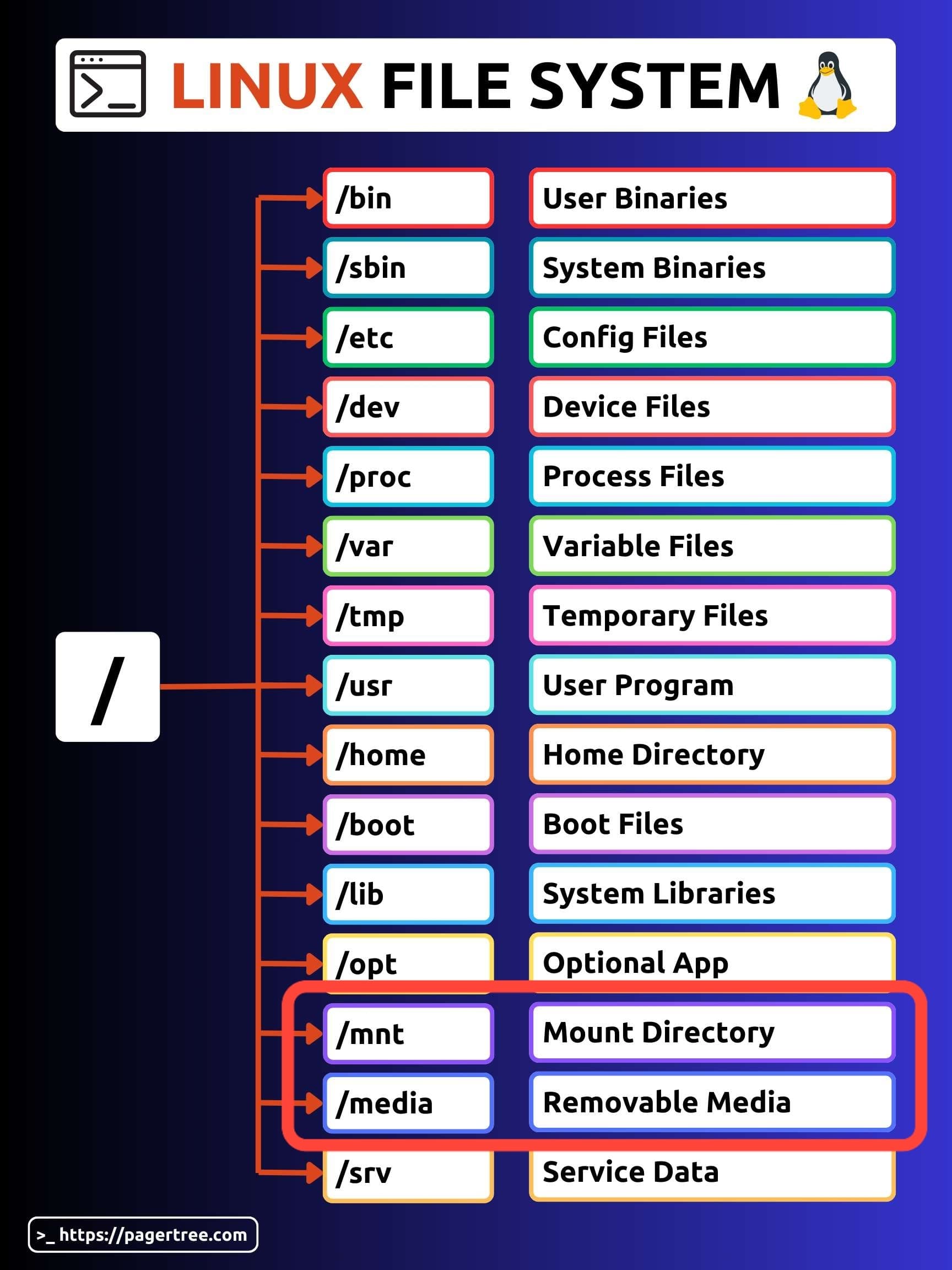
In Linux File system /media directory is used to mount the removable media. When you try to access a partition from the live environment it gets mounted under /media (because the live environment don't have the auto mount setup for any of the partitions)
The general structure is /media/username/uuid-of-the-partition
In the live environment the default username is zorin, and 2648ED8548ED53D9 is the UUID of the windows partition /dev/sda2 in the case of the OP.
So the final mount point we get: /media/zorin/2648ED8548ED53D9
Mount points under /media gets reset when you unmount manually or when you shutdown or reboot. But they do follow the same structure eachtime.
Well, then I would suggest to try it with a new Install. To be sure that the System will be installed on the right Drive, You could take the ''Something else'' Option during the Installation. then choose manually the drive and create the Partitions.
So, create the bootable USB Stick with Zorin on it with MBR Partition Sheme. Then start it, install it and choose the ''Something else'' Option. In this choose Your Drive. There create a Partition with the Mount Point / and format it to ext4 and then choose under the Option ''Device for boot loader installation'' Windows Boot Manager to pack the Boot Stuff in it.
So it doesn't stop his windows application from working correctly, having it mounted to Zorin?