Hello all, I've been using zorin OS for about 2 weeks now and so far i'm really pleased with it. However, upon the first and subsequent installations of the os where i selected the nvidia drivers, i just got the classic "Something is wrong" error. Only when i decided to not install the drivers, and switched to wayland, was I able to properly use my system. And when I switch to xorg again, via the convenient gear icon at the login screen, I get the same issue. Any Ideas? Any kind of help would be greatly appreciated 
Is it possible that this post applies to you?
1 Like
Perhaps, however I did not upgrade zorin from 17 to 18. I just installed zorin 18 like normal. I'll try to install the older versions of the nvidia drivers and get back to you on that
UPDATE: Nope. Same problem. Had to boot in recovery mode by pressing shift during boot and delteting the nvidia drivers with sudo apt-get purge nvidia* libnvidia* to be able to use my computer. I suspect either nvidia or xorg is broken for whatever reason.
Can You post Your Hardware Specs please?
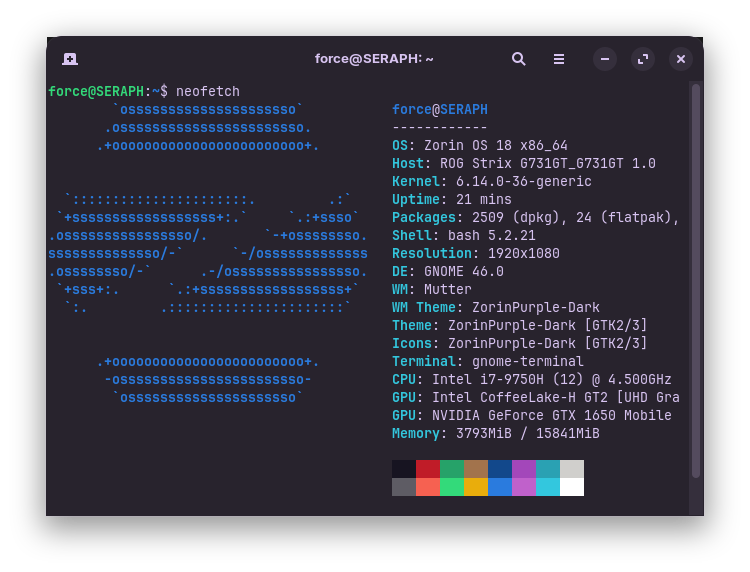
Thanks. Interesting that you have such Problems with Nvidia+Driver+Xorg. Normal, we have here primary the thing that Nvidia+Wayland is the Problem.
Did You installed the Drivers in the Terminal or did You use the Driver Tab in Software & Updates?
Not only have I installed the the drivers via the driver tab, but I also had them installed together with the Zorin OS installation. Imagine my surprise when out of the box I got the the white screen of death 
Okay, if You willing to do, You could try it with the Terminal. If there is a Problem, it could be shown during that.
First type:
sudo apt purge nvidia* libnvidia*
to remove all current Nvidia Stuff. then:
sudo apt autoremove
to remove File rests. Then to install a Driver (I take the 535 for Example):
sudo apt install nvidia-driver-535 nvidia-dkms-535
You can replace the 535 with a different Driver Number when You want install a different Driver instead.
Unfortunately, the error persists. Still the same white screen of death  The instalation process worked without any issues. I'll check the dmesg log and get back to you if I see anything
Make sure that Secure Boot & Fast Boot are disabled in the BIOS.
If you are dual booting with Windows, make sure Fast Startup is also disabled.

Disabled since my first linux distro two years ago :))))
This topic was automatically closed 90 days after the last reply. New replies are no longer allowed.