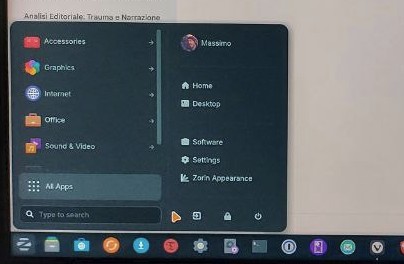
Hi there,
I've been having a weird issue with Zorin OS 18 about a week after installation: when I press the Z key and the menu pops up, its frame is smaller than it was and text like "Documents", "Music" and so on are gone.
Any ideas on how to reset it to its original size? I'm sure there is not an option for that, and I guess something is broken, but what and how to fix it?
Thanks
Did You tried it with disabling the Extension and enable it again? To do that, go in Gnome Software and look for the Extension Manager:
Install it and then open it and go to the ''Installed'' Tab. Scroll down until You see the Zorin Startmenu Extension (should be named as ''Zorin Menu'')and disable the Toggel. Then reboot and enable it again.
Another Option would be to try it with reinstall:
sudo apt reinstall gnome-shell-extension-zorin-menu
I had to get rid of Zorin as it was causing me a lot of issues with Nvidia drivers, I guess. Sadly, I'm out of Zorin. Thanks though.