I'd only enter
'sudo apt install libcamera0.2 gstreamer1.0-libcamera libcamera-ipa pipewire-libcamera libcamera-tools'.
In the newer ubuntu versions you shouldn't need to compile or build it from sources as libcamera is available in the repo.
I'd only enter
'sudo apt install libcamera0.2 gstreamer1.0-libcamera libcamera-ipa pipewire-libcamera libcamera-tools'.
In the newer ubuntu versions you shouldn't need to compile or build it from sources as libcamera is available in the repo.
I have front and back Camera!!!!!!!!!!!!!!!!!!!!!
Thank you so much for the help.
I get the camera using an App like Cheese but it is not detected using Telegram, Viber, Signal.
I tried a number of suggestions on the web but no luck.
How do You use them? In Browser or as Application?
From I can see they are not able to run from a browser and require the App, so from an App.
And are these App's Flatpaks or .deb Versions? Because Flatpaks have limited Permissions. And this can cause Issues. You would need a Tool called Flatseal to give them more Access/Permissions for the System.
Or You use the .deb Versions where You don't have that.
I uninstalled the Telegram App and re=installed ensuring it was SNAP and I got the same result. I am quite sure these are either Snap or .Deb as it is a new install and I don't recall seeing anything Flatpak yet.
I've never used snap because of this I don't know exactly.
You could try:
sudo snap connect telegram-desktop:camera
I am not sure if telegram is still available as .deb package in ubuntu 24 or 25. About ubuntu 23 there was said in a thread that "sudo apt install telegram-desktop" would install the snap package. Perhaps this will also happen in newer versions because in ubuntuhandbook there is also no instruction for deb package only tarball?
But you can look in software manager if there is another package format than snap (search for deb) or try it with:
"sudo apt install telegram-desktop"
The installed Software manager in latest ubuntu is not so good as it prioritizes snaps and not .debs. You can install gnome-software manager which is used in Zorin (the instruction should also work with ubuntu 25 as the package is in the repo):
When there are no .deb packages shown (I am not sure if the .deb plugin is contained in gnome-software), you can install the plugin with:
"sudo apt install gnome-software-plugin-deb"
But even in gnome-software .deb packages are not listed at first position (
unless you have not installed the snap and flatpak plugin at all), so you always have to change the preselection if you want a .deb package.
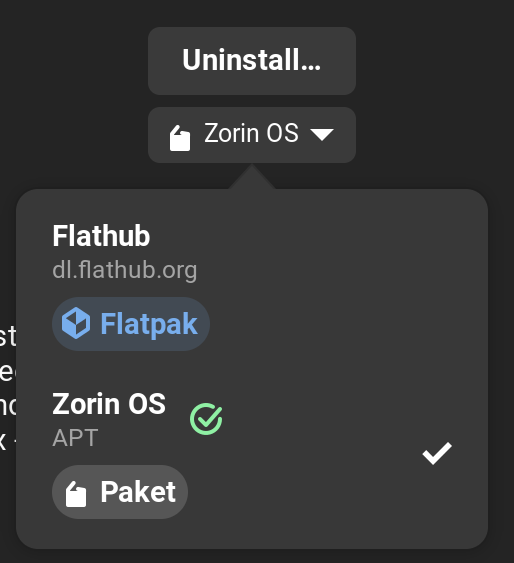
Snap can be a bit ... difficult. I would suggest to use the .deb Versions. Look in the Dropdown Menu which Version You have:
I will give some of this a try. This Surface is on Ubuntu and not Zorin. I do like the Zorin App manager way better so will start there. To note, this does not seem to be a issue with Telegram as I have the same issue with Viber and Signal. None of them find the camera/video though Cheese does.
This is probably due to the package format with which the apps were installed.
With .deb packages, you do not need any special authorizations, but you do with snaps and flatpacks so that they can access system data because they are sandboxed from the system.
For flatpaks, you can grant these permissions by installing flatseal and then setting the permissions for each flatpak program, e.g. grant access to system files or user files.
Unfortunately I do not know this for Snaps. You could perhaps see if you have shared your camera with the desired apps in the general settings>privacy and then in the Telegram settings, when you select call settings, if you can select your camera.
I don't know if your installed ubuntu version has already something like security center? It is a new function to manage permissions of snaps.
I have installed Gnome-Software and it is 100% better than Ubuntu App Manager BUT I still have the same problem. There is no capability under settings/privacy to give camera permissions. It is so weird that Cheese sees the camera but these other Apps do not. I also tried another Camera App and it could not recognize the Camera but Cheese does. I have played with going between Flat/DEB/Snap and same result. I know the Camera works since Cheese can see it. I wonder it there is a terminal command that I can run that will give complete open access to Camera for all and any apps? So far I have not come across anything.
At any point in this thread, have you switched away from Wayland to use Zorin on Xorg?
No, Worth trying?
Oh, I am not on Zorinbut Ubuntu now.
I would try that, yes. Wayland is a display protocol that was made default beginning with Zorin OS 17.
It has limited support in many things, including camera and screen sharing.
EDIT: Ah... Well Ubuntu also has Wayland, so I would still check this.
It was worth a try but no Cigar. Same result.
I tried Flatseal but it didn't make a difference. I perused Security Center and couldn't find anything pertaining to this problem.
I tried camera permissions with the following (Telegram, Signal, and Viber are now all Flatpak on my machine)
Check permissions with:
flatpak info --show-permissions org.telegram.desktop
To grant camera access:
flatpak override --user --show org.telegram.desktop
flatpak override --user --device=all org.telegram.desktop
Repeat for Signal or Viber if installed via Flatpak:
flatpak override --user --device=all org.signal.Signal
So frustrating! I still get no Camera found EXCEPT in Cheese. Uhg....
You could ask your question in ubuntu forum. I am at a loss right now. If flatseal is not enough for flatpaks (there is also a setting for camera access) and it doesn't work with .deb packages either, I'm at a loss right now.
Somewhere/sometime I read that adding the user to the video group can help to get camera access. I'm not sure if that could help you though.