I did some more research. It seems to be a special hardware problem of the Surface devices that the cameras work with cheese, but not with other apps. It is not a permissions problem.
In github it is described but it sounds really complicated. You need to create a
v4l2loopback. The instructions are beyond my abilities, as I am neither a system administrator nor a developer.
I already did the steps provided on the Camera Support link.
I looked at the neilzone information and I could do that but I would need to undo much of what i already did like Libcamera.
I should have a external Webcam delivered today to try that. It is by far not the best solution for a Surface Go device since it is cabled and large compared to the Surface itself but maybe it will buy me some time until what ever is wrong gets fixed in an upgrade. I would try another distro but but Ubuntu seems to have the most Surface support vs something like Debian which I have zero experience with.
Thanks for your help.
If you want to try it I'd follow only the steps described on github link at point
GStreamer Loopback Device for other Applications
because Gstreamer and libcamera are already installed. Perhaps it works.
In github you wrote that you have also problems with freezes. You could try this solution to look if it helps. The command toggles off intel panel self refresh.
If it doesn't work remove the added parameter and update grub:
Open terminal and enter
"sudo -i", enter your password.
"nautilus" (enter your file manager here)
When the file manager is opened as root, search for file
etc/default/grub
and open it with a texteditor.
Add
"i915.enable_psr=0" to file
/etc/default/grub
in line
GRUB_CMDLINE_LINUX_DEFAULT
It could look like this then (I don't know if you have set further grub parameters, please keep them there):
Xorg does not work well at all with the Surface. The touch screen doesn't recognize touch.
The above editing and GRUB stuff is beyond my knowledge. I will keep it to possibly try if the problem persists.
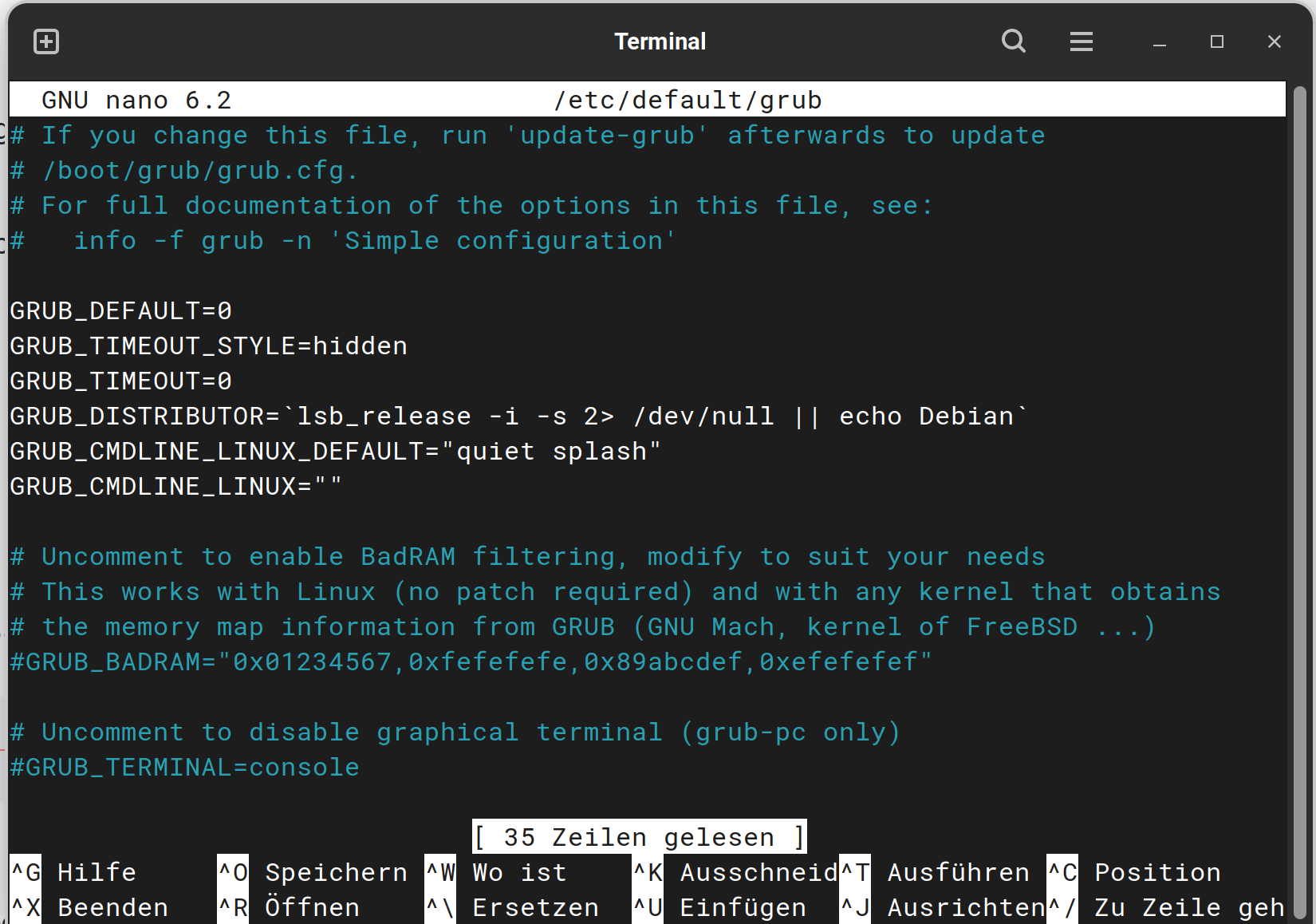
What we need is in the white Text Block. There You have the Line: GRUB_CMDLINE_LINUX_DEFAULT="quiet splash"
Navigate with the Arrow Keys to this Line and add i915.enable_psr=0 to it. Then it should look like this:
Then press ctrl+o to save the Change, Enter to confirm and ctrl+x to exit. Back in the normal Terminal Window type sudo update-grub to make the Change affect. Don't forget that! It is neccessary. Without that, it will not work.
I also see thhat when I boot the system there is an 'unlocked' lock at the top. Is this due to unlocking the bootloader in order to load Ubuntu from a USB?
If so should I change this back ad is it as simple as 'power+up vol' and re-locking in security?
Thanks for all your help. This machine hopefully will be used by my wife instead of her older Samsung Tab running eOS. Now I need to get her to try it out and learn the Ubuntu interface. She doesn't like the external webcam but we are hoping future updates of Ubuntu will eventually fix the camera issue. She only uses it to do video call on Viber or Signal with her mother 1-2x a week.