
i am shifting from windows to linux without prior knowledge. i got dual boot W10 and zorin-core-18-beta
i don't have encryption on storage (ext4). whenever i unlock my phone this particular pop up appears and i would love to understand why and how this works and what next steps to take.
THANKYOU
Hi, and welcome!
Zorin Connect uses cryptography to protect the communication between the devices so that your files can't be read by anyone snooping on your network. It does so in a very similar way that your browser connects to servers over HTTPS, which involves having a so-called secret or private key.
That prompt comes from the GPG Agent, which is a background service that handles this type of secret keys for any other program that needs it. For example, aside from Zorin Connect, browsers use this to store your passwords for websites when you save them locally.
What I don't know is why is it asking you to provide an additional password (or passphrase) to protect those keys. It's not a bad thing by any means, it's just less convenient, but importantly it doesn't seem to be the default as I'm able to connect normally but I don't require to enter any passphrase.
Have you made any changes to the configuration of Zorin Connect, in your computer or in your phone? What version of Zorin Connect have you installed in your phone at the moment?
greetings sir.
yesterday i fresh installed zorin 18-beta. i did not make any changes to zorin connect and config files. Everything is set to default. I got v1.33.4 from play store running on A15.


Any updates sir?
Hi, sorry I completely forgot about this!
Everything looks fine on your end, I can't see why would this be required on every connect. Have you tried to enter a password at the prompt, and does it pop up again after that?
For reference, this is the prompt that I see when I request the pairing from my phone:

much apologies for the delay.
no sir, i never got such prompt on my device.
i made a full-upgrade as well as specified zorin-connect, it was up-to-date.
the zorin app from play store is also updated to latest version.
the issue continues.
I wonder if all this was caused, by OS encryption, or using NTFS file system? It would be a good idea, to go into the DISKS utility, and take a screenshot of your drive. This is basically what we are looking for. We want to see EXT4 & GPT.
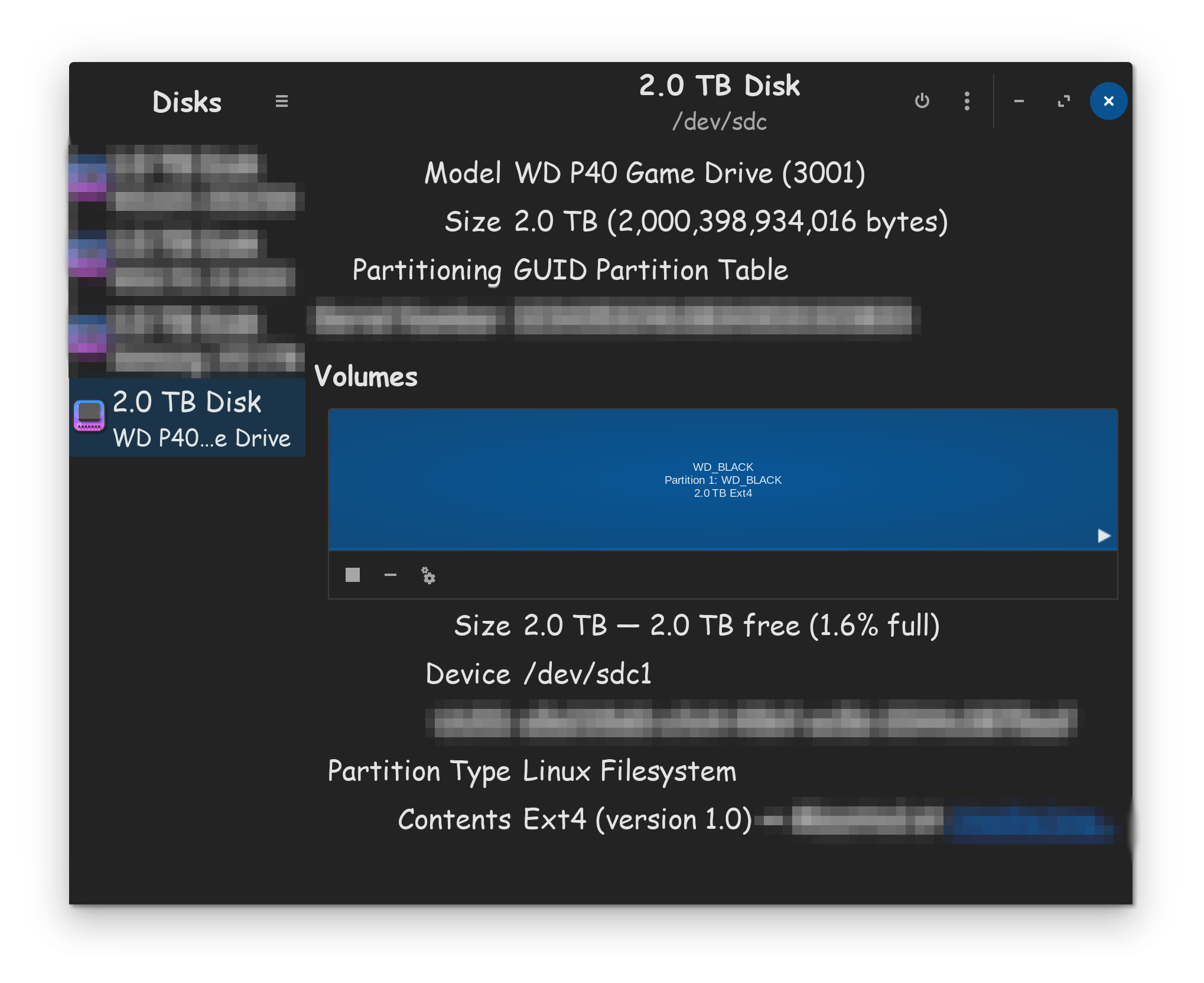


I suppose a good reset might be in order, just to shake things up a bit and see if there's something that went wrong at some point and is not remembering the connection properly.
By "reset" I only mean clearing the cache on your phone's Zorin Connect app: Long-press the app → App-Info → Force stop.
Then, in "Storage & cache", press Clear cache and Clear storage.
On the computer we can do something similar by navigating to ~/.cache/zorin-connect and deleting all the folders you find in there.
To see hidden folders — those that start with a period (.) — toggle the setting to that effect in the file manager:


Restart, and try again 
hello sir
much much apologies for the delay
i have exactly followed the above mentioned steps without any progress.
what else can i do for this?
and another question, if i get the pro version, will i be able to upgrade to 19 with pro features as well?
No, the purchase for Zorin OS Pro is only valid for a single major version. Keep in mind that Zorin OS 18 will be supported until 2029.
I'm honestly out of ideas on this one. I've never seen this behavior with Zorin Connect. You mentioned in the first post this happens every time you unlock the device? Not even opening the application, and this notification is immediately sent?
And what happens when you do enter a password in that prompt? Does it keep asking about it?
Try opening "Passwords and Keys" from the applications menu, do you see something there that mentions GPG or Zorin Connect?
1 Like
yes sir it happens every single time. yes, even if i don't open the application it pops up on the screen immediately.
i did not set up password in the prompt, just click cancel or it disappears after 3-4 minutes automatically.
no sir, as i have not set any password it doesn't mention anything of zorin connect. the GnuPG keys section is empty.
and i can boot multiple computers using the pro version right?
or it is for single computer?
I don't know what phone you are using but since upgrading to a Fairphone 6 (I use KDE Connect (not Zorin Connect) on a different distribution, when I start my computer that has KDE Connect it immediately syncs with my phone if I have wifi enabled. Have you tried disconnecting Zorin Connect on the computer whilst in a session? By this I don't mean unpair, just click on the device shown in Zorin Connect Settings and your phone's ID should change from Bold font (active connection) to Normal font (inactive).
With regards to Pro you can install it on as many computers that you personally own but you only receive support for your Primary computer that you installed Pro to.
Give that a try, then. I suspect this is a requirement but for whatever reason there's no keyring set up. This is similar to how launching some Chromium-based browsers require it. Are you using the default browser by any chance, and do you remember seeing a similar popup?
For personal use, you can install it on multiple computers. More details here:
This topic was automatically closed 90 days after the last reply. New replies are no longer allowed.