Hi, I am new hear and have a question about the in place upgrade. The current help article (Upgrade Zorin OS - Zorin Help) doesn't provide and answer - hence why I am asking here..
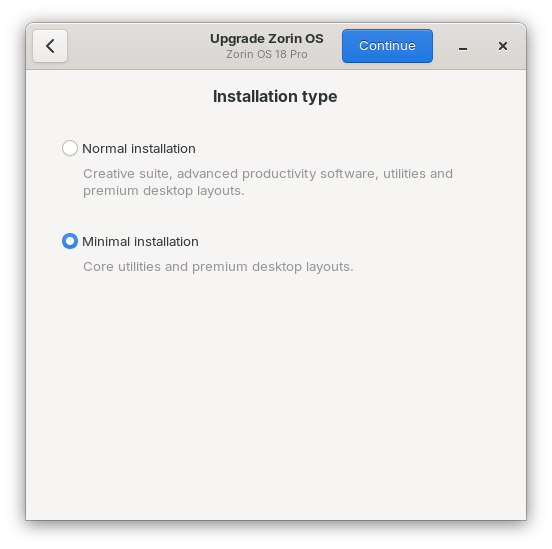
If I use the in place upgrade, enter a details in the email address and support code to start the upgrade - do you get an option not to install all the extra bundled software?
I am looking to pay and support the development of Zorin, and upgrade from core to pro, and just use the extra layouts without all the extra software being downloaded and installed.
Any one with experience of the in place upgrade from core to pro please advice.
Thank you.
The upgrader tool does not offer any option of selectively choosing what software is installed, like a fresh install does.
However, you can easily remove any extra software after performing the upgrade.
Before running the upgrader tool, save a list of your installed packages:
apt-mark showmanual | sort > packages-before.txt
After running the upgrader, repeat to create a new "after" list:
apt-mark showmanual | sort > packages-after.txt
Now, all you need to do is diff the two. You also can save this as a new-packages list:
comm -13 packages-before.txt packages-after.txt > new-packages.txt
I would not blindly remove at this point - but check the results or post them here. If you use xargs on the entire list, you might remove the layouts and Pro Zorin-Appearance packages along with the stuff you wanted to remove.
Hi, I noticed when I went through the wizard for the in-place upgrade, that there was an option for minimal install. Everything went fine during the upgrade
Hi, Newbie to Zorin and Linux, but love it so far. The upgrade from Core to Pro as I understand it, you can download the packages that form the pro upgrade? and what you pay for is to support the community and also for the "least hassle" by Pro install all the popular/most used packages?
Yes, I believe you are right, you can download most (or maybe all) of the software that is bundled in the pro version. The pro version gives convenience of pre installing all the additional software.
I have only been using Zorin since Sunday and really like it. I got most of the apps I wanted installed.
Today I paid for the pro version mainly to support/aid development and access some of the other layouts etc.
I am determined to learn more about linux this year.
It was nice to see that Timeshift was avail in the software centre - it's nice to have that application available to install via that. Older articles said Zorin didn't have it - so it was nice to see it is available there.
Hi, that is correct. The in place upgrade gave the option to d a minimal install. I also followed your advice and guidance and compared packages - and all is good. I am happy with the minimal option in the upgrade process, and it worked.