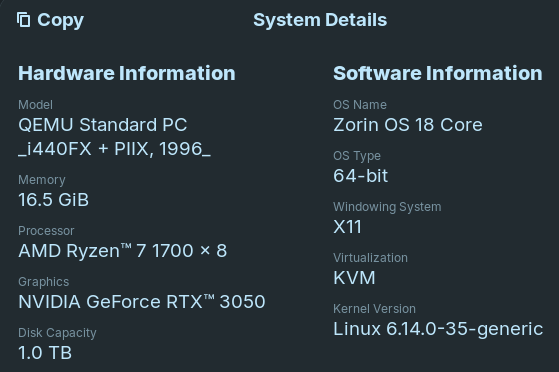
Zorin 18 core:
- X11 Desktop only to have monitors go into standby mode
- Only works with Nvidia 535 driver in Wayland and X11
- Nvidia 580 driver reboots to blank screens with turning monitors on and off with no login screen in both Wayland and X11 desktop
So something is wrong with Wayland and turning physical monitors to standby mode?
What changed from Nvidia 535 driver to Nvidia 580 driver that you do not get a login screen on reboot?
Now I am using Unraid 7.2 and running Zorin OS 18 Core in a VM with hardware passthru of: NVME SSD, Nvidia 3050 GPU, keyboard/mouse.
" To get the NVIDIA GeForce RTX 3050 GPU working properly in Ubuntu 24.04, follow these steps:
- Use the Additional Drivers Tool: Open the "Software & Updates" application, go to the "Additional Drivers" tab, and select a recommended NVIDIA driver from the list. For Ubuntu 24.04, the
nvidia-driver-570-server (proprietary) driver has been reported to work successfully, providing a stable NVIDIA-SMI version of 570.86.15 and CUDA 12.8 support.
This method is often the simplest and most Ubuntu-idiomatic approach. * Alternative: Use the Graphics Drivers PPA: If the standard Additional Drivers tab does not show a suitable driver, add the official NVIDIA graphics drivers PPA. Open a terminal and run:
sudo add-apt-repository ppa:graphics-drivers/ppa
sudo apt update
sudo apt install nvidia-driver-560 libnvidia-egl-wayland1
This method ensures you get updates and is often more reliable than manual installation.
- Configure PRIME Profiles: After installing the driver, access the "NVIDIA X Server Settings" application. Navigate to the "PRIME Profiles" section and change the profile from "NVIDIA On-Demand" to "NVIDIA (Performance Mode)".
- This ensures the dedicated GPU is used for rendering.
- Adjust Power Settings: Within the "NVIDIA X Server Settings" application, go to the PowerMizer settings and change the "Preferred Mode" to "Auto" to optimize performance.
- Troubleshooting a Boot Freeze: If the system freezes on the loading screen after installing the GPU, boot into recovery mode. Access the GRUB menu, select the top option, press 'e' to edit, and add
nomodeset and systemd.unit=multi-user.target to the kernel line before pressing Ctrl+X to boot.
This will bring you to a command-line interface. From there, you can install the driver using apt-get install nvidia-driver or manually download and install the appropriate proprietary driver from the NVIDIA website. * Verify Installation: After rebooting, verify the driver is loaded by running nvidia-smi in the terminal. This command should display information about your GPU and the driver version.
AI-generated answer. Please verify critical facts."
[Footnote: Zorin18 is a fork of Ubuntu 24.04 LTS]
1 Like
Well, Wayland and Nvidia seem to be still not the best Combination on Zorin. theoretically it should work better together because of the newer Desktop Version but ... when X11 works for Your System, I would suggest to simply stay on it.
Because for the Driver: You could try the open Driver instead. Maybe they work better. First uninstall the old Drivers:
sudo apt purge nvidia*
Remove potential File Rests (but look in the List with the Files what will be deleted before You delete them!):
sudo apt autoremove
Then install the new one's:
sudo apt install nvidia-driver-580-open nvidia-dkms-580-open
One other Point about Your Setup could be that You run it in a Virtual Machine and not on bare Metal.
That didn't work, same no login screen and monitors sleep/awake.
Going to 535.
sudo apt install nvidia-driver-535-open nvidia-dkms-535-open
Well that last command with 535 just messed the system just a blinking underscore.
Used those commands to remove the Nvidia stuff for 535.
Going back to the drivers install from the Software & Updates. And have that install the proprietary 535.
Not sure about the above reply about PPA for Nvidia.
When the 535 Driver works well for You, maybe simply use that.
1 Like
For the vast majority of games, the 535 to 550 driver, is plenty new enough right now. There are only a small selection of games right now, that require the 580 driver, Doom The dark Ages for example. Use what works I say.