Thanks for your help!
Both commands give back empty space, but I use Fractional scaling:
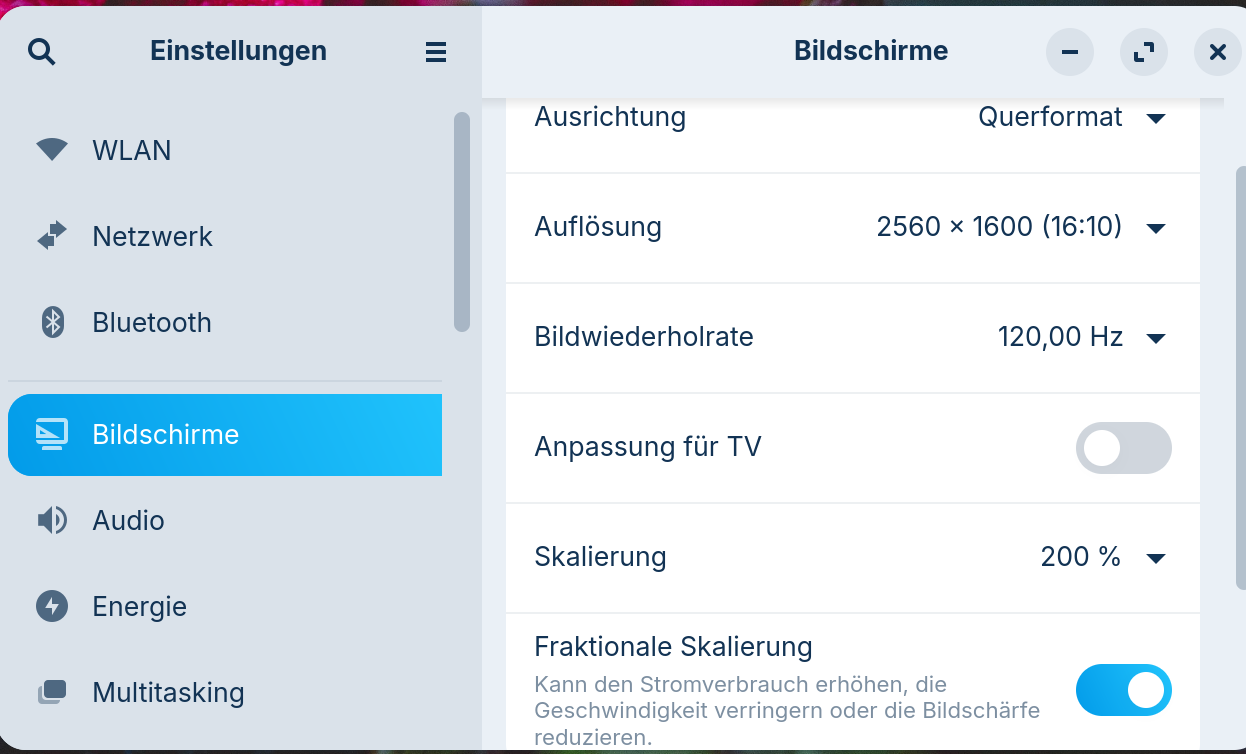
Can we test it briefly without fractional scaling to see if the window switches back to two columns?
1 Like
During disabled fractional scaling the one column under Designs resists.
What is your terminal output for:
gsettings get org.gnome.desktop.interface scaling-factor
And
gsettings get org.gnome.desktop.interface text-scaling-factor
1 Like
as fractional scaling is enabled again, your commands give following outputs:
~$ gsettings get org.gnome.desktop.interface scaling-factor
uint32 0
~$ gsettings get org.gnome.desktop.interface text-scaling-factor
1.0
pkill zorin-appearance
Set the scale factor only for the application:
GDK_SCALE=1 GDK_DPI_SCALE=1 zorin-appearance
I am on XFCE, not Gnome... So I am guessing that the launch command is zorin-appearance - we may need to check this is this does not work.
Once the above is set, launch Zorin Appearance and see if it is two columns...
1 Like
your launch command is right, but problem resists
~$ pkill zorin-appearance
pkill: Muster, die nach Prozessnamen mit mehr als 15 Zeichen suchen, ergeben keine Treffer.
Mit der Option »pkill -f« können Sie versuchen, nach der gesamten Befehlszeile suchen zu lassen.
ah... pkill and its 15 character limit...
killall zorin-appearance
1 Like
~$ killall zorin-appearance
worked now, but aftewards still 1 column in Designs
This is after:
correct?
1 Like
yes, sorry forgot the second command, but redone gives 1 column
I am already at a loss on this. Scaling seemed the likeliest culprit.
LibAdwaita is pretty strict about widget presentation and it does not follow a Grid, but instead, size limits.
I may need to load up a copy of Gnome and examine the zorin-appearance application internals to come up with other ideas.
1 Like
Try changing your Scale from 200% back to 100%
thanks for helping me!
A change to 100% Scaling also leaves the designs in one Column.
@Forpli had covered this one earlier:
2 Likes
This topic was automatically closed 90 days after the last reply. New replies are no longer allowed.