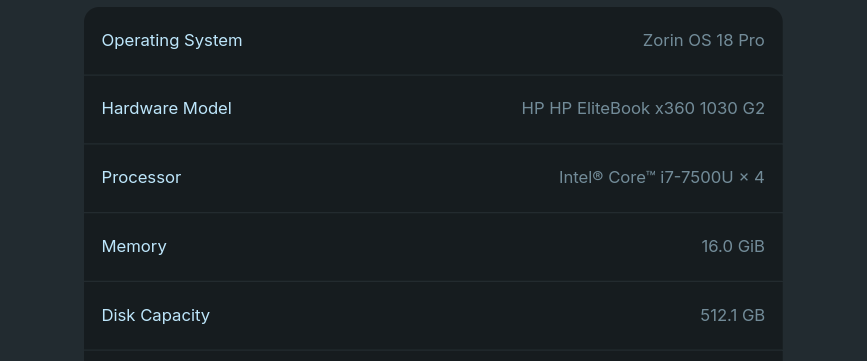
I was using my laptop normally, with a Firefox window and one Antigravity window open, when I began to notice my mouse becoming choppy. At the top of my screen, I could see that my memory usage was climbing — I have the Vitals GNOME extension installed.
Shortly after, my laptop became completely unresponsive. The keyboard backlight still responded to key presses, but the screen remained frozen. After about 2–3 minutes, the screen went black, and I was taken to the login screen.
2025-12-02T14:12:25.937393+01:00 jesseekoh-HP-EliteBook-x360-1030-G2 antigravity.desktop[13359]: at process.processTicksAndRejections (node:internal/process/task_queues:105:5)
2025-12-02T14:12:25.937486+01:00 jesseekoh-HP-EliteBook-x360-1030-G2 antigravity.desktop[13359]: at async y$.s (file:///usr/share/antigravity/resources/app/out/main.js:180:253399)
2025-12-02T14:12:25.937596+01:00 jesseekoh-HP-EliteBook-x360-1030-G2 antigravity.desktop[13359]: at async wOe.g (file:///usr/share/antigravity/resources/app/out/main.js:180:250050) {
2025-12-02T14:12:25.937646+01:00 jesseekoh-HP-EliteBook-x360-1030-G2 antigravity.desktop[13359]: [cause]: AggregateError [ETIMEDOUT]:
2025-12-02T14:12:25.938965+01:00 jesseekoh-HP-EliteBook-x360-1030-G2 antigravity.desktop[13359]: at internalConnectMultiple (node:net:1134:18)
2025-12-02T14:12:25.940209+01:00 jesseekoh-HP-EliteBook-x360-1030-G2 antigravity.desktop[13359]: at internalConnectMultiple (node:net:1210:5)
2025-12-02T14:12:25.941070+01:00 jesseekoh-HP-EliteBook-x360-1030-G2 antigravity.desktop[13359]: at Timeout.internalConnectMultipleTimeout (node:net:1742:5)
2025-12-02T14:12:25.941725+01:00 jesseekoh-HP-EliteBook-x360-1030-G2 antigravity.desktop[13359]: at listOnTimeout (node:internal/timers:590:11)
2025-12-02T14:12:25.941761+01:00 jesseekoh-HP-EliteBook-x360-1030-G2 antigravity.desktop[13359]: at process.processTimers (node:internal/timers:523:7) {
2025-12-02T14:12:25.942072+01:00 jesseekoh-HP-EliteBook-x360-1030-G2 antigravity.desktop[13359]: code: 'ETIMEDOUT',
2025-12-02T14:12:25.942706+01:00 jesseekoh-HP-EliteBook-x360-1030-G2 antigravity.desktop[13359]: [errors]: [ [Error], [Error] ]
2025-12-02T14:12:25.942735+01:00 jesseekoh-HP-EliteBook-x360-1030-G2 antigravity.desktop[13359]: }
2025-12-02T14:12:25.943850+01:00 jesseekoh-HP-EliteBook-x360-1030-G2 antigravity.desktop[13359]: }
2025-12-02T14:12:31.757317+01:00 jesseekoh-HP-EliteBook-x360-1030-G2 wpa_supplicant[761]: wlp58s0: CTRL-EVENT-SIGNAL-CHANGE above=1 signal=-50 noise=9999 txrate=65000
2025-12-02T14:12:33.556960+01:00 jesseekoh-HP-EliteBook-x360-1030-G2 wpa_supplicant[761]: wlp58s0: CTRL-EVENT-SIGNAL-CHANGE above=1 signal=-62 noise=9999 txrate=72200
2025-12-02T14:12:45.248954+01:00 jesseekoh-HP-EliteBook-x360-1030-G2 wpa_supplicant[761]: wlp58s0: CTRL-EVENT-SIGNAL-CHANGE above=0 signal=-67 noise=9999 txrate=43300
2025-12-02T14:12:58.038141+01:00 jesseekoh-HP-EliteBook-x360-1030-G2 wpa_supplicant[761]: wlp58s0: CTRL-EVENT-SIGNAL-CHANGE above=1 signal=-58 noise=9999 txrate=52000
2025-12-02T14:13:02.715749+01:00 jesseekoh-HP-EliteBook-x360-1030-G2 wpa_supplicant[761]: wlp58s0: CTRL-EVENT-SIGNAL-CHANGE above=1 signal=-50 noise=9999 txrate=65000
2025-12-02T14:13:09.934171+01:00 jesseekoh-HP-EliteBook-x360-1030-G2 wpa_supplicant[761]: wlp58s0: CTRL-EVENT-SIGNAL-CHANGE above=0 signal=-82 noise=9999 txrate=39000
2025-12-02T14:13:36.742756+01:00 jesseekoh-HP-EliteBook-x360-1030-G2 wpa_supplicant[761]: wlp58s0: CTRL-EVENT-SIGNAL-CHANGE above=1 signal=-50 noise=9999 txrate=65000
2025-12-02T14:13:38.401145+01:00 jesseekoh-HP-EliteBook-x360-1030-G2 wpa_supplicant[761]: wlp58s0: CTRL-EVENT-SIGNAL-CHANGE above=1 signal=-43 noise=9999 txrate=65000
2025-12-02T14:13:39.444964+01:00 jesseekoh-HP-EliteBook-x360-1030-G2 wpa_supplicant[761]: wlp58s0: CTRL-EVENT-SIGNAL-CHANGE above=1 signal=-40 noise=9999 txrate=72200
2025-12-02T14:13:41.050387+01:00 jesseekoh-HP-EliteBook-x360-1030-G2 wpa_supplicant[761]: wlp58s0: CTRL-EVENT-SIGNAL-CHANGE above=1 signal=-41 noise=9999 txrate=72200
2025-12-02T14:13:42.117969+01:00 jesseekoh-HP-EliteBook-x360-1030-G2 wpa_supplicant[761]: wlp58s0: CTRL-EVENT-SIGNAL-CHANGE above=1 signal=-26 noise=9999 txrate=72200
2025-12-02T14:13:43.543882+01:00 jesseekoh-HP-EliteBook-x360-1030-G2 wpa_supplicant[761]: wlp58s0: CTRL-EVENT-SIGNAL-CHANGE above=1 signal=-32 noise=9999 txrate=72200
2025-12-02T14:13:45.514792+01:00 jesseekoh-HP-EliteBook-x360-1030-G2 wpa_supplicant[761]: wlp58s0: CTRL-EVENT-SIGNAL-CHANGE above=1 signal=-29 noise=9999 txrate=72200
2025-12-02T14:13:47.750693+01:00 jesseekoh-HP-EliteBook-x360-1030-G2 wpa_supplicant[761]: wlp58s0: CTRL-EVENT-SIGNAL-CHANGE above=1 signal=-25 noise=9999 txrate=72200
2025-12-02T14:14:11.647997+01:00 jesseekoh-HP-EliteBook-x360-1030-G2 gnome-shell[1946]: libinput error: client bug: timer event6 hold: scheduled expiry is in the past (-122ms), your system is too slow
2025-12-02T14:14:24.585874+01:00 jesseekoh-HP-EliteBook-x360-1030-G2 gnome-shell[1946]: libinput error: event6 - ALP0016:00 044E:1215: client bug: event processing lagging behind by 74ms, your system is too slow
2025-12-02T14:14:26.221255+01:00 jesseekoh-HP-EliteBook-x360-1030-G2 gnome-shell[1946]: libinput error: client bug: timer event6 hold: scheduled expiry is in the past (-88ms), your system is too slow
2025-12-02T14:14:27.700754+01:00 jesseekoh-HP-EliteBook-x360-1030-G2 gnome-shell[1946]: libinput error: client bug: timer event6 hold: scheduled expiry is in the past (-43ms), your system is too slow
2025-12-02T14:14:29.020864+01:00 jesseekoh-HP-EliteBook-x360-1030-G2 gnome-shell[1946]: libinput error: client bug: timer event6 hold: scheduled expiry is in the past (-39ms), your system is too slow
2025-12-02T14:14:30.353309+01:00 jesseekoh-HP-EliteBook-x360-1030-G2 touchegg[640]: libinput error: client bug: timer event6 hold: scheduled expiry is in the past (-88ms), your system is too slow
2025-12-02T14:14:31.316987+01:00 jesseekoh-HP-EliteBook-x360-1030-G2 touchegg[640]: libinput error: client bug: timer event6 hold: scheduled expiry is in the past (-76ms), your system is too slow
2025-12-02T14:14:32.842834+01:00 jesseekoh-HP-EliteBook-x360-1030-G2 antigravity.desktop[13359]: #033[93m[main 2025-12-02T13:14:30.567Z]#033[0m No ptyHost heartbeat after 6 seconds
2025-12-02T14:15:21.495668+01:00 jesseekoh-HP-EliteBook-x360-1030-G2 gnome-shell[1946]: libinput error: event6 - ALP0016:00 044E:1215: client bug: event processing lagging behind by 118ms, your system is too slow
2025-12-02T14:15:27.542499+01:00 jesseekoh-HP-EliteBook-x360-1030-G2 gnome-shell[1946]: libinput error: client bug: timer event6 hold: scheduled expiry is in the past (-330ms), your system is too slow
2025-12-02T14:15:30.618007+01:00 jesseekoh-HP-EliteBook-x360-1030-G2 gnome-shell[1946]: libinput error: WARNING: log rate limit exceeded (5 msgs per 3600000ms). Discarding future messages.
2025-12-02T14:15:34.002517+01:00 jesseekoh-HP-EliteBook-x360-1030-G2 touchegg[640]: libinput error: client bug: timer event6 hold: scheduled expiry is in the past (-303ms), your system is too slow
2025-12-02T14:15:37.369684+01:00 jesseekoh-HP-EliteBook-x360-1030-G2 touchegg[640]: libinput error: client bug: timer event6 gestures: scheduled expiry is in the past (-181ms), your system is too slow
2025-12-02T14:15:39.206220+01:00 jesseekoh-HP-EliteBook-x360-1030-G2 touchegg[640]: libinput error: client bug: timer event6 gestures: scheduled expiry is in the past (-174ms), your system is too slow
2025-12-02T14:15:41.235003+01:00 jesseekoh-HP-EliteBook-x360-1030-G2 touchegg[640]: libinput error: WARNING: log rate limit exceeded (5 msgs per 3600000ms). Discarding future messages.
2025-12-02T14:15:44.789273+01:00 jesseekoh-HP-EliteBook-x360-1030-G2 kernel: rfkill: input handler enabled
2025-12-02T14:15:45.049043+01:00 jesseekoh-HP-EliteBook-x360-1030-G2 gnome-session[1840]: gnome-session-binary[1840]: WARNING: Error signaling shutdown to monitoring process: Broken pipe
2025-12-02T14:15:45.120408+01:00 jesseekoh-HP-EliteBook-x360-1030-G2 systemd-oomd[478]: Considered 64 cgroups for killing, top candidates were:
2025-12-02T14:15:45.131170+01:00 jesseekoh-HP-EliteBook-x360-1030-G2 CRON[124845]: (root) CMD (command -v debian-sa1 > /dev/null && debian-sa1 1 1)
2025-12-02T14:15:45.135516+01:00 jesseekoh-HP-EliteBook-x360-1030-G2 at-spi-dbus-bus.desktop[1944]: Failed to launch bus: Bus killed by signal 9
2025-12-02T14:15:45.140944+01:00 jesseekoh-HP-EliteBook-x360-1030-G2 systemd-oomd[478]: #011Path: /user.slice/user-1000.slice/user@1000.service/app.slice/app-flatpak-org.mozilla.firefox-2982.scope
2025-12-02T14:15:45.142730+01:00 jesseekoh-HP-EliteBook-x360-1030-G2 bluetoothd[614]: Endpoint unregistered: sender=:1.77 path=/MediaEndpoint/A2DPSource/ldac
2025-12-02T14:15:45.147963+01:00 jesseekoh-HP-EliteBook-x360-1030-G2 systemd-oomd[478]: #011#011Memory Pressure Limit: 0.00%
2025-12-02T14:15:45.149851+01:00 jesseekoh-HP-EliteBook-x360-1030-G2 systemd-oomd[478]: #011#011Pressure: Avg10: 29.62 Avg60: 21.03 Avg300: 6.82 Total: 26s
2025-12-02T14:15:45.152632+01:00 jesseekoh-HP-EliteBook-x360-1030-G2 gnome-session-binary[1840]: WARNING: Error signaling shutdown to monitoring process: Broken pipe
2025-12-02T14:15:45.156599+01:00 jesseekoh-HP-EliteBook-x360-1030-G2 systemd-oomd[478]: #011#011Current Memory Usage: 8.6G
2025-12-02T14:15:45.158068+01:00 jesseekoh-HP-EliteBook-x360-1030-G2 systemd-oomd[478]: #011#011Memory Min: 0B
2025-12-02T14:15:45.158143+01:00 jesseekoh-HP-EliteBook-x360-1030-G2 bluetoothd[614]: Endpoint unregistered: sender=:1.77 path=/MediaEndpoint/A2DPSink/aptx_hd