That is two for 340, so I am fine with going with that. 
1 Like
something showed up with the name 390
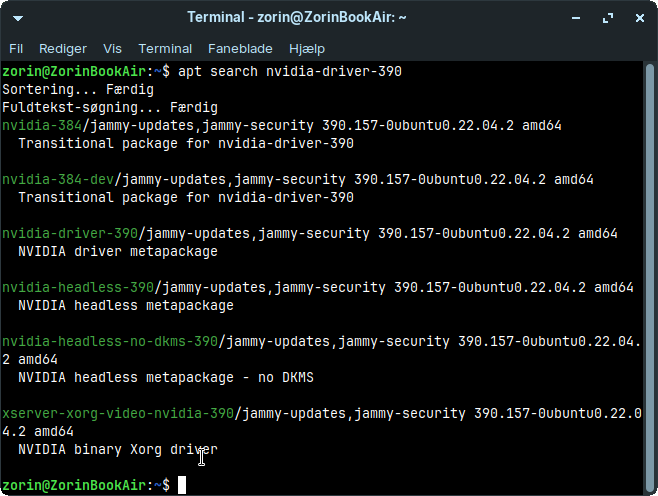
But I can read from all you guys you think I should install a 340driver.. how do I go about doing this, had it been windows from 95to11 I would know
 but not here, or where to look to get it
1 Like
You could try it with the 390 Driver but it could be that it isn't compatible because it isn't clearly labeled as supported for this Card. I would suggest to test it in Live Mode first.
If You want go the safe Way, use the 340 Driver.
EDIT: If the Driver shouldn't be in the Repo's, You could download it from Nvidia, too:
If no proprietary nvidia driver is shown in Software&Updates > Additional drivers, then there is no driver offered from the repository for your nvidia card.
You can try
apt search nvidia-driver-340
IF it shows up...
sudo apt install nvidia-driver-340
I would recommend to install kernel 5.15 before as even the 390 driver from the repository needs kernel 5.15 (later kernel versions that would also be supported have reached EOL)
It did not show 
I downloaded this but only got a .run file, it will only open in texteditor or libraword - google suggests a kernel update
I think I need a slow step by step process for this
You have to use it in Terminal. But You need an older Kernel for this Driver. Like @Forpli, I would suggest to take the 5.15 Kernel. That should work.
Yes okay, well the Kernel thing I definitely need a slow step by step process for
You are on Lite 17. So, there should be the 5.15 Kernel in the Repos if I remember correctly. Let's see if it is true. Type in the Terminal:
apt list linux-headers-generic
sudo apt install linux-image-5.15.0-83-generic linux-headers-5.15.0-83-generic linux-modules-5.15.0-83-generic linux-modules-extra-5.15.0-83-generic
Done
1 Like
it was, I did Aravisian's long code
1 Like
So I did the install. not that I can tell anything is different with this other Kernel (whatever it is a kernel does) I did however have two times today that the mac would not but it kept saying something about not enough vram or something, but then I wanted to get into the recovery menu, så I spam pressed left shift button after powering down, but then it just started into the desktop.
But yes I am ready to install the 340driver - I have downloaded the .run file from nvidias page and have it on my mac 
Unfortunately, I am not familiar with .run files. Since this method requires the driver to be reinstalled after every kernel update, I have never used it.
I assume you have not yet booted with the 5.15 kernel. To do this, you need to restart your computer and select "Advanced options for Zorin" in the Grub menu, where you can specify the kernel you want to boot from. This only applies to this one boot process; the next time, it will be the normal 6.8 kernel again (however, you can also set an older kernel as the default permanently if it works better with your computer).
If the grub menu is not displayed during boot, press the esc key (with UEFI) or the left shift key (with BIOS) repeatedly.
In fairness, @smsdalle may end up sticking with the 5.15 kernel, removing the need to install with DKMS.
To install the driver using @Forpli's preferred 'legacy' method:
sudo add-apt-repository ppa:kelebek333/nvidia-legacy
sudo apt update && sudo apt install nvidia-graphics-drivers-340
Here is a link to that repository so you can check and reference:
The nvidia 340 driver of kelebek333 ppa should work with kernel 6.8.
I recommend kernel 5.15 only for the installation of the 340 driver from the ubuntu repository or the .run file.
If I were you I would also test before you install the 340 driver if it helps to set an environment variable for the GSK renderer during the use with nouveau.
sudo nano /etc/environment
and add the following line to it:
GSK_RENDERER=cairo
or alternatively
GSK_RENDERER=gl
Then press ctrl +o to save, press enter to confirm and ctrl + x to exit and then reboot. You can test both variables, one after another (only add cairo or gl, not both).
Here is an interesting thread about the 340 driver in ununtu 24, Zorin 18 is based on. Not for now, but if you consider to switch to Zorin 18 lite later. Some users got the 340 driver also to work there with some workarounds.
@Aravisian Is dkms not needed for kernel updates within a kernel line, e.g. within the 5.15 kernels? I think this kernel still gets updates, or not? I'm not familar with dkms.
What's about the kelebek333 ppa when there are kernel updates for the 6.8 kernel?
DKMS is needed for any kernel upgrade, even if from 5.15.0‑101 to 5.15.0‑102; it is still a new kernel package.
Kelebek's builds include DKMS and the dkms.conf, so will build for kernel upgrades, however, to the best of my knowledge, the API changes by 6.8 are beyond its scope.
1 Like