wauw - okay this takes some extra reading, and fiddeling. I might not have time over the weekend, I will report back with my findings  I will start by trying to boot into 5.15 and then test the enviroment for the GSK Renderer. and will go from there - not that the system is better yet.. But you guys are SOOOO FREAKING AWESOME that you take the time to look into this and pick your brains just to help me out with my 14 year old macbook air, that is all just for fun.. though the whole Zorin is absolutly stepping stone to get away from Windows.. but thanks everyone for what you are doing
3 Likes
Okay - so I have had some time today, but I've hit a snag.. I cannot boot into recovery or grub.. I am on a macbook air 2011 and I have tried every key on the keyboard and searched google.. the google ai search thingy that I hate, did suggest writing something in terminal that shout boot it in when restarting, but terminal did not recognise the code, so right now I've hit a wall
When only Zorin is installed, GRUB is disabled. So, You would have to enable it. When in Zorin, open the Terminal and type:
sudo nano /etc/default/grub
Then You should see a wthite Textblock similar to this:

Here change two Lines to:
GRUB_TIMEOUT_STYLE=menu
and:
GRUB_TIMEOUT=20
For the last one, You can take another Number if You want. The Number says how long the GRUB Menu appears in Seconds. So, 20=20 Seconds.
When You have made the Changes press ctrl+o to save the Changes, Enter to confirm and ctrl+x to exit. Back in the normal Terminal Overview type sudo update-grub to make the Changes affect. Don't forget that! Without it, it will not work.
is there a code in terminal I can use to force the restart into the grub menu? left shift does not work on this macbook air neiter esc or ctr+alt+f2 - I think Ive tried every keys suggested online
Have you tried Tab?
Did you change the Grub file entry to menu?
GRUB_TIMEOUT_STYLE=menu
and:
GRUB_TIMEOUT=20
yes I rechecked after startup - the changes are there
but no I have you heard of Tab being used - let me just try
no tab dosent work either.. I tried connecting a usb keyboard - but that one is not even active here within the os - so that didn't work
Well, the issue that is immediate is that you are trying to reach the recovery menu to select the 5.15 kernel, right?
Yes:
sudo grep menuentry /boot/grub/grub.cfg | cut -d "'" -f2
Identify the menuentry. Mine looks like: Zorin OS, with Linux 6.14.0-36-generic
So grab yours that has the 5.15 kernel.
Back into Grub Menu, add it as the default (I will say it is 5.15.0-92 - adjust as needed to match yours):
GRUB_DEFAULT="Ubuntu, with Linux 5.15.0-92-generic"
GRUB_TIMEOUT_STYLE=menu
GRUB_TIMEOUT=10
ctl+o then enter then ctl+x - now run
sudo update-grub
This will consistently ensure you boot on that kernel.
You guys are so awesome to help with this
I can also see this one
Zorin, with Linux 5.15.0-83-generic (recovery mode)
but I should choose the non recovery one?
Yes, choose the non-recovery one since you are looking for a normal boot.
but do I get into the grub this way, or does this actually skip the need for grub? and just boot zorin up on the 5kernel all the time? 
Yes, the method above skips the need to access grub menu at boot, so that you boot directly into the desired kernel.
Yes, this means you are still unable to access Grub Menu and on a MacBook - that is not surprising. For a MacBook, using rEFInd instead would be a better option for managing grub - but for now, let's tackle one step at a time.
cool - thanks - I'll try
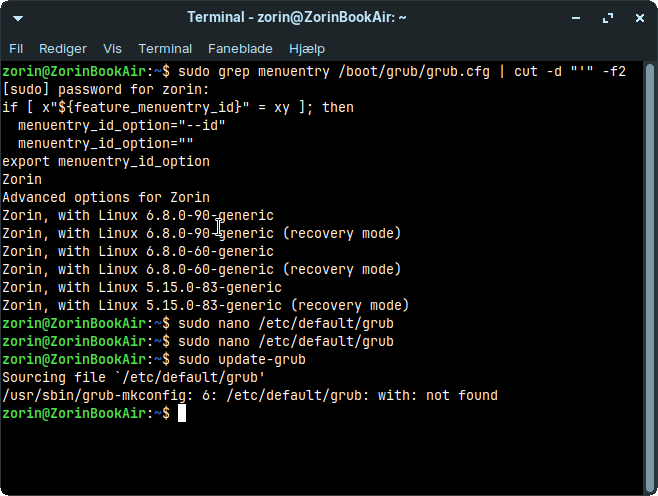
What shows in terminal after hitting enter key when running
sudo nano /etc/default/grub
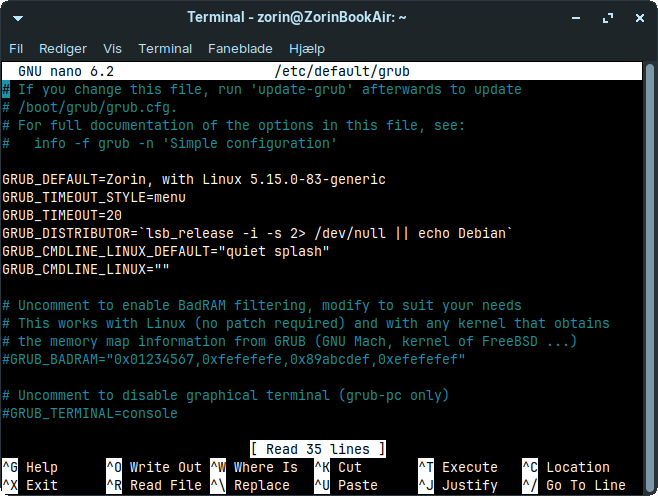
Please set quotation marks in this line:
GRUB_DEFAULT="Zorin, with Linux 5.15.0-83-generic"
and then save the file as shown above, exit and run sudo update-grub.
awesome thanks - I totally missed the quotation marks
1 Like
when I do it with edit it and save it ctr+o, enter, ctr+x and write
sudo update-grub - it says
Sourcing file `/etc/default/grub'
/usr/sbin/grub-mkconfig: 1: /etc/default/grub: If: not found
and when power on or restart again I'm still here in kernel 6
But do you see the grub menu now during boot? If yes, you can select the advanced options for Zorin there and choose the 5.15 to boot from.
I don't know what the error means.