no grub menu does not show itself, not by itself nor by me holding down any button, not shift, or tab or esc or ctr+alt+f2 or f1 or any button. If I hold down any button other than Alt by itself (Alt will show the boot menu), I just have a black screen with any other key or key combination, if I repeatietly press buttons I also just get black screen and if I stop/release it just stays black, will not boot into zorin. I have to power off and on again to get in. So the only way I can see is to get the script working so the system itself will boot into kernel 5.15 so we can try and get the cpu under control
I'm wondering if adding
GRUB_TERMINAL=console
to /etc/default/grub
could help (update grub after editing the file), but I'm not familar with Macs.
But then you would have to undo the command that skips the grub menu before.
Unfortunately, I don't know how to do that.
nope - still get the
if: not found
when doing sudo update-grub
Is it possible that you have removed the # at the beginning of the first line at /etc/default/grub accidentally? The line should begin with a # as shown in your screenshot.
If the # is missing, please add it, save the file and update grub.
1 Like
@Forpli's suggestion logically follows.
You are seeing:
And "if" is the very first word on the grub file. By removing that hashtag, it would set it so grub was trying to read a developer comment, NOT the beginning of the actual file.
If you want confirmation, you can post a screenshot of your open terminal showing the contents just as you did in post 56:
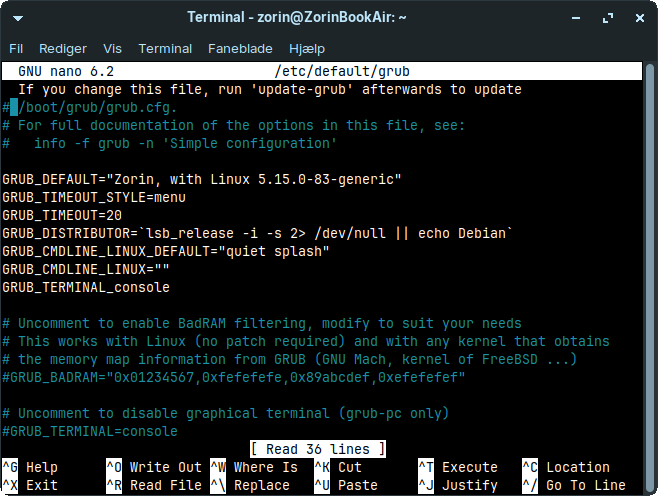
There it is confirmed (Good eye, Forpli).
Accidentally, the hashtag was backspaced during your edit.
Just add the hashtag back making this line:

look like this one:

Tap ctl+o, then enter then ctl+x
Then,
sudo update-grub
1 Like
Yes now it saved on update-grub
and yes well spotted Forpli, I missed that, - you guys are awesome
So now I should just be able to power off and on again and it should boot into kernel 5.15
So after update-grub
I powered off and then powered on again, but I'm still on kernel 6
Might be I misunderstood this.
I think GRUB DEFAULT must be a sol numerical identifer, after-all.
Can you show the output of
sudo grep menuentry /boot/grub/grub.cfg | cut -d "'" -f2
In the screenshot of post no. 54 the output is shown.
1 Like
Oh, there we go.
@smsdalle, can you try:
GRUB_DEFAULT="1>4"
Try this one:
GRUB_DEFAULT="0>4"
save the file and update grub.
Edit: This command is completely wrong.
and then restart see if it boots into the 5.15 kernel by itself?
Yes, please reboot and look if kernel 5.15 is used. Sorry for the many trials and errors.
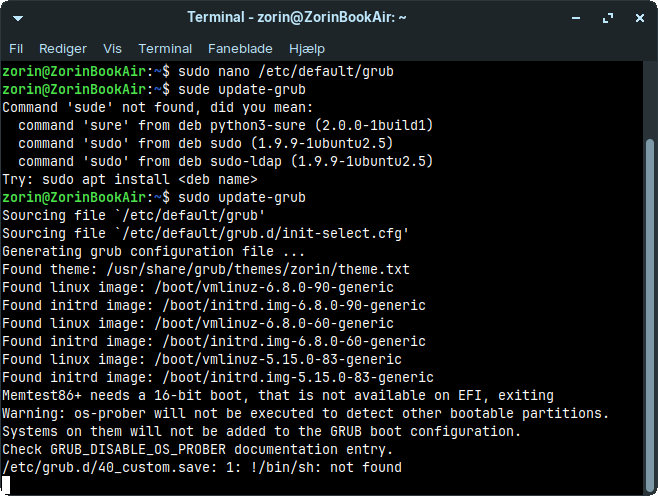
is this relevent, last few line after update-grub
Memtest86+ needs a 16-bit boot, that is not available on EFI, exiting
Warning: os-prober will not be executed to detect other bootable partitions.
Systems on them will not be added to the GRUB boot configuration.
Check GRUB_DISABLE_OS_PROBER documentation entry.
/etc/grub.d/40_custom.save: 1: !/bin/sh: not found
I'm sorry, I'm at a loss right now.
I hope Aravisian or someone else can help you later.
thats okay - thanks so far 