The .deb alone may not be enough if upgrading a kernel. That is what DKMS is for, to shuffle the modules to the next installed kernel.
In this case, the user is best off locking in the 5.15 kernel, installing the 340 driver and then - if not broken, don't fix it!
Do you recommend to save the current kernel version 5.15 as default and also make no updates within kernel 5.15? Are no security updates required? Unfortunately, I haven't quite understood that yet. Sometimes you write that it is essential to always perform kernel updates.
I usually recommend users regularly keep their system up to date.
The kernel is actually low on the list of priorities, in my opinion.
Security updates on LTS kernels get backported, even after EoL.
Security updates in kernels are also not common. Most security updates are in system and package updates.
I often do recommend locking in a working kernel, to avoid regressions and bugs - the 6.17 kernel being a big shining example of the fallacy of "latest and greatest."
The Linux Kernel is primarily motherboard and hardware - so if everything is working, even on an "early" kernel, it means you have all that you need.
In some cases, wifi being a common one... A Kernel upgrade may bring better support or functionality. But this also is less common - so the user should follow release or patch reports to know.
And in that case, the user would know that they have an incomplete module...
1 Like
@smsdalle I hope it is okay for you when I add some informations about the 390 driver of the kelebek333 ppa here. My own threads about the nvidia drivers have already been closed.
That are the packages for the 390 drivers:
I tested the installation in a Zorin 17 live session (sudo apt install --simulate...).
I noticed that the command
sudo apt install nvidia-graphics-drivers-390
also didn't work (package not found):
To install the nvidia 390 drivers (after adding the ppa) you can try
sudo apt install nvidia-driver-390 nvidia-dkms-390 nvidia-utils-390
However, I'm not sure if these are really the patched packages for kernel 6.8 or the original ones from Ubuntu repository, which only work with kernel 5.15, as they use the same name. You may need to give the ppa a higher priority or download the .deb packages manually. It's really complicated to understand how to install the proprietary legacy drivers. I'm not sure yet whether the patched packages are maybe all contained in the tar.gz file.
Uhm - I am acutally really lost right now  I have no idea about any of this, So I don't really know what you are asking, or what going on in the next 13posts
  The only thing I remember doing that got some jammy names on screen was
APT LIST --UPGRADABLE
It does take a turn into confusing territory...
A quick recap:
You are needing the Nvidia-340 legacy driver - in the past, this was installable from Kelebek's repository with a simple command sudo apt install nvidia-graphics-drivers-340
Now, for reasons we do not understand; it is not working and the .deb package is missing from Kelebek's repository.
We then began looking for a .deb package you can use, but since we are not using your hardware - cannot effectively test it.
You can try the .deb package and see if it ties to your card;
https://ppa.launchpadcontent.net/kelebek333/nvidia-legacy/ubuntu/pool/main/n/nvidia-graphics-drivers-340/nvidia-340_340.108-4ppajammy9.2_amd64.deb
thank you so much for the recap okay so I downloaded the .deb package and used
cd ~/Hentet
to get to the download folder and then
sudo dpkg -i nvidia-340_340.108-4ppajammy9.2_amd64.deb
to install it, and it seemed to work, wen it was done it said nothing about any errors, but after restart when I run
lshw -c video
it still says nouveau next to driver=
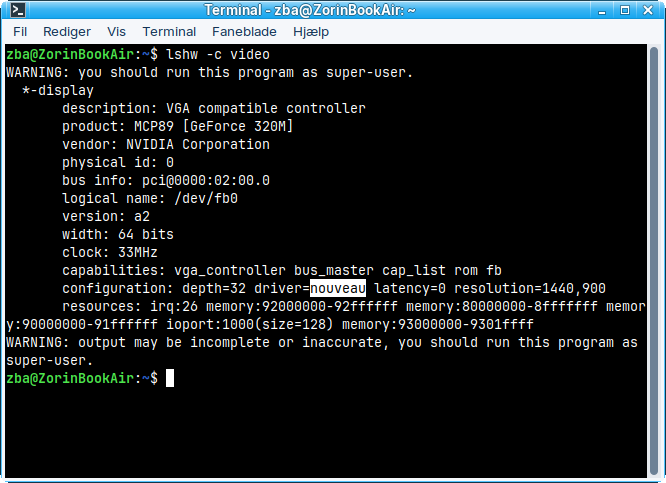
and the cpu and fan is still spiking
Can You type in Terminal nvidia-smi please?
Have you tried installing mbpfan? You can find it here: GitHub - linux-on-mac/mbpfan: A simple daemon to control fan speed on all MacBook/MacBook Pros (probably all Apple computers) for Linux Kernel 3 and newer
well, it's not really the fan itself, the fan goes off, because the cpu goes to 100% even though when you look in monitor and add up all the processes it might be 5% or 10% or 38% but not a 100% but the cpu still runs 100% and then the fan tries to cool it down
NVIDIA-SMI has failed because it couldn't communicate with the NVIDIA driver. Make sure that the latest NVIDIA driver is installed and running.
Hmm ... Okay, try sudo prime-select nvidia to make Your Nvidia Card to Yourprimary Output and then try it again with nvidia-smi
Given the uncertainty of the driver install, I do not think we should try blacklisting the Nouveau driver at this time.
Can you relay the terminal output of:
find /lib/modules/$(uname -r) -name "nvidia*.ko"
And also
lsmod | grep nvidia
Time passes... and over the last several years, we have helped users install Legacy Nvidia drivers. It cannot last forever... We may be witnessing the final end of 340 driver support.
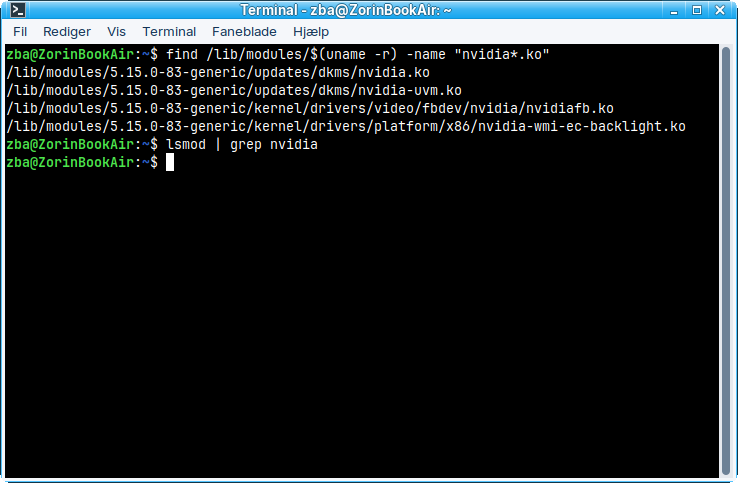
The files for binding the module to the kernel are present, given your first output.
The next output shows no modules are loaded, though.
Does
sudo modprobe nvidia
Have any effect?
unfortunatly no
modprobe: ERROR: could not insert 'nvidia': No such device
maby we are as you said earlier, at an end for legacy drivers
The only idea I have is to try it with Zorin 18 lite when it will be released, install kernel 6.8 and then add the build ppa from kelebek333. I read that some users got 340 to work there (together with setting an environment variable) and the driver package for the build repository looks better than the normal kelebek333 ppa one (all packages here as .deb packages, no tar.gz).
But I'm not sure if it is worth to try. You see the warning in the ppa.
I now doubt that I ever installed the proprietary 390 drivers because it made no difference to nouveau. I only ever looked at where they were displayed in the GUI, but didn't check with the terminal. And the installation with the command for the kelebek ppa also failed for me; I could only do it via the Additional drivers menu.
So they will make a zorin 18 lite, I read it like 17 would be the last lite. I could ofcourse try regular 18 but, when I first started my adventyre with linux/zorin those 4or so weeks ago, it just ran so bad on the thinkpad that was my first try, where lite just runs smooth.. and I was not a fan of the look and all the fancy "motions" when I opend the startmenu or switched between programs
Yes, on your old system Zorin 18 core will probably run bad (also on mine laptop).
If you don't want to wait (the date is not known yet) and like to test how Zorin 18 would run with XFCE desktop, you can install XFCE on Zorin core.
sudo apt install xfce4
and at loginscreen switch between both desktops.
But if I were you I'd wait for the release.
The pure XFCE desktop is not very good looking.
18 Lite will be the last Lite.