I am trying to make my scrollbar wider. I have Zorin OS 18.1. I've seen posts referring to the gtk.css file but I am
not clear on how to create it. Could someone explain it please?
You could try it with disabling Overlay Scrollbars. You can do that in Zorin Appearance. Go there to the 2nd Option from the Bottom (I don't know the english Term for it, sorry) and there You find it:
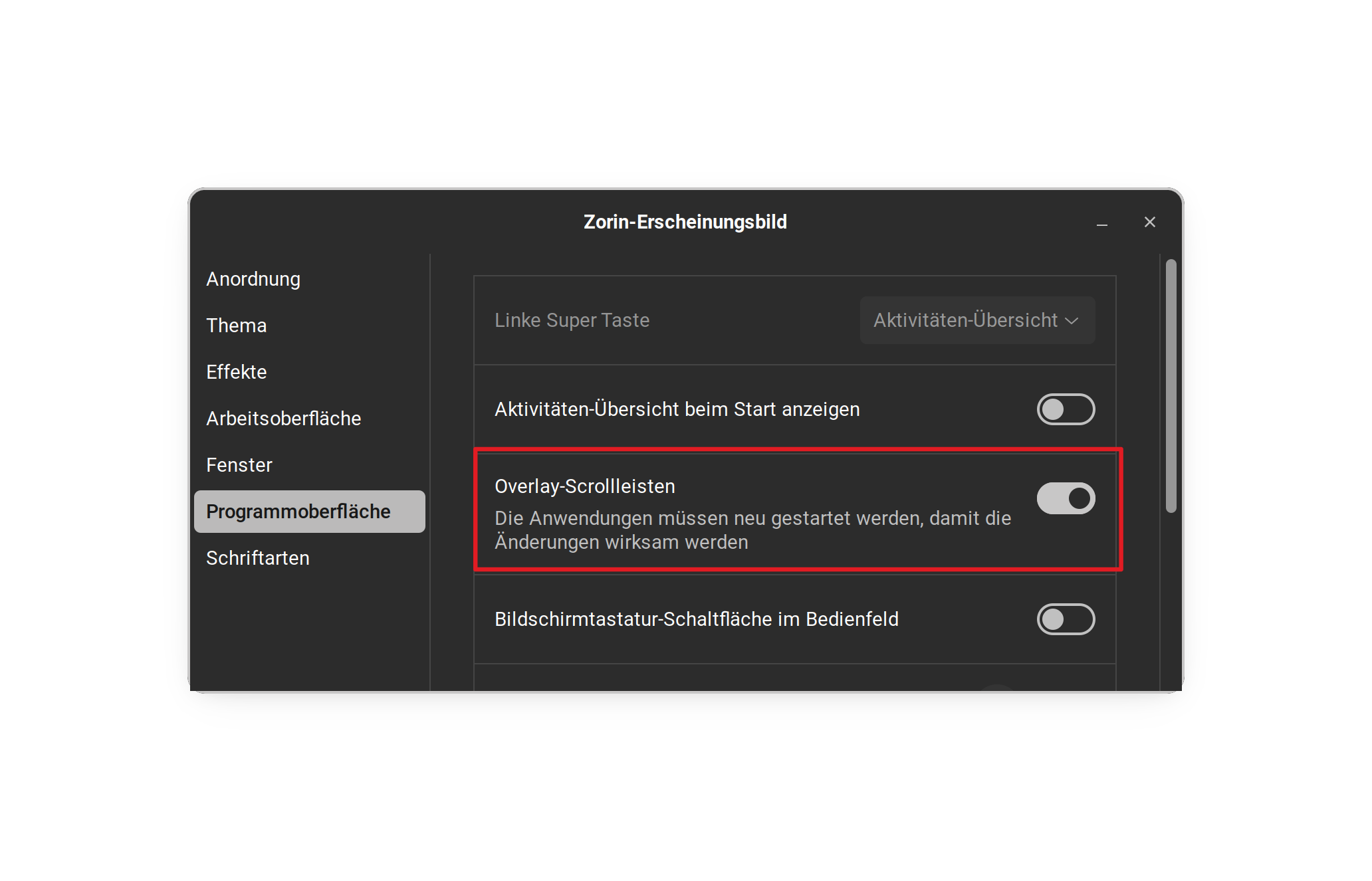
Program interface at least thats the english for that word, I am not currently on zorin so i cant look either
First disable the overlay-scrolling as already mentioned so that the scrollbar is always visible (if you don't like that the scrollbar disappears).
Then create an empty text document at ~/.config/gtk-3.0 and name it gtk.css. Press ctrl+h in your file manager to show the hidden files. The ~ is a shortcut for your home directory.
Put this content in the file:
scrollbar.overlay-indicator:not(.dragging):not(.hovering) slider,
scrollbar.overlay-indicator:not(.dragging):not(.hovering).horizontal slider, scrollbar.overlay-indicator:not(.dragging):not(.hovering) trough {
min-width: 8px;
min-height: 8px;
}
scrollbar trough, scrollbar slider {
min-width: 16px;
}
scrollbar.horizontal trough, scrollbar.horizontal slider {
min-height: 16px;
}
It is a really big scrollbar. You can play with the values and set it lower than 8 px there.
Then save the file and copy it.
Create a new folder named gtk-4.0 at ~/.config and paste the copied gtk.css file there.
Then logout and login again to see the changes.
Here you see the new created gtk-4.0 folder at ~/.config:
This is the gtk-3.0 folder at ~/.config with the new created gtk.css file.
The scrollbar is only visible when there is something to scroll, otherwise not.
When Zorin is installed, the Folder is already there.
Thanks. I found it and Overlay is turned off.
Thanks for the directions in a newbie format. I will try it and let you know. The screen displays helped.
I have both the gtk-3.0 and gtk-4.0. I created the text file and renamed it gtk-css. Do I need the file in both? I'm restarting now.
Can I run these commands in terminal?
I restarted zorin but no change. When i look at the gtk.css file it looks like one long sentence. I used CTRL-C and CTRL-V to copy and paste from your post.
Yea, you need the gtk.cas textfile in gtk-3.0 and gtk-4.0.
Don"t paste the copied text into the terminal but into the gtk.css textfile.
No terminal to use here in the guide.
To copy the text for the file from my post click on the top right corner, there is a small copy icon.
thanks. Will try it.


