Hello,
I just switched from Windows to Zorin OS. No problems during install and I can use the terminal and navigate all UI. However, when I open brave or chrome (haven’t installed other browsers) the image gets pixelated and chrome homepage will come up but the system is frozen. The only way to get out, is to power reset. I’ve checked resources, drivers, RAM and no errors. It’s an old Lenovo G50-45 laptop.
Note: When I switched from Windows 10 to Zorin, I did it with a newly installed ssd. The system recognizes the storage and everything looks okay but maybe this is the reason the browser is crashing my system?
Idk, I’ve been searching for an answer for the past 24 hrs so please help if possible.
Things I’ve tried:
-Disabled secure boot.
-Im unable to switch to xorg? The gear icon doesn’t show up when clicking on my username.
-Tried chrome - - disable-gpu but command name chrome not found.
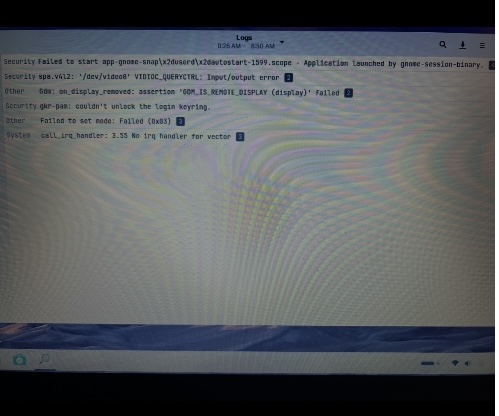
I attached the error logs. I’m not sure what these mean but I have a feeling it’s a graphics driver issue or something along those lines..
Thanks!

Omg, I can’t believe that’s all I had to do. I’ve been logging out and in all morning. Thank you for helping with this issue!
So, the Browsers run stable now? Or do they still freeze?
Hello,
I hope I'm not intruding. I have this exact same issue, Brave locks the entire PC a few seconds after opening and a hard reset (hold down power button > 4 secs) sorts it. I switched to the other desktop, with xorg but that produces gfx glitches before freezing.
Just thought I'd report that 
Michael
Try to launch Brave browser with disabled hardware acceleration
brave-browser --disable-gpu
Its so counter-intuitive isn't it? When I was younger, I learned to play games, you need a dedicated GPU. So to put simply, GPU good, no GPU bad. Everything better with a GPU, faster, smoother, better.
Which is why I was so surprised, if you activate your GPU for anything but gaming, system begins to lag. Were talking, Kdenlive video production workloads, and internet browsing workloads.
Computers can be confusing at times, I totally know what thats like.
Thanks for the info., can I do that outside of Brave, don't think I'll have enough time before it hangs to type it?
Yes. brave-browser --disable-gpu is the launch command - run that in terminal and Brave should launch.
Use that instance to test if Brave stops crashing.
If it does...
Then you can use that launch command as the Exec= line in the brave browser .desktop file to launch it that way from now on.
This topic was automatically closed 90 days after the last reply. New replies are no longer allowed.