Hi.
I've installed zorin os 18 in my dell xps 9315, and camera is not working. Any help ?
Thanks in advance
1 Like
Welcome to the Forum!
Is it a built-in Camera or an external one? did You checked the ''Additional Drivers'' Tab in Software & Updates if there is a Driver offered? Did You checked the Manufacturer's Website if they maybe offer Linux Drivers?
It is a built in camera. Yes, I checked that tab:
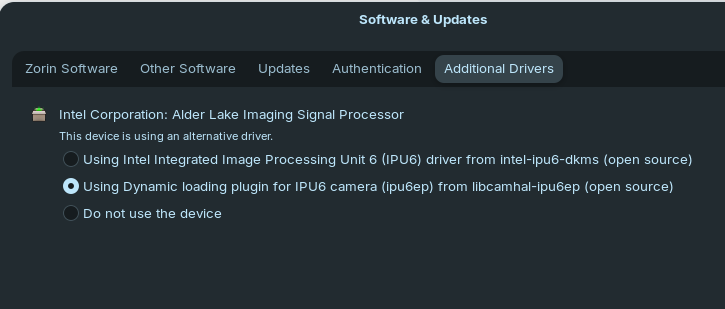
And no. I have not checked the dell's site. I'll do ti
Thanks very much
There are some additional software for ubuntu in Dell's Website, but none is for camera
Is it IPU6?
You can check with
lspci | grep -i camera
If it is...
Can you try
sudo apt install linux-oem-24.04
The firmware for IPU6 needs to be backported in Zorin OS 18. The OEM kernel I mentioned above might have that backport.
If that is no good, there is a repo:
Which you can add, then install the firmware with
sudo add-apt-repository ppa:oem-solutions-engineers/intel-ipu6
sudo apt update && sudo apt install intel-ipu6-camera-hal
Many thanks Aravisian.
When try sudo add-apt-repository ppa:oem-solutions-engineers/intel-ipu6, it says:
ERROR: ppa 'oem-solutions-engineers/intel-ipu6' not found (use --login if private)
But can add sudo add-apt-repository ppa:oem-solutions-engineers/intel-ipu6.
It is the same ?
Thanks
Try it with
sudo add-apt-repository ppa:oem-solutions-group/intel-ipu6
sudo apt update && sudo apt install ipu6-camera-hal
Thank you Forpli.
sudo add-apt-repository ppa:oem-solutions-group/intel-ipu6: OK
sudo apt update: OK
sudo apt install ipu6-camera-hal:
E: Unable to locate package ipu6-camera-hal
Does anything here help? IntelMIPICamera - Ubuntu Wiki
Maybe
sudo apt install intel-ipu6-camera-hal
This is the repository:Packages in “Intel MIPI IPU6” : Intel MIPI IPU6 : “OEM Solutions Group” team
And checking the package details, you can see ipu6-camera-hal listed for Noble.
The .deb packages are also shown:
https://launchpad.net/~oem-solutions-group/+archive/ubuntu/intel-ipu6/+files/libcamhal-ipu6_0~git202506270118.c933525~ubuntu24.04.4_amd64.deb
Given this verification,
sudo add-apt-repository ppa:oem-solutions-group/intel-ipu6
sudo apt update && sudo apt install ipu6-camera-hal
Should work.
It seems the problem is related with the kernel of zorin os 18.
I am having this problem:
Building for 6.14.0-33-generic 6.14.0-1014-oem
Building initial module for 6.14.0-33-generic
Error! Bad return status for module build on kernel: 6.14.0-33-generic (x86_64)
Consult /var/lib/dkms/ipu6-drivers/0~git202406240945.aecec2aa-0ubuntu2~24.04.3/build/make.log for more information.
dpkg: error processing package intel-ipu6-dkms (--configure):
installed intel-ipu6-dkms package post-installation script subprocess returned error exit status 10
I think i have messed up my IP with install and uninstall drivers. I will reinstall zorin os 18 and try each of the above solutions.
II will reply if it solved the problem.
Thanks all of you guys. You are awesome.
I have uninstalled sudo apt purge intel-ipu6-dkms and run the commands above:
sudo add-apt-repository ppa:oem-solutions-group/intel-ipu6
sudo apt update && sudo apt install ipu6-camera-hal

But the driver ipu6-camera-hal was not found. Only the old intel-ipu6-dkms.Hi. I have tested the above configurations in a fresh installation of zorin os 18 and none worked.
So far, I think Zorin OS 18 is far better than Windows 10 and Windows 11, but the camera is a condition to use zorin, since I am a remote developer and use zoom all the time, i have to return to windows 11.
Thanks again to all.
Hi everyone.
Today, I think to try one more time. And finally found a solution for my camera.
Below a list of commands that worked for me:
Step-by-step instructions
- Open a terminal and update package lists:
sudo apt update - Add the official Dell PPA for Intel IPU6 support:
sudo add-apt-repository ppa:oem-solutions-group/intel-ipu6 - Install required kernel modules and libraries:
sudo apt install linux-modules-ipu6-generic-hwe-24.04 linux-modules-ivsc-generic-hwe-24.04 libcamhal-ipu6ep0 dkms - Clone the Intel IPU6 drivers repository:
git clone https://github.com/intel/ipu6-drivers.git - Navigate into the directory:
cd ipu6-drivers - Apply the patch corresponding to your kernel version (e.g., for 6.8.x):
git apply --stat patch/v6.8/*.patch - Register and build the driver using DKMS:
sudo dkms add .
sudo dkms autoinstall ipu6-drivers/0.0.0 - Reboot the system:
sudo reboot - After reboot, open Software & Updates → Additional Drivers
- Select: Using Dynamic loading plugin for IPU6 camera (ipu6ep) from libcamhal-ipu6ep (open source)
- Click "Apply Changes" and reboot once more
I am very happy, because it led me to switch from windows to zorin os.
Thank you very much for all help.
Best regards
Sérgio
4 Likes
This topic was automatically closed 90 days after the last reply. New replies are no longer allowed.