Hello,
I am wondering how I can install firefox without using the snap version via the command line.
When I type apt-get install firefox, zorin OS installs a customized version that requires to open firefox and agree to add the official APT repository. Is there a way to install firefox from the command line without manually interacting with the operating system?
Thank you
Here is a thread that covers this exact issue.
You can remove snap and snapd, then add the Mozzila repository and install Firefox normally.
Canonical, the company that makes Ubuntu, is also the developer of Snap and in a Conflict Of Interest, they adjusted some Ubuntu repositories to redirect the end user to install as a Snap, without disclosing that they were doing so.
1 Like
This is the Installation of the non-Snap Version of Firefox. Zorin has added this Bypass because without it, You would only get the Snap Version even when You use the Terminal to install the APT Version.
So, Zorin integrates that. It will add the Mozilla-own Repo and then You get Firefox directly over the Repo from Mozilla. It isn't a customized Version. It is - when You like it to call it that Way - Vanilla Firefox.
You should get the same Thing when You search for Firefox in Gnome Software and there choose the Zorin APT Version. Then You get an Info Screen what explains that, too.
1 Like
On Zorin OS 18, my experience is that the bypass of Canonical's redirect is no longer in effect, due to the change to Brave Browser as default.
1 Like
Okay, thanks for the explanation. So, what exactly do I need to do to install the official Firefox using only the command line? Without interacting with the GUI?
I tried it with the Zorin 18 USB live stick. I entered "sudo apt install firefox" and wasn't asked for adding mozilla repo.
After that I checked "snap list" and there was nothing shown.
In gnome software manager firefox is shown as Zorin apt package.
In the /etc/apt/sources.list.d no mozilla repo is contained.
I'm not sure what that means. Firefox seems not to be installed as a snap.
This is interesting. I am using Zorin OS 18 as well. I tested this on this same system a couple of weeks ago due to a thread and - it tried to install the snap version.
If I remember correctly, I posted the terminal results showing it.
Yet, now I tested it and it installs APT version (no sign of Snap) and I never added the Firefox repo. I do not use Firefox, so had no need to.
Perhaps an update adjusted this? There has been a lot of feedback over the Firefox vs. Brave topic...
EDIT: I posted too soon.
This gets more interesting...
Here is my terminal result:
sudo apt install firefox
Reading package lists... Done
Building dependency tree... Done
Reading state information... Done
The following NEW packages will be installed:
  firefox
0 upgraded, 1 newly installed, 0 to remove and 0 not upgraded.
Need to get 38.8 kB of archives.
After this operation, 123 kB of additional disk space will be used.
Get:1 https://ppa.launchpadcontent.net/zorinos/apps/ubuntu noble/main amd64 firefox all 1:1zorin1 [38.8 kB]
Fetched 38.8 kB in 1s (39.7 kB/s)
Selecting previously unselected package firefox.
(Reading database ... 448401 files and directories currently installed.)
Preparing to unpack .../firefox_1%3a1zorin1_all.deb ...
Unpacking firefox (1:1zorin1) ...
Setting up firefox (1:1zorin1) ...
Looks like it installed, yes?
But it did not.
Try launching with
firefox
Command 'firefox' not found, but can be installed with:
sudo apt install firefox
Odd.
Then I looked at the package list and saw:
zorin-firefox-installer
Which gave this window - note what it says at the bottom:
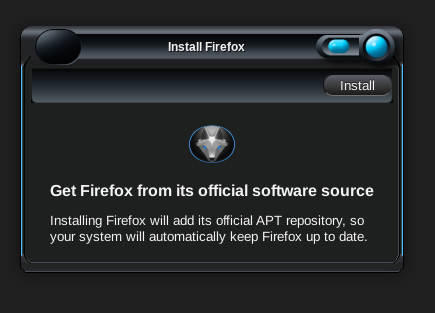
So, when a user runs sudo apt install firefox, it installs a Zorin Installer tool (which will appear in the App Menu as "Firefox") which will then add the Mozilla APT repository and then install Firefox, non-snap.
I have not run the installer to see it all the way through...
But a user will see in terminal if it will install Snap and SnapD or not in the output, asking for a y/n response.
3 Likes
That's crazy, I've never seen anything like it! That means Firefox isn't even fully installed after entering "sudo apt install firefox." I hadn't launched Firefox after the installation to check if it will open.
1 Like
It threw me for a loop, too.
And I would swear on a two puppies and a kitten that a few weeks ago, it showed me a Snap Install in terminal. So this may be part of a recent update.
1 Like
This is exactly the problem I am reporting. Currently, it is only possible to install the snap version of firefox via the command line. The APT version requires manual intervention.
Can you show a screenshot of your output for terminal
sudo apt install firefox
without selecting y to actually install - so we can see what packages it is offering?
Have edited the title as original inferred there was no snap version. 
1 Like
You can follow the official step by step CLI guide: Install Firefox on Linux | Firefox Help
(Note: During step 4 use For Debian Bookworm and Older:)
2 Likes
Yes, I also have noticed that during the beta phase.
But later:
3 Likes
When I install firefox via apt, I get a customized version made by zorin OS. So I have to open firefox from the GUI to confirm that I want to add the APT repository and install it from mozilla.
Thank you. I am familiar with this solution. I am just wondering why it is necessary to click manually to do this. I can use the proposed solution, but I think it should already be the default setting in zorin OS, without having to confirm from the GUI.
This is a Compromise because Zorin has used Firefox in the Past but switched to Brave because of changed Terms Of Use from Mozilla. So, now You have this.
I know the history of zorin OS, I've been using it since version 15.x. However, I still can't understand this choice, which, in my opinion, is a bad design decision. Zorin OS should allow the installation of the APT version of firefox without having to manually interact with the GUI.
1 Like
The bad design decision was made by Canonical when they placed a stub in the repository that redirects "sudo apt install firefox" to installl Snap, SnapD and the Snap Package of Firefox.
Because Canonical has done this; that stands in the repository. The ZorinGroup cannot change Canonical's packaging.
The only way to workaround this is to redirect to the zorin-firefox--installer package, which then also must add the step of adding the Mozilla repository, and then installing Firefox as a .deb package.
This is not a design choice by the ZorinGroup.
It is a fix to a design choice made by Canonical.
It is a one button click of "install" followed by entering your password. It is quite painless.
When I used to use Firefox I would only ever install Firefox ESR. When I ran Devuan the version of Firefox that was always present is ESR. On a side note, any forum member working in Education should be using Firefox ESR. Why? Two reasons,
- It is the only version that can be locked down to prevent students accessing sites they should not be visiting, (don't know how Brave scores on this front) and
- Firefox is the best browser for screen readers, even with Windows running NVDA. I have no information as to how Brave fits in with the Accessibility ecosystem.
I agree that Canonical is to blame. However, I don't understand why it is necessary to interact manually via the GUI if you want to install it via the command line. Couldn't it be requested during that installation? Or couldn't some parameter be passed to bypass it?