I really need help, i have installed and flashed my usb drive with the current zorin os, i loaded zorin from the boot loader into a virtual session but my laptos keyboard wont work within zorin, i managed to connect to the internet using the on screen keyboard to try and update the software but it keeps saying installation failed i dont know what todo to make the keyboard work let alone install and update zorin as my computer's os
1 Like
Zorin has a try feature before you install it. try just doing what you would do, Boot from the thumb drive wait for the zorin desktop to appear and just try zorin. it wont be installed but if everything works on your machine it will when you and only you chose to install it. and if ya have troubles after the install just ask here in the forum and we will do what we can to help you. open things up, look at whats there in the try feature its running on a vm for you to test out all the features before you make a decision
1 Like
Exactly, forget trying to use a virtual machine, they are notorious for not being able to utilize hardware. Instead, boot off the thumb drive, then click on Try Zorin OS. This will allow you to do what it says, and get a feel for the OS. Unless your computer is over 10-years old, I don't suspect you will have any troubles running Zorin OS 18.

2 Likes
Yeah thats what i meant, i was in the try before you install that was what i meant by virtual machine my mistake, but yeah it was in the try before you install that the keyboard wasnt working
I believe that this notebook was released May of 2026.
This may mean network and also keyboard drivers that are included in Zorin OS are not up to date for such very new hardware.
This makes installing Zorin OS 18 a bit trickier if you need a newer kernel.
As an alternative, you might first check a Rolling Release or Cutting Edge distro like Fedora.
1 Like
Okay makes sense, had my heart set on zorin as it seemed like the best option to me as i have never used linux before
Don't fret too much, Zorin OS 18.2 will role out not too long from now, (don't know exact date) it should come with a later kernal when that happens, then you can remake your thumb drive install, and then you should be ok.
2 Likes
Maybe @HighLnd can test ZorinOS 18.1 via "Try Zorin" from USB. It will be slow due to USB limitations.
If some (new) hardware support found missing, an option could be to manually introduce a later kernel. But that is a bit of extra work.
2 Likes
was asking in the ubuntu forum on that laptop its a macbook and very new 26.04 will not run it at all and the 26.10 limited version of ubuntu also states the acer swift air can be installed but the wifi and a few other problems may arise and its not very stable. so not sure where to point ya on a compatable OS. maybe someone else on here may have some suggestions
You can not install a later kernel or upgrade the kernel on a live boot stick, even not on a persistent one.
The best would be to test a distribution with a current kernel, e.g. the latest Ubuntu.
Edit: I just see @wesoliv429 post. That does not seem to work well.
If you have another USB drive which is big enough (20 GB), you could try to install Zorin OS on that USB drive to test if it would work. Then, after the installation, boot from that USB drive and install a new kernel, e.g. Liquorix.
For the installation process you could connect an external keyboard if you have one.
1 Like

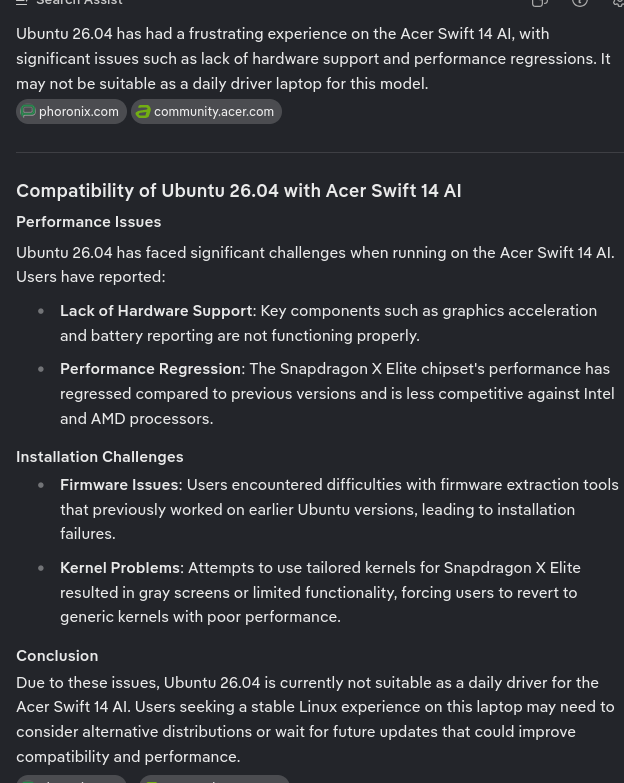
Not sure what todo, i think i will wait for a new update for zorin to fix the issue thank you all for the help
1 Like
Smart. When I got my old computer back in 2001 during the pandemic, it was so new, that the current version of Zorin OS at that time, version 15, was too old to utilize the hardware. Since version 16 hadn't released at that time, I switched to using POP OS for a year. POP OS is one of those distro's that always push for the latest and greatest. (Not good if you have an older then 10 years old computer)
Anyways, thats what I did, before I had switched to Zorin OS 16. I did buy a new computer this year, but I think it was made several months prior to me purchasing it, as I have had zero issues with running Zorin OS 18.1 on it, in reference to it fully utilizing my hardware. It sounds like your computer was made even more recent then mine, which would explain why your having issues.
Waiting most indeed is a logical choice, if no distro is new enough to support your hardware, due to kernal issues. Zorin OS 18.2 will drop soon, then you will be able to install the latest version, and hopefully get you going. For now, just use an older computer, your phone, or tablet to surf the webs.
1 Like