I'm using Zorin OS with a Wayland session and I'm facing an annoying visual issue with some applications. Apps like Spotify (both Flatpak and .deb) and the Google Chrome profile picker window are showing a blue, legacy-style title bar (it looks like Windows 95/classic theme) instead of the native window decorations.
I checked GNOME's Looking Glass (lg), and the windows are indeed running as native Wayland surfaces (metaSurfaceActorWayland), not XWayland.
In Chrome, Preferred Ozone platform is set to Wayland. The main browser window is fine, but the "Who's using Chrome?" startup window always shows the blue bar.
For Spotify, I tried launching with: --enable-features=UseOzonePlatform --ozone-platform=wayland and even --enable-features=WaylandWindowDecorations. The app runs in Wayland, but the blue border persists.
It seems like Mutter is forcing a Server-Side Decoration (SSD) fallback because these apps aren't communicating their CSD (Client-Side Decorations) correctly to the Zorin environment.
System Info:
OS: Zorin OS 18
Session: Wayland
Apps affected: Spotify, Chrome (Profile Picker), and some other apps.
VGA: 9070XT With MESA 25.3
Has anyone found a way to force these apps to use the system theme or at least hide this blue fallback bar?
It's a cross all distro its affected. Tested on elementary OS and Solus OS. So it's not specific to Zorin. My guess is that Spotify is packed wrongly from host.
No, it's a default installation of ZorinOS 18 Pro. I only selected the Windows 10-like theme in Zorin Appearance. However, the issue persists even if I select any other theme within Zorin Appearance. The problem only disappears if I log in using XORG (X11) instead of Wayland. But I want to use Wayland because of my 165Hz and 144Hz monitors; on XORG, the refresh rate feels off/jittery.
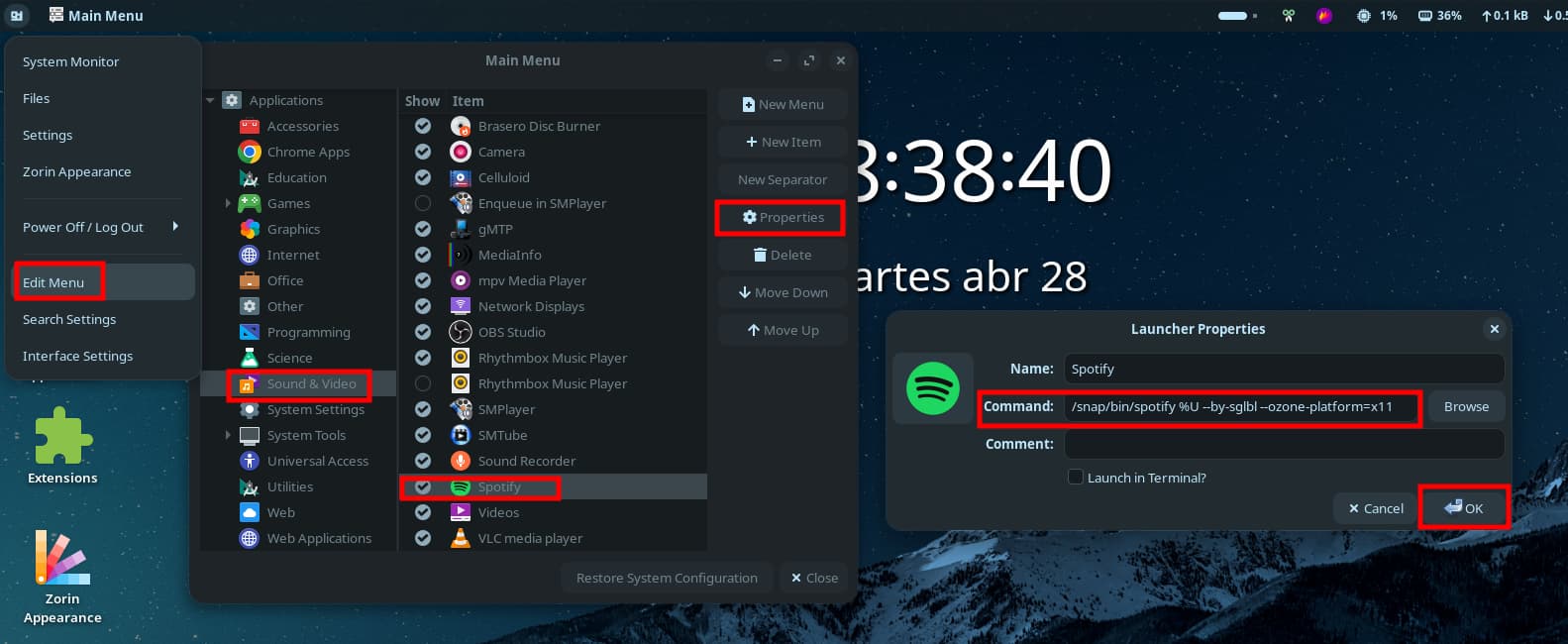
The solution is actually simple, you just need to force spotify to use X11 support instead of buggy and ugly wayland. Since spotify is an electron app, wayland support is really problematic like always.
If you want to stay in wayland and still want an easy solution (tested for official snap package, since the top result on software store is flatpak and it's not the official one):
Run this on the terminal:
spotify --by-sglbl --ozone-platform=x11
If you want to make this default, from menu open "Main Menu" (or on a theme with top-panel, right click and select "Edit Menu" and follow the steps: