Is the inability to allocate more than 50% of the RAM a physical limitation? And... I'm not entirely clear what this means for the graphics card. For example, if I buy a gaming laptop with both integrated and discrete graphics cards, can I use the integrated graphics for Linux and the discrete graphics card for the virtual machine? And if I have multiple virtual machines, can they access the same graphics card if they run one at a time, not all at once? Or, if we're talking about a PC, can I install multiple graphics cards and assign each one separately to different virtual machines, but the one assigned to Linux must be connected to the monitor?
Is there a book that provides fundamental information?
I'm currently trying to return the laptop to the store and get a different one, because I read the Acer forums and realized it's not a laptop, it's a ■■■■ sandwich. It has hardware issues even under Windows 11, the environment it was designed for.
This book is more than a community because it provides fundamental knowledge. I'll give an example:
-
How do I set up keyboard shortcuts like in Windows? For example, I want to switch keyboard layouts with Alt+Shift, but I can only select three keys in the keyboard settings. I also don't like the back-and-forth switching between layouts; I want them to cycle through. How can I do this?
How can I set up copy and paste with Control+C, Control+V? How can I delete with Shift+Delete? -
Where is the Network Connections folder? How do I configure connections? How do I configure the network?
-
How do I put "My Documents," "My Computer," "Trash," and "Network Connections" folders on the desktop?
-
Where is the Device Manager located, and how are drivers installed? Can I add it to the "This PC" properties?
-
Where is the Process Manager located, and how do I configure it for the Control+Alt+Delete hotkeys? 6) Where is IPCONFIG?
-
Where is the registry and how is it managed?
-
Where are the services located and how do I set permissions for running processes?
-
How should I configure a virtual machine to run demanding applications that need access to the video card, processor, peripherals, and so on?
-
How should I install applications if I get a TAR archive instead of an executable file?
-
If I use more than one video card, where should I set permissions for specific applications (for example, if I want to set the operating system to set the integrated graphics resolution to 4070 for one virtual machine, 5080 for the neural network, 5080 for the renderer, and 1070 for another program?
-
Where are the operating system log files that I should clean?
...And most importantly, how patient will you or other users be to answer my utterly stupid questions (and they are stupid, since I know nothing about Linux). I have a conscience and don't like being a burden to others. That's why I primarily look for books, but books like "Linux for Dummies" don't provide the information I need.
These are already set up, by default. The only place that it does not work is in terminal - there is no way around that. In terminal, ctl+shift+c/v are both used, since ctl+c is hardcoded (from way back in the old days of Unix) as "close".
Again, only the terminal has that - everything else in GnuLinux Desktop uses ctl+c for copy and ctl+v for paste.
This is not your fault: Gnome Hides this.
In Settings, go to go to Keyboard, then click View and Customize Shortcuts
Scroll to Typing
Look for Switch to next input source.
If you want a fast and efficient way, you can Right Click Copy and Right Click paste this line into terminal and hit enter:
gsettings set org.gnome.desktop.wm.keybindings switch-input-source "['<Alt>Shift_L']"
Then this line:
gsettings set org.gnome.desktop.wm.keybindings switch-input-source-backward "[]"
Gnome introduced that this cannot be disabled a few years ago. It is one of the reasons I personally think Gnome Desktop is not a good choice for Windows Migrants. Yes, it is as restrictive as Windows OS is, but in different ways.
I will let Gnome Users address this; I am under the impression that this should already work.
You list many different other questions in this thread. Instead;
Start a new thread for each individual question.
Some of these, I have already answered. For example:
There is no Registry on GnuLinux. That is Windows OS System only. You do not manage it here; because it does not exist.
This does not mean you cannot do what you are trying to do. It is only that the system is different, therefor the method is different. That there is no registry does not mean something is lacking. It means only that it is a different system.
Books and YouTube Videos can be helpful resources but they do not really allow easily narrowing down to One Specific Problem. It becomes sort and sift.
On the forum, we have been helping users with questions about the new and unfamiliar for years.
1 Like
Yes, I moved this thread to Feedback
And advise the O.P. to create individual help request threads on the many questions.
1 Like
Thanks for the reply. I was trying to use these keys in the terminal specifically, since it involves working with text.
Is there a complete list of keyboard shortcuts for Zorin OS? Also, a complete command line dictionary and descriptions of how to construct complex commands (with attributes, hyperlinks, etc.)? I wouldn't want to create a cluttered forum by creating a separate thread for every question about hotkeys and the command line.
Doesn't Linux have a registry or anything related to Windows? Okay, let's say there's a service, like licenses like in Autodesk programs or an update for some program, and I want to disable the process associated with this service or prevent a specific program from starting a process that accesses another program. How do I do this in Linux?
I agree that switching between ctl+c and then ctl+shift+c in terminal is annoying and a problem I have never managed to meaningfully solve.
Settings > Keyboard > Keyboard Shortcuts
The terminal comes with a manual which is accessed using the man command. For example, you can list the contents of a directory with ls command. Let's say you want to look up the Manual on that:
man ls
To look up the manuals own manual:
man man
You can review the entire manual online:
The terminal follows a simple grammar syntax which is easy to remember and follow. Command followed by path is the most common.
You also can look at:
1 Like
I can confirm that it works out of the box.
But as the OP mentioned the device has issues even under Windows, I'm assuming that's the main reason they are having troubles under Zorin even with the basic features.
Settings > WiFi / Network
"Software & Updates" > Additional
If the above is blank then you are good to go because Majority of the required Drivers are already included in the Linux Kernel, so there is no need of manual installation.
There is System Monitor available, through which you can monitor the running processes. And the default keyboard shortcut for it is Ctrl+Shift+Esc
IPCONFIG is available as IFCONFIG (CLI only afaik)
I will suggest first take your time and go through The Zorin Manual shared by @swarfendor437. Once you complete the walkthrough you will get some basic idea and then can dive deeper. But focus on one thing first, One step at a time.
2 Likes
You are still assuming it as a Windows user perspective. Things like that have different mechanism and works differently under Linux. Instead of Registry or services.msc, under Linux there are crontab, systemctl, configs and scripts which have different use cases and manage/perform certain group of tasks which users can modify if they want.
But these are recommended for intermediate to advance users only. Just like in the case of Windows where Registry and Services.msc are not recommended for normal users.
This 50% limitation to allocating from your Physical RAM is the same rule of thumb for any software application used to create Virtual Machines - if you exceed half of your physical RAM you are likely to crash the OS.
You run one virtual Machine at a time. Technically if you have enough RAM you could also create a VM inside a VM but personally I don't see the point.
To give you an idea of the various settings available to you in virt-manager, take a look here:
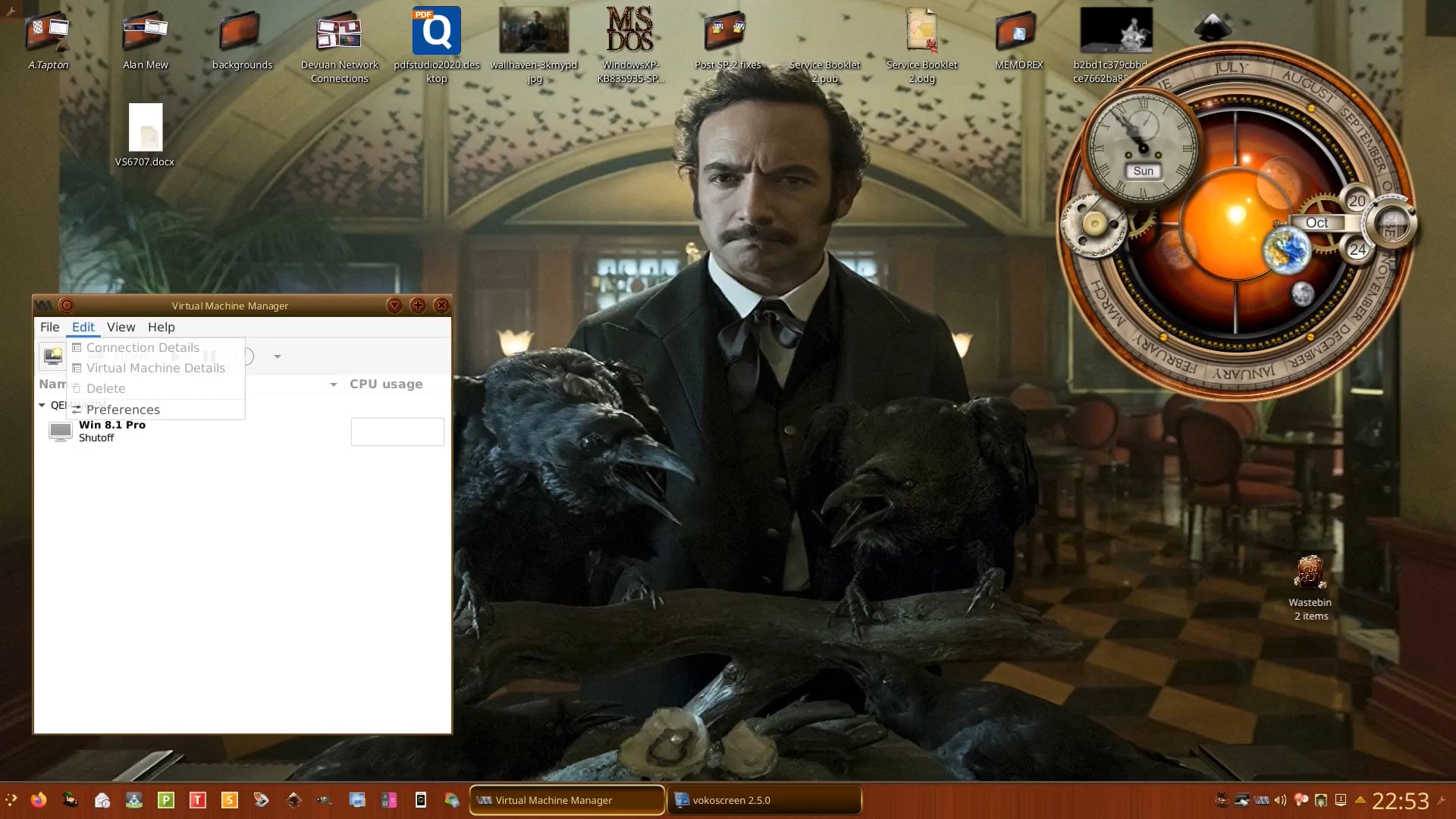
Have you looked at the Unofficial Manual I created for Zorin 18 Core yet? (Still a work-in-progress but you can find some useful information in it nonetheless.
Five years ... so you began using Zorin on version 16? That's what I went back to. Very happy with it. I also work in IT but want my home computer to function as a stable appliance I can depend on. I suspect one reason for your gentle learning curve has been your experience in IT. You have the instincts born of that experience to pop the hood when needed. Many do not.
MS-DOS 6.22 was nor an OS it was with windows 3.11, but thank you for souvenir...
I'm wondering if part of your problem is the newness of the laptop you were using. Many of us in the Linux world are running older hardware because Linux works more efficiently and you can buy something and keep using it for many years - even decades - with Linux.
I've had very good luck with both Dell and Lenovo. Dell sells computers with Ubuntu and Lenovo is kind of the unofficial laptop brand for Linux users because their hardware tends to be highly compatible with the Linux kernel.
A laptop that is 3-5 years old might be much cheaper than a new one and would most likely run very well with just about any Linux distro.
If you get something brand new, you might run into insufficient hardware support for it in Zorin. If you find your hardware isn't working right with a newer laptop, then you may need to consider a distro like Fedora with KDE that prioritizes cutting edge updates vs. slow and stable updates like Ubuntu/Zorin. That, or wait for Ubuntu 26.04 to release in a few weeks.
While Fedora with KDE has an interface that feels more like Windows 10 than Zorin, I have two caveats about it:
- You'll need to spend about five minutes installing RPM Fusion so that media files (mp3, mp4, heic, etc.) can be viewed or created.
- Drivers for NVIDIA GPUs take a bit longer to install vs. Ubuntu/Zorin, and they can sometimes be a bit buggy due to Fedora's Wayland-only approach.
Some people who want the cutting edge updates of Fedora but don't want to deal with the above-listed hassles will install Nobara, which is Fedora but with the above-mentioned tweaks already resolved out of the box.
1 Like
MS DOS 6.22 was and is an operating system distributed in a boxed version. It may not have been successful in the West and Europe, but it was popular in Russia as the first version of MS-DOS to support the Cyrillic alphabet out of the box.
1 Like
And it wasn't ever really an MS product, by that I mean they did very little coding. They purchased Quick and Dirty DOS.
Correct - I started on Zorin 16.
I didn't actually 'work' in IT, I was in a production (manufacturing) area, but as my area of responsibility was the first to be converted from a paper-based to electronic-based system, I was the liaison between users and the IT team on that, and got interested that way. The interest continued throughout my working life and while staying in my 'real' job, I continued to help develop the system.
I'm now happily retired, but you don't unlearn 30+ years of experience.
I have plenty of old hardware, so old that I can't even watch YouTube in 360p. But right now I'm faced with the question of upgrading: either an i9, 128GB DDR5, 5080, or buying a used server motherboard with 256-512GB of DDR3 RAM, two xenon chips, and a Tesla graphics card. Thanks for the advice, I'll read up on Fedora.
I've found a good AI can help me calculate what's going to be the best hardware configuration for my use case. It can also frequently let you know what Linux support is like for a particular device.
The i9 with 128 GB DDR5 is probably more than most of us here need, but again, it depends on your use case.
2 Likes
An I9 CPU, (You don't mention GPU, but I assume your aiming for an Nvidia 5090) and 128GB of DDR5, is way more then most people need. The SPECS you talk about, is for someone who runs multiple VM's, or does high levels of PRO video editing, CAD, or 3D modeling.
I personally bought a new machine in 2021, an MSI GE-76 Raider notebook, and its got all I need, for general computing, internet plus streaming, normal photo/video production, and gaming,
CPU: 10870H I-7 8-Core 16-Thread
GPU: Nvidia 3080 16-GB
RAM: 32-GB DDR-4
Storage: WD-2TB upgraded to 5TB
Built In Screen: 17" 1080P LED
External Monitor: Dell 4K 32" 144-HZ 1-MS IPS display
Networking: 2GBps Ethernet & WIFI-7
Keyboard: Keychron Q6-MAX
Mouse: Steelseries Aerox 5
Which is all I need. I will be changing out the SteelSeries mouse eventually however, because I am having issues with the scroll wheel, and sometimes clicks not registering.
Other then that, this setup is all I need. If I was buying a computer today though, I'd be going with an all AMD system. Nvidia as a company is dead to me, Jenson Wong lost all my respect. Lisa Sue at AMD, actually gained more of my respect.
