Zorin software updater question

When I start up the computer, after a couple minutes, the software updater comes up and informs me that there are updates for me to perform. However, since I prefer to use the terminal to update my computer, I usually close it. I do "sudo apt update && sudo apt upgrade" in the terminal instead.

However, I tried to turn off these automatic software updater prompts. It is not supposed to automatically prompt me like this. But it still does. Please see the attached screenshot. How do I fix this?

Also, I notice that when I use the software updater, I do not need to enter my password. However, I do need to enter my password in order to update using the terminal. Why does the software updater not need a password? Is it already automatically running with root privileges?

sudo nano /etc/apt/apt.conf.d/20auto-upgrades

APT::Periodic::Update-Package-Lists "0";
APT::Periodic::Unattended-Upgrade "0";

Tap ctl+o to overwrite, enter to save current configuration, then ctl+x to exit the editor.

The GUI software updater uses a Polkit Rule assigned to your user account. When you access via terminal, you are bypassing that, so must elevate privileged commands manually.

APT::Periodic::Update-Package-Lists "0";
APT::Periodic::Unattended-Upgrade "0";

The file /etc/apt/apt.conf.d/20auto-upgrades already has this configuration. But the software updater still pops up after a few minutes every time I turn on the computer and have updates pending.

sudo apt purge software-properties-common software-properties-gtk python3-software-properties

I would prefer to avoid uninstalling the software updater, in case doing so would break my system in some way. For example, I notice in the GUI that there are a lot of zorin-exclusive PPAs and packages listed there. I do not want to mess that up somehow by uninstalling the software updater. Nevertheless, I will consider trying this if I am unable to otherwise solve the problem.

Forget about the Command. Would be a bad Idea to use it. I will delete it.

What if you remove it from autostart?

/etc/xdg/autostart/update-notifier.desktop

The log out/in or reboot - it should not autostart and run, thereby not nagging you.

this works, thanks

Recently, I have been having a problem. If I try running "sudo apt update" after I start up my computer, it always gives me this error.

E: Could not get lock /var/lib/apt/lists/lock. It is held by process 1534 (packagekitd)
N: Be aware that removing the lock file is not a solution and may break your system.
E: Unable to lock directory /var/lib/apt/lists/

This lock lasts anywhere from 5 to 20 minutes.

What can I do to fix this problem? Is it related to the fact that I removed "/etc/xdg/autostart/update-notifier.desktop" from autostart?

Did you check if the .desktop file is still removed from /etc/xdg/autostart and your settings in Software&Updates are still as you want? Maybe there was an update and changed something.
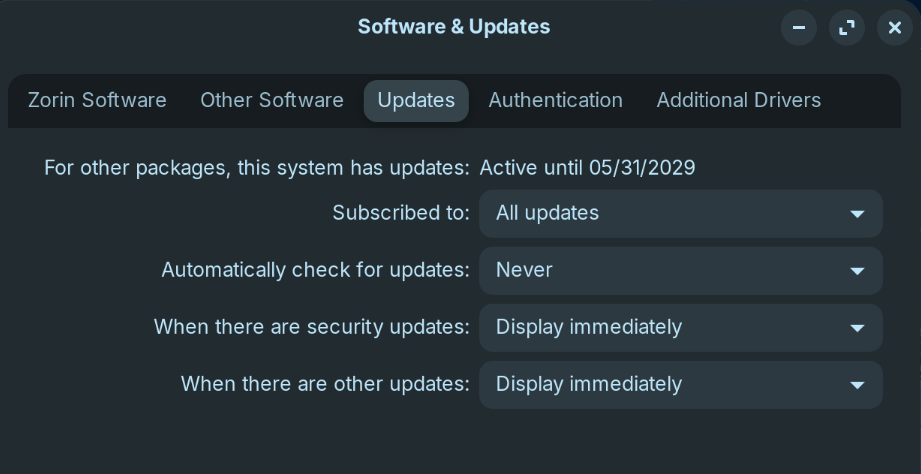
My settings in Software&Updates are the same.

/etc/xdg/autostart/update-notifier.desktop is removed from autostart.

/etc/xdg/autostart$ ls
at-spi-dbus-bus.desktop
geoclue-demo-agent.desktop
gnome-keyring-pkcs11.desktop
gnome-keyring-secrets.desktop
gnome-keyring-ssh.desktop
hplip-systray.desktop
im-launch.desktop
nm-applet.desktop
orca-autostart.desktop
org.gnome.DejaDup.Monitor.desktop
org.gnome.Evolution-alarm-notify.desktop
org.gnome.SettingsDaemon.A11ySettings.desktop
org.gnome.SettingsDaemon.Color.desktop
org.gnome.SettingsDaemon.Datetime.desktop
org.gnome.SettingsDaemon.DiskUtilityNotify.desktop
org.gnome.SettingsDaemon.Housekeeping.desktop
org.gnome.SettingsDaemon.Keyboard.desktop
org.gnome.SettingsDaemon.MediaKeys.desktop
org.gnome.SettingsDaemon.Power.desktop
org.gnome.SettingsDaemon.PrintNotifications.desktop
org.gnome.SettingsDaemon.Rfkill.desktop
org.gnome.SettingsDaemon.ScreensaverProxy.desktop
org.gnome.SettingsDaemon.Sharing.desktop
org.gnome.SettingsDaemon.Smartcard.desktop
org.gnome.SettingsDaemon.Sound.desktop
org.gnome.SettingsDaemon.UsbProtection.desktop
org.gnome.SettingsDaemon.Wacom.desktop
org.gnome.SettingsDaemon.Wwan.desktop
org.gnome.SettingsDaemon.XSettings.desktop
org.gnome.Software.desktop
spice-vdagent.desktop
touchegg.desktop
tracker-miner-fs-3.desktop
ubuntu-advantage-notification.desktop
user-dirs-update-gtk.desktop
xapp-sn-watcher.desktop
xdg-user-dirs.desktop

Do you have disabled automatic updates in gnome-software > preferences?

1 Like

I had automatic updates in gnome-software > preferences. I disabled them now. This fixed the issue. Thank you.

For good measure, I removed /etc/xdg/autostart/org.gnome.Software.desktop. I do not see any problems from that so far.

2 Likes

I marked @Forpli's Post as Solution then.