I have had this issue intermittently from day one but until two days ago it always booted after pressing the restart button. Not so any more.
When powered up it has the big Z followed by Zorin followed by the small strobing Z which I think is strobing slower. Hours later it is still at that screen.
I have tried power off at the mains overnight and that also did not work.
I have not added any new apps but I do have auto update though I would doubt that would cause any problems.
What do people suggest as a fix for this issue, temporary or, better still, permanent.
@Mi.Tasol you can use the Grub Menu to access a terminal prompt prior to booting - this is reached during that throbbing Z logo.
Whack the tab or esc key if using EFI boot.
If using MBR (Legacy) boot, hold down the Left Shift key during boot.
From this menu - the first thing to try is to see if you have Zorin on an Earlier Kernel and just arrow key down to it and try booting up - in case an updated kernel is causing the issue.
If it is not:
From the Grub Menu, select Advanced options for Zorin
Then arrow key down to the listing that ends in (recovery)
This will bring you to the recovery menu. To get to a prompt, you can arrow key to the bottom and tap enter on Drop to Root prompt
In that prompt you can run:
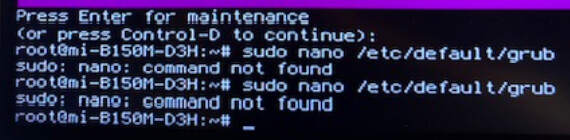
sudo nano /etc/default/grub
Then arrow key to the line that says GRUB_CMDLINE_LINUX_DEFAULT="quiet splash"
From here, add the nomodeset parameter. It should look exactly like; GRUB_CMDLINE_LINUX_DEFAULT="quiet splash nomodeset"
Tap ctl+o to overwrite, then enter to save as current configuration, then tap ctl+x to exit the editor - from there you can test a normal boot.
hi @Aravisian
Holding the LEFT shift key from power on to Z did not work. I think that the system is MBR as it has BIOS. I put new batteries in the keyboard 'just in case' and that also made no different. Pressing esc and tab at the throbbing Z did nothing either.
It booted to windows7 using F12 but was slow but then again I have not used windows for about a month and have moved a lot of files after adding a disc a couple of weeks back.
My uneducated guess is that means the computer itself and the dedicated Win hard drive are ok. Zorin is on a separate dedicated hard drive.
This one can be trickier... the timing has to be right - but nothing on the screen will indicate a hit or miss.
This is why I recommend tapping each furiously.
@Mi.Tasol I'm 74 and went through the same learning process. It's great to learn new stuff at older ages! The Zorin terminal is actually more friendly that the DOS prompts I started out with.
The first time I pressed esc rapidly I got a page full of grub>
Doing it much slower get the message "Minimal BASH-like line editing is supported. For the first line......." followed by grub> twice
Fourth od fifth time I got the option of -22 generic and -23 generic so chose -23
I had problems after that which I will post separately from the Zorin computer instead of this @#$%^&* Win10 computer.
When you saw this; this is Not the grub menu. This is Grub itself. They are two different things, but both are part of the same whole.
A bit like how the Gnome Desktop is a part of Zorin OS, but is not Zorin OS itself.
However, you did seem to get there with a few tries:
I would suggest trying the -22 option.
The logic is that the later addition, in this case the -23, is the culprit on the later problem.
I am glad you brought this up. The suspicion is that it is the Graphics that are halting, causing you to never reach login or desktop.
The nomodeset parameter we suggested disables modesetting, to prevent a race condition where the graphic drivers try to load ahead of the kernel, causing them to fail.
This can help you reach the desktop temporarily, to use the terminal more normally, or access GUI settings... But it is better to not run with nomodeset all the time.
So if we can avoid that - that would be preferred.
At this time, you are saying you were able to Boot Normally - If you can verify which kernel is booting normally - we should just set that as your default kernel and leave it at that.
If you are still booted in, in terminal run
uname -r
and that will show exactly which kernel you are on.
I am still logged on and will probably leave it on all night so that if you have any other suggestions or questions that need to be dealt with before reboot then it is still ready. There was a note at one stage of booting that inferred only generic drivers would be loaded until after first reboot so that is why I will not have my usual graphics until then.
The answer from uname -r was 6.17.0-23-generic
If you want me to set nomodeset I will need to know what to type in to the terminal. From your comment above that seems unlikely but you and I are talking different countries versions of English and that often leads to misunderstandings.
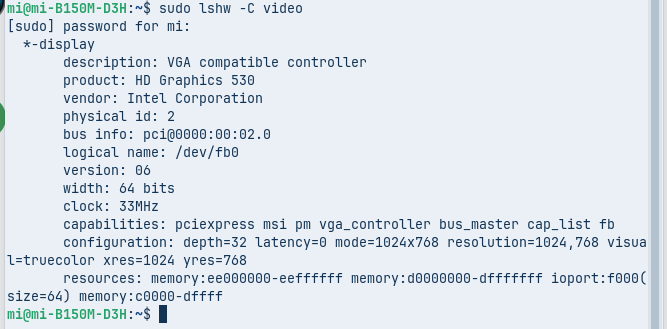
That looks like Skylake. Should be well supported in the kernel...
So, I would presume the i915 driver in the kernel is in use - It's worth risking a reboot - but... If it fails to boot, try the -22 kernel instead (As before, beating up the poor defenseless innocent esc key or tab key until it submits the Grub menu).
As you expected the reboot fizzed and it took forever to get back in to the right menu. I tried the -22 kernel and ended up frozen again. I tried again and it froze at this point
I suspect you are right about it being a video error. I am using the on board video and do not have a separate card handy. Is that a realistic option for fixing the problem? I will have to get it over the web as the local (100km) shops are limited and going to Brisbane (430km) for such an item is nuts. If I have to go that route what do you recommend?
I then went back to option 1 - boot normally and then auto update took over and updated a number of files.
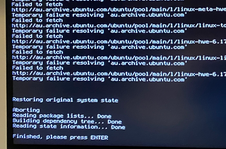
But the Package Repair leaves a lot of questions.
Your screenshots are small, I am having trouble reading them... But it looks like Kernel related packages were incomplete.
And the kernel as where your drivers reside.
I had to play with esc again and this time I got the option of -29. I guess that was the update that auto update loaded. I stayed with -22 as you suggested.
I have attached the photo that was hard to read (when posted as a screenshot) so that you can confirm I am missing kernel packages. If they are missing, please advise how do I get them?
I will keep the computer running 24/7 to save killing the ESC key any more (and stop me beating my head against the desk top.
Thanks again
Mi
I cannot see any evidence that the photo attached so will try again.